Google Business Profile posts: how they work, what to post, and why they get rejected
Google Business Profile posts explained: updates, offers and events, image size, scheduling, 12 months of post ideas, real examples and why posts get rejected.


Google Business Profile posts (GBP posts, once called Google My Business posts) are short updates, offers and events you publish on your free Google listing. They show up on your profile in Google Search and Maps, under "From the owner" on a computer and in the Updates or Overview tab on a phone. Each post can carry a photo or video and a button such as Book, Call or Learn more.
Posts won't rank you on their own, but they answer customers' questions at the moment they're deciding who to call. This guide explains how Google Business Profile posts work, how to create and schedule them, the right image size, 12 months of post ideas, examples you can adapt, and the reasons posts get rejected or don't show up.
What are Google Business Profile posts?
Google Business Profile posts are messages you publish directly on your Business Profile to share news, tips, offers and events with people who find you on Google. Google's posts help page describes three types, each with slightly different required fields.
| Post type | Best for | Required | Optional |
|---|---|---|---|
| Update | News, tips, new photos, FAQs, seasonal advice | Description or photo | Photo, video, button with a link |
| Offer | Discounts, promotions, gift cards | Title, start and end dates and times | Description, photo, coupon code, link, terms |
| Event | Workshops, open houses, classes, tastings | Title, start and end dates and times | Description, photo, button |
Offers get a "View offer" button automatically. An event without times shows as lasting 24 hours on its dates. Hotels can publish updates but not offers or posts about deals, per Google's photos, videos and posts content policy.
Where do Google Business Profile posts appear?
Posts appear on your Business Profile in Google Search and Maps: in the "From the owner" section on a computer, and in the Updates or Overview tabs on a phone. Who sees Google Business posts? Anyone who opens your profile, which usually means people who searched your name or found you in the map pack. Google also shows "featured posts" in place of reviews on mobile for some businesses, but only English-language, single-location food and drink businesses in a few countries, including the US.
How long do Google Business Profile posts last?
Posts stay visible until they're six months old, then Google archives them, unless you set a date range. Offers and events end on the dates you choose. That's one reason to post regularly: a profile whose newest post is from last spring looks abandoned.
How to create a Google Business Profile post
Create a post from your Business Profile: select Posts, then Add post, pick Update, Offer or Event, add your text, photo and button, and select Post. Your profile must be verified, or the post will sit as pending. The steps from Google's help page:
- Go to your Business Profile (search your business name on Google while signed in).
- Select Posts, then Add post.
- Choose Update, Offer or Event.
- Add a photo or video, your text, and optional extras like a Button or Coupon code.
- Optionally turn on Schedule this post, or set it to repeat.
- Select Post.
To edit or delete a post later, open it, select More, then Edit or Delete.
Can you schedule Google Business Profile posts?
Yes, natively. Turn on Schedule this post to pick a publish date and time, or use the Repeats dropdown to publish weekly, monthly or on a custom schedule. A repeating post suits evergreen reminders, like "Book your spring AC tune-up," but don't let the same text repeat for months. Customers notice.
How to post to multiple Google Business Profiles
If you manage several locations in one account, select the profiles you want when you create the post, and Google shares it to all of them. Agencies managing many clients often use software built on Google's Business Profile API, which supports standard, event and offer posts and buttons like Book, Order, Shop, Learn more, Sign up and Call.
What size should a Google Business Profile post image be?
Google doesn't publish separate image dimensions or a required ratio for posts, so use its Business Profile photo standards: JPG or PNG, between 10 KB and 5 MB, recommended 720 by 720 pixels, minimum 250 by 250. Google's photo help page also says photos should be in focus, well lit and "represent reality," without heavy filters.
A square picture at 720 by 720 matches Google's recommended resolution, and wide (horizontal) photos work as long as the subject is centered. Three practical rules for post images:
- Center the subject. Post previews crop images differently in Search, Maps and on phones. Keep faces, products and text away from the edges.
- Skip text-heavy graphics. A real photo of your work reads better than a flyer, and small text becomes unreadable on a phone.
- Upload a sharp original. Start from a photo comfortably above the recommended size rather than a small, compressed one.
Videos follow the profile video rules: up to 30 seconds, up to 75 MB, 720p or higher.
How long should a Google Business Profile post be?
Write 80 to 200 words: enough to answer one question well, short enough to read on a phone. Google's help page doesn't state a character limit, but the post form caps the description, so tight writing wins. Put the most important line first, because the preview shows only the opening.
Can you include phone numbers and links in posts?
Google says posts with phone numbers, emails or social handles it can't verify may be removed, and recommends a Call now button instead, which uses your verified profile number. Links must go to trustworthy sites. A post's button can point to any page on your site, so link the exact service or booking page rather than your homepage.
Google Business Profile post ideas
The best Google Business Profile post ideas answer something a customer would ask this month: a seasonal tip, your most common question, what a job involves, what it costs and why, or a recent project. Plan one bigger idea per month and fill the weeks between with quick tips and fresh photos of real work.
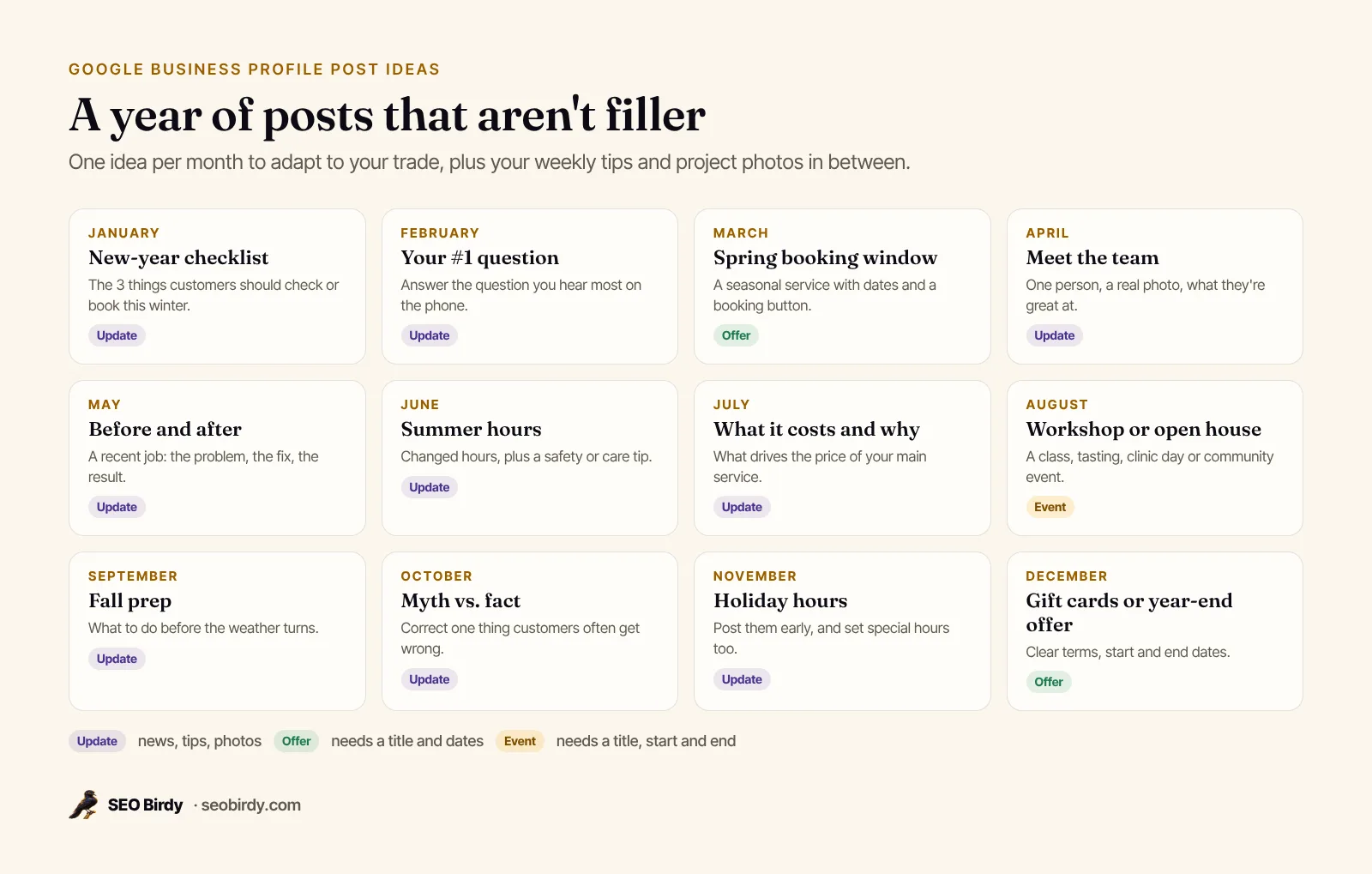
Post ideas for contractors and home services
- A seasonal maintenance checklist ("5 things to check before hurricane season")
- "What does a [service] cost, and why?" with the factors, not a price list
- A before-and-after photo of a recent job, with the neighborhood
- How to tell if a problem is urgent or can wait
- Meet the technician who'll be at your door
Post ideas for restaurants and cafes
- A new dish or seasonal menu, with a real photo
- An event post for a tasting, trivia night or live music
- Holiday hours and how to book a table
- The story behind a signature dish or a local supplier
Post ideas for dentists and healthcare practices
- How to prepare for a first visit
- Answers to common questions about a treatment, kept general
- New evening or weekend hours
- Insurance plans you accept and how to check coverage
Post ideas for new businesses and anniversaries
A new business can post its opening date, what to expect on a first visit, and introductions to the team. An anniversary post can thank customers, share what's changed over the years and point to a celebration offer or event. Both are simple, genuine and easy to photograph.
Google Business Profile post examples
Here are Google Business Profile post examples and samples for each type, for fictional businesses. Adapt the structure, not the words.
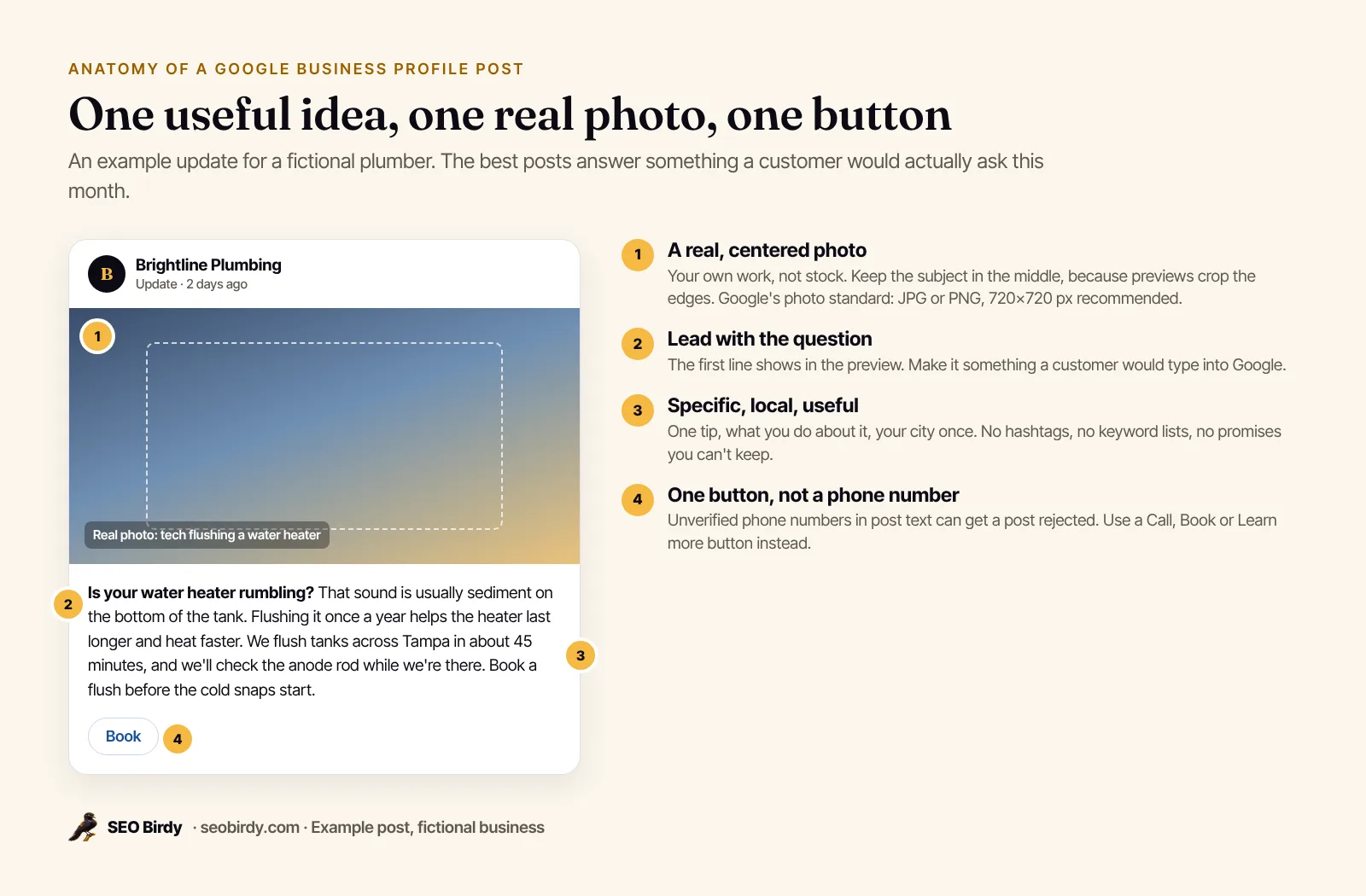
Update, home services:
Is your water heater rumbling? That sound is usually sediment on the bottom of the tank. Flushing it once a year helps the heater heat faster and last longer. We flush tanks across Tampa in about 45 minutes and check the anode rod while we're there. Book a flush before the cold snaps start. (Button: Book)
Offer, salon:
Title: Free deep-conditioning with any color service. Dates: March 1 to March 31. Add a deep-conditioning treatment to any color appointment this month at no charge. Mention the offer when you book. Terms: one per client, not combined with other offers. (Button: View offer)
Event, bakery:
Title: Kids' cookie decorating class. Saturday, December 13, 10 a.m. to noon. Little bakers decorate a dozen holiday cookies to take home. All supplies included, ages 5 and up, 12 spots. (Button: Sign up)
Best practices for Google Business Profile posts
Good posts are specific, local, useful and honest. Pick one idea per post, lead with the question or benefit, add a real photo, use one clear button, and mention your city once where it's natural. Skip hashtags, keyword lists and promises you can't keep.
- Write for the customer, not the algorithm. Google's content policy rejects spammy, auto-generated or distracting content.
- Use the right type. A sale belongs in an Offer post with dates, not an Update.
- Match the button to the goal. Book for appointments, Call for urgent services, Learn more for advice posts.
- Keep the facts consistent with your hours, services and website, so posts never contradict your profile.
- Check spelling. Google's policy calls out misspellings and gimmicky characters.
- Keep the design simple. A clean photo with no borders, stickers or crowded text works better than a designed flyer.
If you use an AI post generator, read every draft before it goes live. Generic AI filler is exactly the "auto-generated" content Google warns about, and it can invent prices or guarantees.
Why was my Google Business Profile post rejected?
Posts get rejected, shown as "Not approved," when they break Google's post guidelines, which are its content policies. Common causes are an unverified phone number or email in the text, a link Google doesn't trust, content about regulated products such as alcohol, tobacco, gambling or financial services, offensive or sexually suggestive material, or text that looks spammy or auto-generated.
| Reason | Fix |
|---|---|
| Phone number, email or social handle in the text | Remove it and add a Call now button |
| Link to an untrusted or redirecting site | Link directly to a page on your own website |
| Regulated products (alcohol, tobacco, gambling, financial services) | Post about your business, not the regulated product |
| Misspellings, gimmicky characters, all caps | Rewrite plainly |
| Photo that doesn't meet the policy, or a low-quality image | Use a clear, real photo of your business |
| Hotel posting an offer or deal | Hotels can post updates only, without promotions |
Select the question mark on a post marked "Not approved" to see which policy it broke, then edit and repost. Google's full rules are in its prohibited and restricted content policy.
Why aren't my Google Business Profile posts showing?
If your posts aren't showing, check their status. "Pending" means the post is still processing or your profile isn't verified. "Not approved" means it broke a policy. Posts older than six months are archived unless they have a date range, and offers and events disappear after their end date.
Also check how you're looking. On a computer, posts sit in the "From the owner" section of your profile. On a phone, they're under Updates or Overview. If you're searching for a keyword rather than your name, people may see your listing in the map pack without your posts until they open the profile.
Do Google posts help SEO?
Google hasn't confirmed that posts affect rankings. Its local ranking help article lists verifying your business, keeping information complete, replying to reviews and adding photos, and doesn't mention posts. Posts help people who've already found your profile decide to call, book or visit.
Is it worth it? Yes, because posts are free and they're what people see when they open your profile. So post for customers, and measure posts by what they do. Your profile's Performance report shows calls, website clicks, directions and bookings, and includes offers. Add UTM tags to post buttons to see their visits separately in Analytics. For the things that do move rankings, see how to rank in Google Maps and our Google Business Profile optimization checklist. To see whether your visibility actually changes after you start posting, use local rank tracking across your service area.
How often should you post on Google Business Profile?
Post once a week if you can, and at least twice a month. Weekly posts keep your profile current, give you room to cover seasonal topics as they come up, and stay well clear of the six-month archive. Consistency matters more than the day of the week, and Google gives no guidance on a best day to post.
The hard part isn't writing one post. It's writing the fortieth one. That's the job Maps Autopilot does, and it's how to automate Google Business Profile posts without losing control: every week it drafts a helpful post for your service and city (a seasonal tip, a common question answered, or what to expect from a job), avoids repeating recent topics, and leaves it for your approval. Approved posts publish as updates with a Learn more button to your website.
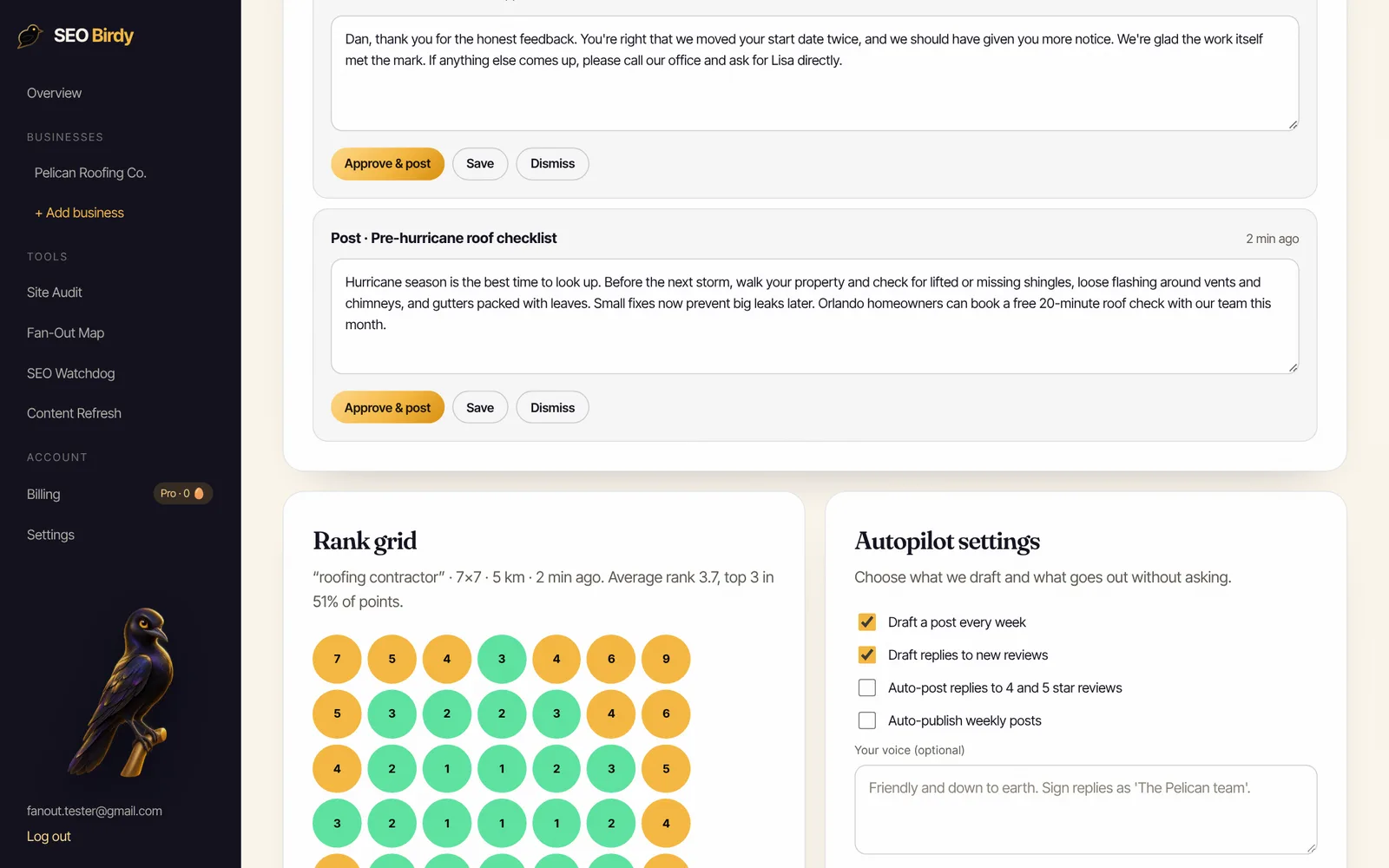
A useful post every week, without writing it yourself. Maps Autopilot drafts a weekly Google Business Profile post for your business and city, drafts replies to every new review, and tracks your rank on a geo-grid. You approve each one, or switch on auto-publishing.
See Maps Autopilot →Agencies posting for many clients can run the same workflow under their own brand through our white-label program. Pair posts with steady review replies, using our guide on how to respond to Google reviews, and check where your profile stands with the free AI Visibility Audit.
Frequently asked questions
Do Google Business Profile posts help SEO?
Google hasn't said posts are a ranking factor. Its local ranking tips list verification, complete information, reviews, replies and photos, not posts. Posts help in a different way: they appear on your profile in Search and Maps, answer questions before people call, and give searchers a reason to pick you. Treat them as a conversion tool that supports your local SEO.
How often should I post on Google Business Profile?
Once a week is a good rhythm for most local businesses. It keeps your profile current without forcing filler, and posts older than six months are archived anyway unless they have a date range. If you can only manage twice a month, post twice a month and make each one useful. One helpful post beats four empty ones.
What is the best image size for a Google Business Profile post?
Google doesn't publish separate image specs for posts, so use its Business Profile photo standards: JPG or PNG, between 10 KB and 5 MB, with 720 by 720 pixels recommended and 250 by 250 minimum. Previews crop images, so keep the subject in the center, avoid text near the edges, and upload a larger, sharp original rather than a small one.
Can you schedule Google Business Profile posts?
Yes. When you create a post in your Business Profile, turn on Schedule this post to choose a publish date and time, or use the Repeats option to publish weekly, monthly or on a custom schedule. Software that connects to Google's Business Profile APIs can also publish posts for you, ideally after you approve each one.
Why is my Google Business Profile post pending?
A post shows as pending while it's still uploading or processing, or when your profile isn't verified yet. Verify the profile first. If a post stays pending for a long time, delete it and post again with a smaller image. Posts marked not approved broke a content policy, and Google shows a question mark you can select to see which one.
Can I put a phone number in a Google Business Profile post?
You can, but Google may remove posts with phone numbers, emails or social handles it can't verify as connected to your business. The safer choice is a Call now button, which uses the verified phone number on your profile. It also lets customers call with one tap, which is easier than copying a number from the text.
How do I post to multiple Google Business Profiles at once?
If you manage several locations in one Business Profile account, Google lets you select multiple profiles when you create the post, so one post goes to all of them. Tailor the text when locations differ in hours, services or offers, because a generic post that's wrong for one location creates confused calls.
We build SEO Birdy's audits and autopilots, and we test every recommendation against live search results and AI answers before we publish it. Our guides follow Google Search Central and Bing Webmaster guidelines.