Local rank tracking: how to see where you really rank on Google Maps
Local rank tracking explained: why your Google Maps rank changes street by street, how geo-grid trackers work, which metrics matter, and how to check for free.


Local rank tracking measures where your business appears in Google's local results, especially the Google Maps list and map pack, for the searches your customers use. Because Google ranks local results partly by distance from the searcher, your rank changes from street to street, so good local rank tracking checks from many points across your service area, not just one.
That's the difference between a normal rank tracker and a local one. This guide explains why your Google Maps rank moves with the searcher, how geo-grid trackers work, which metrics are worth watching, how to read the patterns, what you can check for free, and what to look for if you pay for a tracker.
What is local rank tracking?
Local rank tracking is the regular measurement of where your business ranks in Google's local results (the map pack and Google Maps) for specific keywords, from specific locations. It answers a question normal rank tracking can't: when someone three miles from your office searches "emergency plumber," do they see you, and in which position?
Normal SEO rank tracking reports one position per keyword for your website in the organic results. Local SEO rank tracking reports your Business Profile's position, and it has to account for location, because the same search returns different businesses in different neighborhoods. That's why the core tool of local rank tracking is the geo-grid.
Why does your Google Maps rank change from street to street?
Your Google Maps rank changes with location because distance is one of Google's three local ranking factors. Google's local ranking help article defines distance as "how far each business is from the customer who's searching," and says that if a customer doesn't share where they are, "Google uses what it knows about their location."
So a dentist can be first for "dentist" in the blocks around the practice, fifth a mile away, and absent at the edge of town. None of those numbers is wrong. Each is the true ranking for a person standing at that spot. That's also why owners often think their ranking is great: they check from the office, which is usually their best location.
Device and context matter too. Phones often share a more precise location than desktops, and searches like "near me" lean on location even harder. A ZIP code or city in the query ("plumber 33602") changes the results again, because the searcher has told Google where they want results.
How does geo-grid rank tracking work?
A geo-grid rank tracker lays a grid of points over your service area, searches your keyword as if from each point, and records where your Business Profile appears in the results at every one. The output is a map of colored dots: green where you're in the top three, amber further down, grey where you don't appear. Repeated weekly, it shows exactly where you're gaining or losing ground.
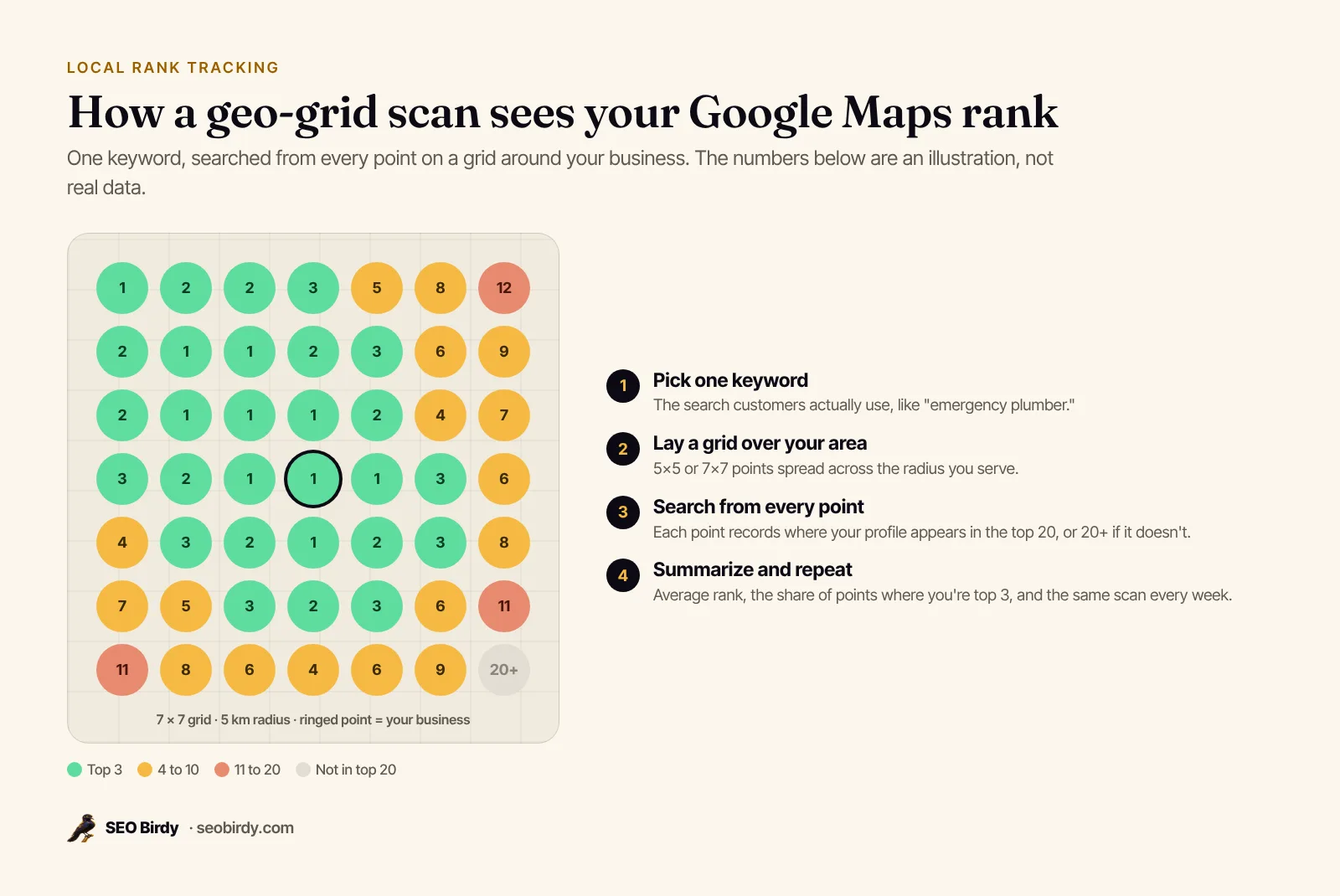
What grid size and radius should you use?
Use a 5×5 grid (25 points) for most single-location businesses and a 7×7 grid (49 points) for dense cities or larger service areas. Set the radius to the area your customers actually come from. For a service-area business, that's roughly the service areas on your profile, which Google says shouldn't extend beyond about two hours' drive.
| Setting | Small town or district | Large city or wide service area |
|---|---|---|
| Grid | 5×5 (25 points) | 7×7 (49 points) |
| Radius | 2 to 5 km | 5 to 15 km |
| Keywords | 1 to 3 core services | 3 to 5, one scan each |
| Frequency | Weekly | Weekly |
Whatever you choose, keep it fixed. Changing the radius or grid size between scans makes the numbers incomparable.
What does an unranked point mean?
An unranked point means your profile didn't appear in the results checked from that location, usually the top 20. It's not an error. For a searcher there, you effectively don't exist for that keyword. A good tracker counts those points in your average rather than ignoring them, or a business visible at only three points would look like it ranks first.
Which local rank tracking metrics matter?
Two metrics, or KPIs, matter most: average rank across all grid points, and top-3 coverage, the share of points where you're in the map pack. Average rank tells you how strong you are overall. Top-3 coverage tells you how much of your area actually sees you in the three results most people choose from.
| Metric | What it tells you | Watch out for |
|---|---|---|
| Average rank | Overall strength across the area | Tools that skip unranked points flatter you |
| Top-3 coverage | Share of your area where you're in the map pack | Bigger radius means lower coverage; compare like with like |
| Points found | How much of the area sees you at all | A small grid hides gaps |
| Rank at your address | Your best case | Never report this alone |
| Competitors at each point | Who's beating you, where | Changes week to week |
"Share of local voice" is another name you'll see for top-3 or found coverage. There's no universal "good" average rank, because it depends on radius and competition. A useful target is steady improvement in top-3 coverage over two to three months, starting with the neighborhoods nearest your address.
What Google's own reports show
Google's reports don't give you a map rank, but they help confirm what the grid says. Your Business Profile Performance report shows the search terms people used to find you, plus views, calls, website clicks and directions. Search Console's Performance report shows your website's average position in organic results, grouped by country and device, not by city. Neither replaces a geo-grid, but rising calls alongside rising top-3 coverage is the result you're after.
How to read a local rank grid
Read a grid by its shape. Strong in the middle and weak at the edges means distance is limiting you. Strong on one side means a competitor cluster or an area you don't reach yet. Weak everywhere, even next to your address, usually means a relevance problem: the wrong category or no matching service page.
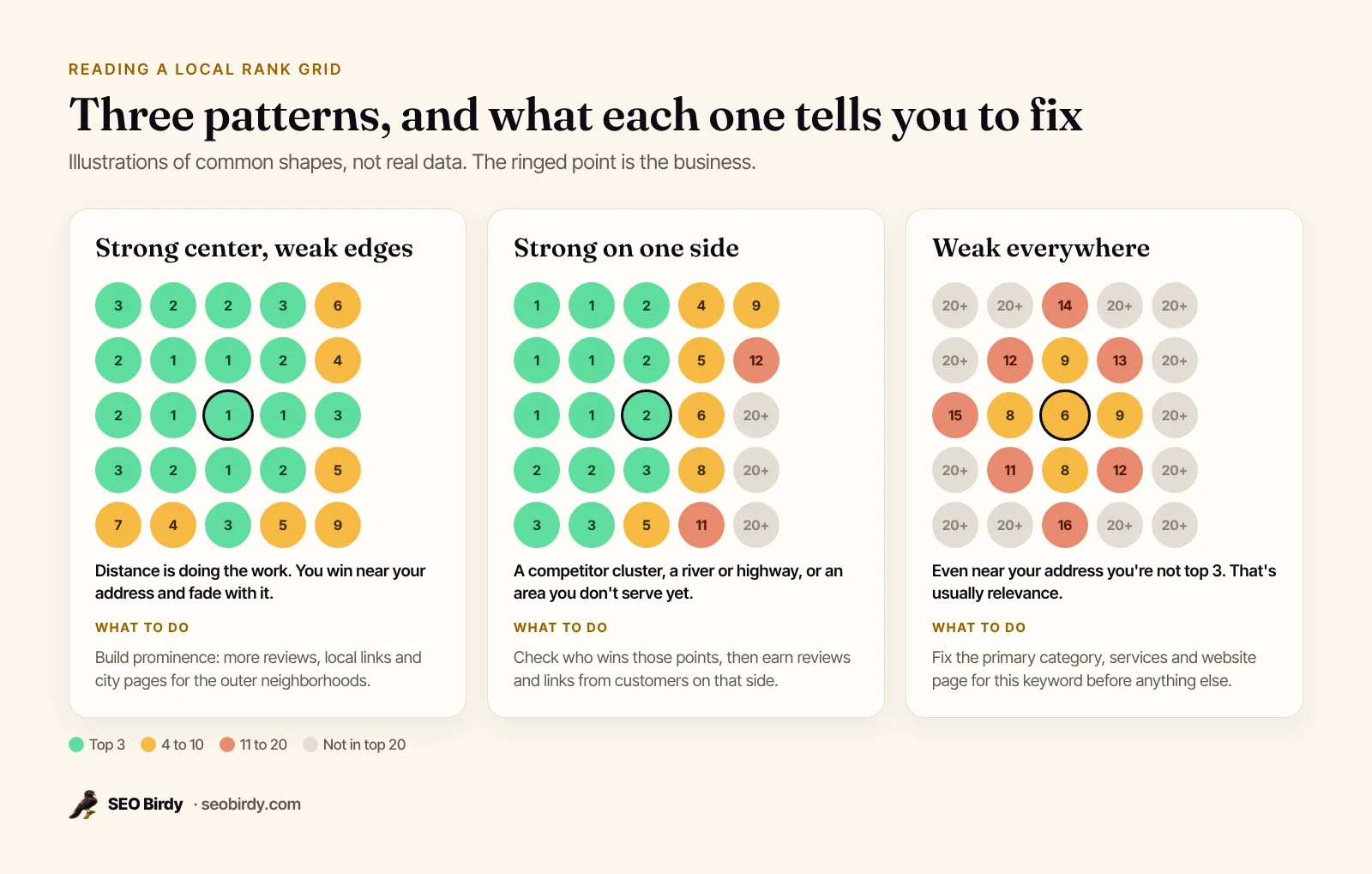
Here's what to do for each:
- Strong center, weak edges. You're winning on distance and need more prominence to reach further. Earn reviews from customers in the outer neighborhoods, build local links, and publish genuine pages for the suburbs you serve. Our guide on how to rank in Google Maps covers each step.
- Strong on one side. Look at which competitors win those points. If a rival sits there, you're competing with their distance advantage. Win customers on that side, and check that your pin and service areas are right.
- Weak everywhere. Start with relevance: check your primary category against the top three for the keyword, add the service to your profile, and link a page that clearly matches it. Our Google Business Profile optimization checklist walks through each field.
Real grids are messier than these illustrations. Here's a real scan view from an example account in SEO Birdy:
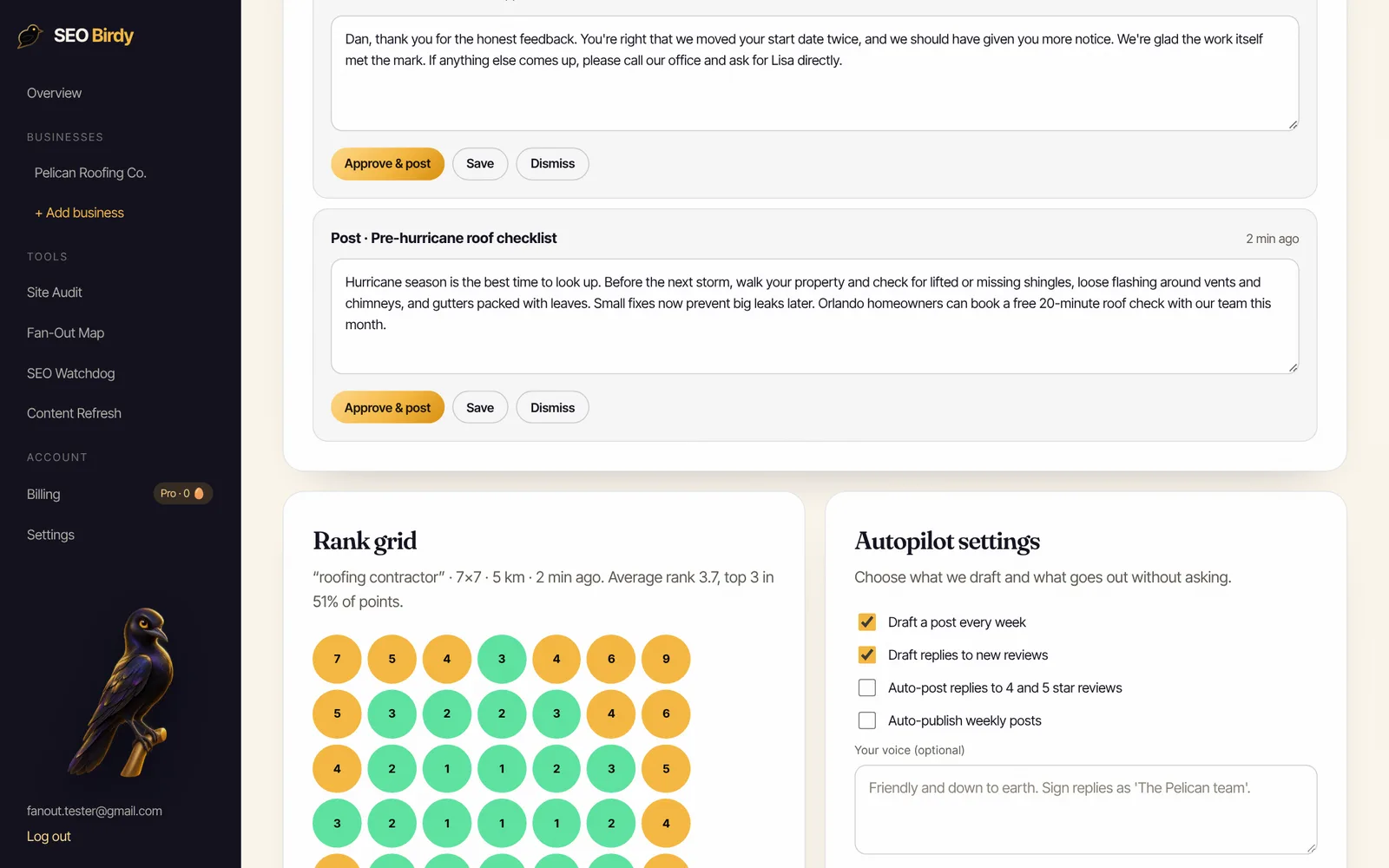
The roofer above ranks first through third through the middle of its area and slips to sixth through ninth at the edges, a clear "strong center, weak edges" pattern. The plan writes itself: reviews and city pages for the outer neighborhoods, then the same scan next week to see if they moved.
Which keywords and locations should you track?
Track the two to five searches that bring you paying customers, phrased the way customers search: your main category ("roofer"), your highest-value service ("roof replacement"), and an urgent variant if you have one ("emergency roof repair"). Skip your business name, because you'll rank for it everywhere, and skip vanity terms nobody searches.
You don't need to add "near me" to every keyword. A geo-grid already searches from each location, which is what "near me" does. If you serve several cities, either run one grid wide enough to cover them or a separate grid centered on each. For multiple locations, track each location's own profile with its own grid.
How to check local rankings for free
You can check local rankings for free in three ways: Google's Ad Preview and Diagnosis tool for single searches from a chosen location, SEO Birdy's free AI Visibility Audit for your current Google Maps position against local competitors, and the free plan's monthly map rank check for a full grid. Each has limits, so use them together.
- Google's Ad Preview and Diagnosis tool. Inside a free Google Ads account, the Ad Preview and Diagnosis tool lets you change the location, language and device for a search, and Google says you'll find results similar to a regular search without accumulating ad impressions. It's one location at a time, so it's good for spot checks, not a grid.
- The free AI Visibility Audit. It shows the top Google Maps results for your service and city, with each competitor's rating and review count, plus whether ChatGPT, Gemini, Claude and Perplexity recommend you.
- SEO Birdy's free plan. It includes one map rank check a month: a 5×5 grid for the keyword you choose.
Asking a friend across town to search, or using incognito mode, shows you one more point, not a map. Incognito hides your search history, but Google still uses your location. A VPN changes your IP address, but phones and browsers often share more precise location, so it isn't a reliable way to check either.
Check your Google Maps position free. The AI Visibility Audit shows where you rank on Google Maps for your service and city, your rating and review gap against the top local competitors, and whether AI assistants recommend you.
Run the free AI Visibility Audit →How to choose a local rank tracker
Paid or free, the best local rank trackers in 2026 have five things in common. Choose one that scans a grid rather than one point, uses Google's official data instead of scraping results pages, keeps the same settings scan after scan, stores history, and shows who outranks you at each point. Price matters less than whether you'll actually look at it every week and act on it.
What to look for:
- Grid scans, not single-point checks. A single position per keyword hides the whole problem.
- An official data source. Google's spam policies list "scraping results for rank-checking purposes" as machine-generated traffic that violates its policies. Trackers built on Google's APIs avoid that.
- Honest averages that count unranked points.
- Scheduled scans on the same day each week, plus on-demand checks after a change.
- History and comparison, so you can see before and after.
- Competitor visibility at each point.
- Fits your work. If the tracker also drives the fixes (posts, review replies), you'll use it more.
SEO Birdy's geo-grid runs each point through Google's Places API Text Search, which returns up to 20 results per search biased toward that point's location. It records your position in those 20, counts unranked points as 21 in the average so a patchy presence isn't flattered, and reports top-3 coverage. ### How accurate are local rank trackers?
Accurate enough to show trends, never perfect for a single point. Results from an API can differ slightly from what one person sees in the Maps app, because the app also uses that person's own context, and every tracker samples a limited number of points. Treat the grid as a consistent yardstick rather than a screenshot of every phone, and trust changes that hold across several points and several weeks.
Weekly geo-grid tracking, plus the work that moves it. Maps Autopilot scans your rank across your area every week (5×5 on Growth, 7×7 on Pro), and drafts your weekly Google Business Profile posts and replies to every new review for approval.
See Maps Autopilot →How often should you track local rankings?
Track local rankings weekly. Rankings move with competitors, new reviews and Google's own updates, so daily checks mostly show noise, while monthly checks are too slow to connect a change to its cause. Run the scan on the same day each week, with the same keyword, grid and radius, and judge changes over a month or more.
Expect week-to-week wobble of a position or two at individual points. That's normal and usually means nothing. What matters is direction: is top-3 coverage creeping up over six to eight weeks? After a big profile change, like a new primary category, run an extra on-demand check a week later.
On SEO Birdy, Growth ($299 a month) includes a weekly 5×5 grid and four on-demand map checks a month, and Pro includes a weekly 7×7 grid and eight on-demand checks. Extra checks cost two golden eggs each. All plans are on our pricing page.
Local rank tracking for agencies and multiple locations
Agencies and multi-location businesses need the same thing at scale: a fixed grid per location and keyword, a weekly schedule, and a report a client can understand in ten seconds. Report average rank and top-3 coverage with a before-and-after grid image, and explain what you did that week. Clients understand colored maps far faster than tables of positions.
For each location, track its own profile with a grid centered on that location, rather than one big grid across a metro area. If you resell local SEO, our white-label program lets you deliver Maps reports and the work behind them under your own brand. We cover how to package it in our guide to white-label local SEO, and our local SEO checklist lists what to fix once the grid shows you where you're weak.
Rank tracking only tells you where you stand. To move the dots, keep your profile active with useful Google Business Profile posts, reply to every review, and see the full plan in Maps Autopilot.
Frequently asked questions
What is a geo-grid rank tracker?
A geo-grid rank tracker checks where your Business Profile ranks for one keyword from many points laid out in a grid across your service area, such as 5 by 5 or 7 by 7 points. Each point records your position, and the results show as a colored map. It reveals where you're in the top three and where competitors win, which a single search can't show.
Is there a free local rank checker?
Yes. Google's Ad Preview and Diagnosis tool, inside a free Google Ads account, shows results for a location you choose, one search at a time. SEO Birdy's free plan includes one map rank check a month for a keyword, and the free AI Visibility Audit shows your Google Maps position and the businesses ranked above you for your service and city.
How often should I track local rankings?
Weekly is the right rhythm for most local businesses. Rankings shift with competitors, reviews and Google's updates, so a single day can mislead you, and daily checks mostly show noise. Scan on the same day each week with the same keyword, grid size and radius, and compare trends over a month or more before deciding whether a change worked.
Why do local rank trackers show different results?
They check from different points, at different times, through different data sources, with different grid sizes and radiuses. Google's results also vary with the searcher's location and context. Compare results from one tracker over time rather than mixing tools, and judge it by the trend in average rank and top-three coverage, not one point's number.
Does incognito mode show my real Google Maps ranking?
Incognito removes your signed-in history, but Google still uses what it knows about your location, so you'll see roughly what someone standing where you are would see. That's usually your best spot, near your office. To see rankings across your area, you need searches from many locations, which is what a geo-grid does.
What grid size should I use for local rank tracking?
A 5 by 5 grid (25 points) is enough for most single-location businesses in a town or a city district. A 7 by 7 grid (49 points) gives more detail in dense cities or larger service areas. Set the radius to roughly the area where your customers actually live, not your whole state, and keep the settings identical from scan to scan.
Is it against Google's rules to scrape rankings?
Google's spam policies list scraping results for rank-checking purposes as machine-generated traffic, which violates its policies and Terms of Service. That's a reason to prefer tools built on Google's official APIs. SEO Birdy's geo-grid uses Google's Places API, which returns results biased toward each grid point, rather than scraping Google's search results pages.
We build SEO Birdy's audits and autopilots, and we test every recommendation against live search results and AI answers before we publish it. Our guides follow Google Search Central and Bing Webmaster guidelines.