The local SEO checklist: 40 steps to rank in your city (2026)
A 40-step local SEO checklist for small businesses: Google Business Profile, local keywords, reviews, citations and tracking. Free printable PDF included.


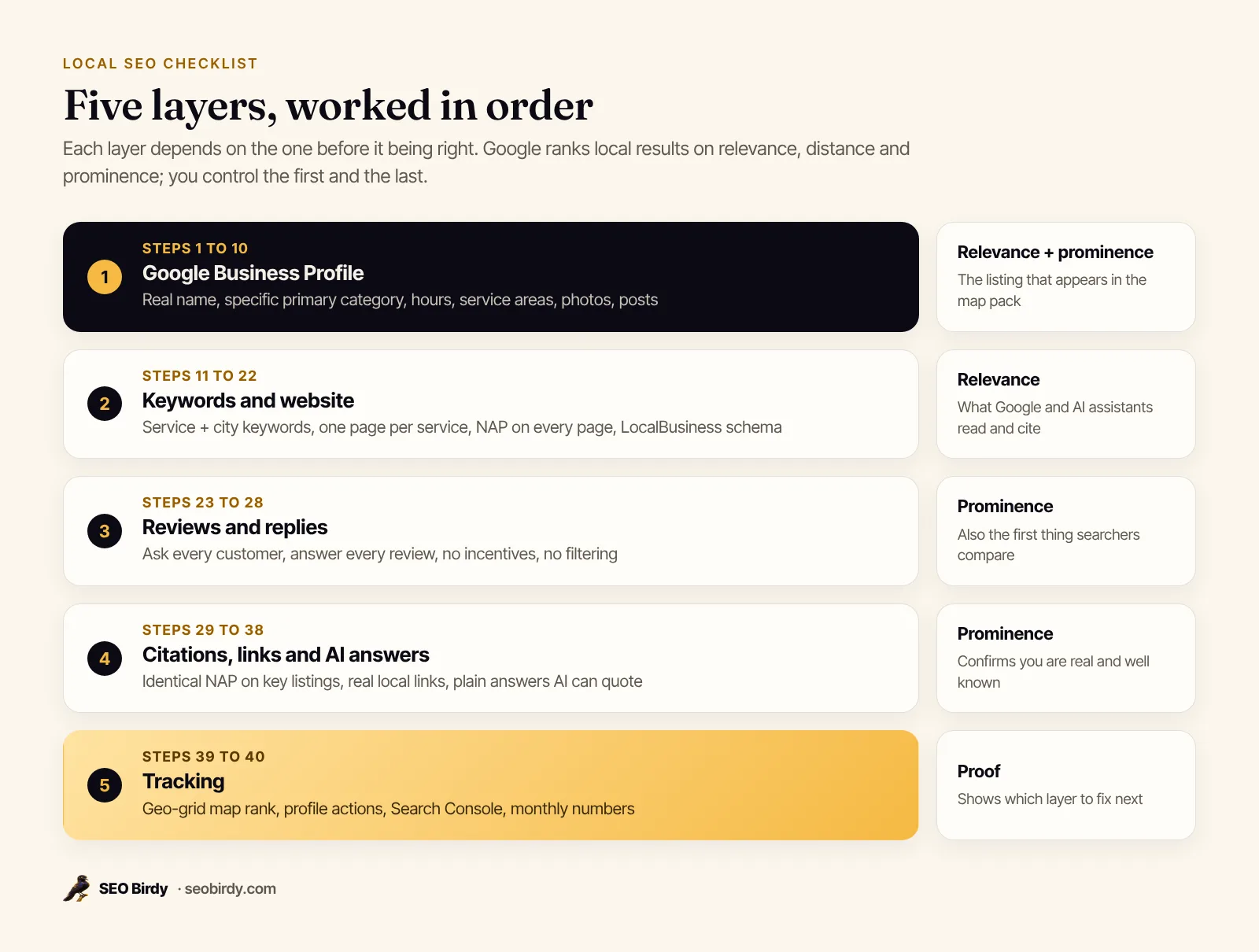
A local SEO checklist is the ordered list of tasks that gets a business into Google's map pack and local results: claim and complete your Google Business Profile, keep your name, address and phone identical everywhere, build a page for each service and area, earn and answer reviews, get listed on trusted local sites, and track where you rank. Do them in that order, because each layer depends on the one before it.
This guide gives you all 40 steps, grouped the way you would work through them, with why each one matters, how to check it, and what usually goes wrong. It's written for owners of local businesses and the people who market them, whether you run a dental practice in Austin or a roofing company in Tampa. If you prefer paper, the same checklist is in the free PDF below.
Get the printable local SEO checklist. All 40 steps with tick boxes, plus a NAP record sheet, a citation tracker and a monthly routine you can pin to the wall.
Download “Local SEO Checklist” (PDF)What is local SEO and how does it work?
Local SEO is the work that makes a business show up when nearby people search for what it sells, in the Google map pack, in Google Maps, in regular results with a city in them, and increasingly in AI assistant answers. It works by giving search engines consistent, complete and trusted information about who you are, what you do and where.
Google spells out how its local results are ranked. In its help article on how to improve your local ranking, Google lists three factors:
- Relevance: how well a Business Profile matches what someone is searching for.
- Distance: how far each business is from the person searching.
- Prominence: how well known a business is, online and offline.
The same page states that there is no way to request or pay for a better local ranking. That is why this checklist exists. Every step below either makes you more relevant (clear categories, services and pages) or more prominent (reviews, mentions, links).
So is SEO important for small business? For any business that serves a radius, local SEO mainly helps businesses to get found at the moment someone is ready to call. The searcher typing "emergency plumber near me" isn't browsing. If you are not in the top few map results, you're usually not in the conversation.
Google Business Profile checklist (steps 1 to 10)
Your Google Business Profile comes first because it is the listing that appears in the map pack and Google Maps. Claim it, verify it, choose the right categories, and fill in every field that applies to your business, using the same details you use everywhere else.
- Claim and verify the profile. Search Google Maps for your business name and city, then follow Google's steps to add or claim your Business Profile. Google says confirming your business makes it more likely to appear in results.
- Use your real-world business name. Google's guidelines for representing your business say the name should match your signage and website, and that unnecessary information isn't permitted. "Pelican Roofing Co." is fine; "Pelican Roofing Co. Best Roofer Tampa Roof Repair" risks suspension.
- Pick the most specific primary category. Categories tell Google what your business is, so this is the most important relevance choice on the profile. A dental practice that only does orthodontics should pick Orthodontist, not Dentist. Google advises using as few categories as needed to describe your core business.
- Add secondary categories sparingly. Only for things you are, not every service you offer. Services belong in the services section.
- Set your address or service areas correctly. If customers come to you, show your address. If you travel to customers, Google says to hide your address and set service areas. You can add up to 20, and Google suggests your overall area stay within about two hours' drive of your base (service area help).
- Enter regular hours and holiday hours. Wrong hours send customers to a locked door, and they tend to say so in a review. Set special hours before every public holiday.
- Write a description that says what you do and where. Plain sentences, your main services, the areas you serve, what makes you different. No links, no promotions.
- Fill in services and products. List each service with a short description. These help Google match you to specific searches like "gutter guard installation".
- Upload real photos. Your storefront or vehicles, your team, finished jobs. Google lists photos and videos among the things that help your profile. Keep adding new ones every month.
- Post updates regularly. Offers, seasonal tips, recent projects. Posts keep the profile active and give searchers a reason to choose you. Our guide to Google Business Profile posts has ideas for every month, and the full walkthrough is in Google Business Profile optimization.
Keywords and website checklist (steps 11 to 22)
Your keywords decide which searches you compete for, and your website proves you're relevant for them. Pick the service and city searches customers type, give each its own page, and make every page easy for search engines and AI assistants to read.
How do you find local SEO keywords?
You find local SEO keywords by listing your services, pairing each with the places you serve, and then checking which versions people actually search. The best free sources are Google's own autocomplete, the search terms report in your Business Profile, and the queries report in Google Search Console.
- List every service, then add the place. "Water heater repair", "water heater repair Tampa", "water heater repair near me". Near me keywords and service plus city keywords are the backbone of local search.
- Check your profile's search terms. Google's Business Profile performance report shows the search terms people used to find your business, updated monthly. It's the best free local SEO keyword research tool for what people search to find your business.
- Mine Search Console. Connect your site to Google Search Console and sort the queries report by impressions. Look for services and neighborhoods you rank on page two for.
- Map one main keyword to one page. Each service gets its own page with its own target search. Two pages chasing the same keyword compete with each other.
For the questions behind each keyword, see our guide to query fan-out.
Website and on-page checklist
The on-page SEO checklist for a local business comes down to one clear page per service, local keywords in titles and headings, your contact details on every page, structured data, and a site that loads fast on a phone.
- Write a title tag for each page with service and city. Example: "Roof Repair in Tampa, FL | Pelican Roofing Co." Keep it under about 60 characters so it isn't cut off.
- Create one page per core service. Each page answers what it costs, how long it takes, what's included and how to book. Thin pages that only swap the city name don't help.
- Decide on location pages vs service area pages. Should you create a page for each city you serve? Only where you have something real to say: jobs done there, local permits, travel times. A page with nothing but a new city name is a doorway page, which Google's spam policies warn against.
- Put your NAP on every page. Where to put NAP on a website: the footer, matching your profile character for character, with a click-to-call phone link.
- Embed a Google map on your contact page. Not a ranking trick, just useful.
- Add LocalBusiness schema. Structured data tells search engines your business type, address, phone, hours and service area in a format they read directly. Google's local business structured data guide lists name and address as required. Our local business schema guide has copy-paste examples.
- Check mobile speed and usability. Local customers often search on a phone, sometimes from the job site or the car. Fix slow images, intrusive pop-ups and tiny buttons.
- Run a page audit. The free Website SEO Audit checks a page's title, description, headings, image alt text and schema and writes the fixes. The on-page SEO checklist and technical SEO checklist cover the rest.
Reviews checklist (steps 23 to 28)
Reviews feed prominence, which is one of Google's three local ranking factors, and they're the first thing a searcher compares between you and the business next door. The checklist is simple: ask every customer, make it easy, reply to every review, and never buy, filter or fake them.
- Ask every customer, the same way. A short text or email after the job, with your direct review link. Ask everyone, not only the customers you think are happy.
- Make the link easy to find. On invoices, receipts, a QR code at the front desk, and your email signature.
- Reply to every review. Google's tips on reviews suggest replies that are short, conversational rather than promotional, and timely. Thank people by name and mention the job.
- Handle negative reviews calmly. Acknowledge the problem, apologize where it's fair, and move the details offline. Our guide on how to respond to Google reviews has examples for every star rating.
- Never offer incentives or filter requests. Google's Maps content policy bans incentivized reviews and selectively soliciting positive ones, which is what review gating means. Can you offer a discount for reviews? No, you can't.
- Stay on the right side of the FTC. The Federal Trade Commission's final rule banning fake reviews, announced in August 2024, prohibits fake reviews, buying positive or negative reviews, and undisclosed insider reviews.
Citations, listings and local links checklist (steps 29 to 36)
Citations are listings of your business name, address and phone on other sites, such as Bing Places, Apple Business, Yelp and industry directories. They help search engines and AI assistants confirm your details. What matters is NAP consistency on the listings that count, not the number of directories you appear in.
- Write down your one true NAP. Exact business name, address format (Suite or Ste, pick one), local phone number and website URL. Use it everywhere. The PDF has a record sheet for this.
- Claim the big platforms. Bing Places for Business can import your listing from your Google Business Profile. Apple Business lets you claim your location on Apple Maps and control your logo, hours and photos.
- Cover the core directories. A practical local SEO citations list for most US businesses: Yelp, Facebook, the Better Business Bureau, Nextdoor, your local chamber of commerce, and one or two directories for your trade (a state dental association, a roofing manufacturer's contractor finder).
- Fix inconsistent business listings. Search your old phone number and old addresses. Edit what you can and request corrections for the rest.
- Don't pay for hundreds of low-quality directories. A short list of accurate listings on sites real people use beats a long list nobody visits.
| Listing type | Examples | Why it matters |
|---|---|---|
| Map platforms | Google Business Profile, Bing Places, Apple Business | Power map results in search engines and map apps |
| General directories | Yelp, Facebook, BBB, Nextdoor | Trusted sources that confirm NAP and carry reviews |
| Local organizations | Chamber of commerce, business associations | Local relevance and often a link |
| Industry directories | Trade associations, manufacturer finders | Topical relevance for your service |
Local backlinks (steps 34 to 36)
Local backlinks are links from other websites in your area or industry to yours, and they build prominence. The best ones come from real relationships: organizations you belong to, events you support, businesses you work with and local news that covers you. Skip anything that looks like buying links.
- Collect the links you've already earned. Suppliers, manufacturers, partners and associations often have member or dealer pages. Ask to be listed with a link.
- Support something local. Youth sports, a charity run, a school fundraiser. A local sponsorship backlink comes with real community goodwill.
- Be useful to local news. A roofer explaining hurricane prep or a dentist on back-to-school checkups is a story. A local news mention can do more for you than dozens of directory links.
What are SEO backlinks examples that don't help? Paid links, link exchanges, comment spam and private networks. Google's spam policies call out link schemes, and they put the whole site at risk.
AI search, voice search and rank tracking (steps 37 to 40)
AI assistants such as ChatGPT, Gemini and Perplexity answer "who's the best plumber near me" by reading the web: business listings, reviews, your website and local articles. Voice assistants read map listings. The same local SEO work feeds both. Then you measure the result, from the places your customers search.
Answer questions for AI and voice search (steps 37 to 38)
- Answer questions in plain sentences on your site. An FAQ on each service page with what it costs, how long it takes and whether you serve a given area. Short, direct answers are the easiest thing for voice search and AI answers to quote. Voice search SEO tips for a local business mostly come down to this plus an accurate profile.
- Check what AI assistants actually say about you. Ask them the questions your customers ask and see who they recommend. Our guide on how to get your business on ChatGPT explains what they look for.
Find out whether AI assistants recommend you. The free AI Visibility Audit asks ChatGPT, Gemini, Claude and Perplexity real customer questions about your service and city, checks your Google Maps position, and shows who gets recommended instead.
Run the free AI Visibility Audit →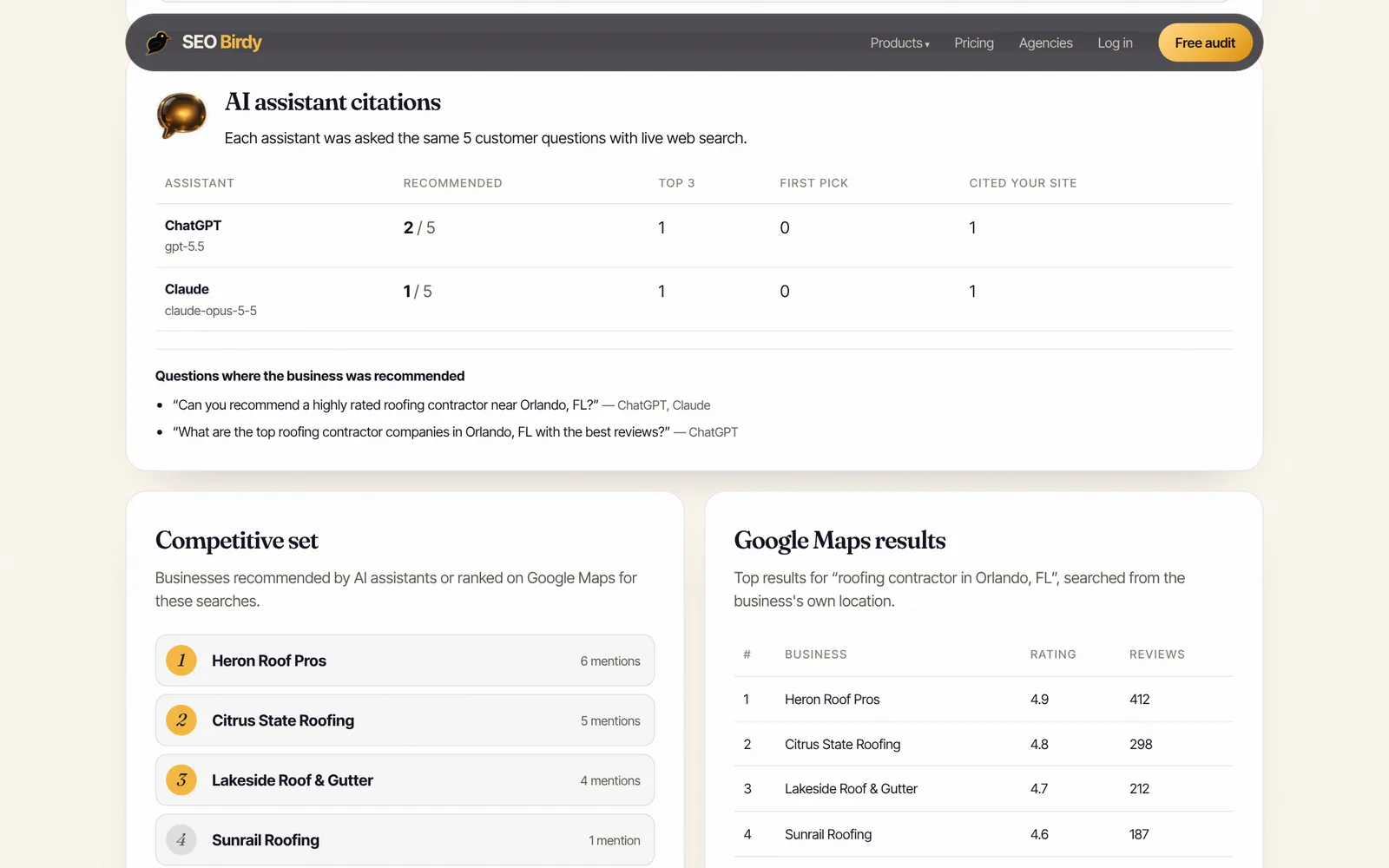
How do you check your local SEO rankings? (steps 39 to 40)
You check local rankings by searching from the places your customers are, not from your office, because map results change with the searcher's location. Use a geo-grid rank tracker to see your position across your service area, and your Business Profile and Search Console reports to see the searches behind it.
- Track map rankings across a grid. A geo-grid checks your rank for one keyword from many points across your area. That's why your Google Maps rankings change by location: distance is one of Google's three factors. Our guide to local rank tracking explains how to read one.
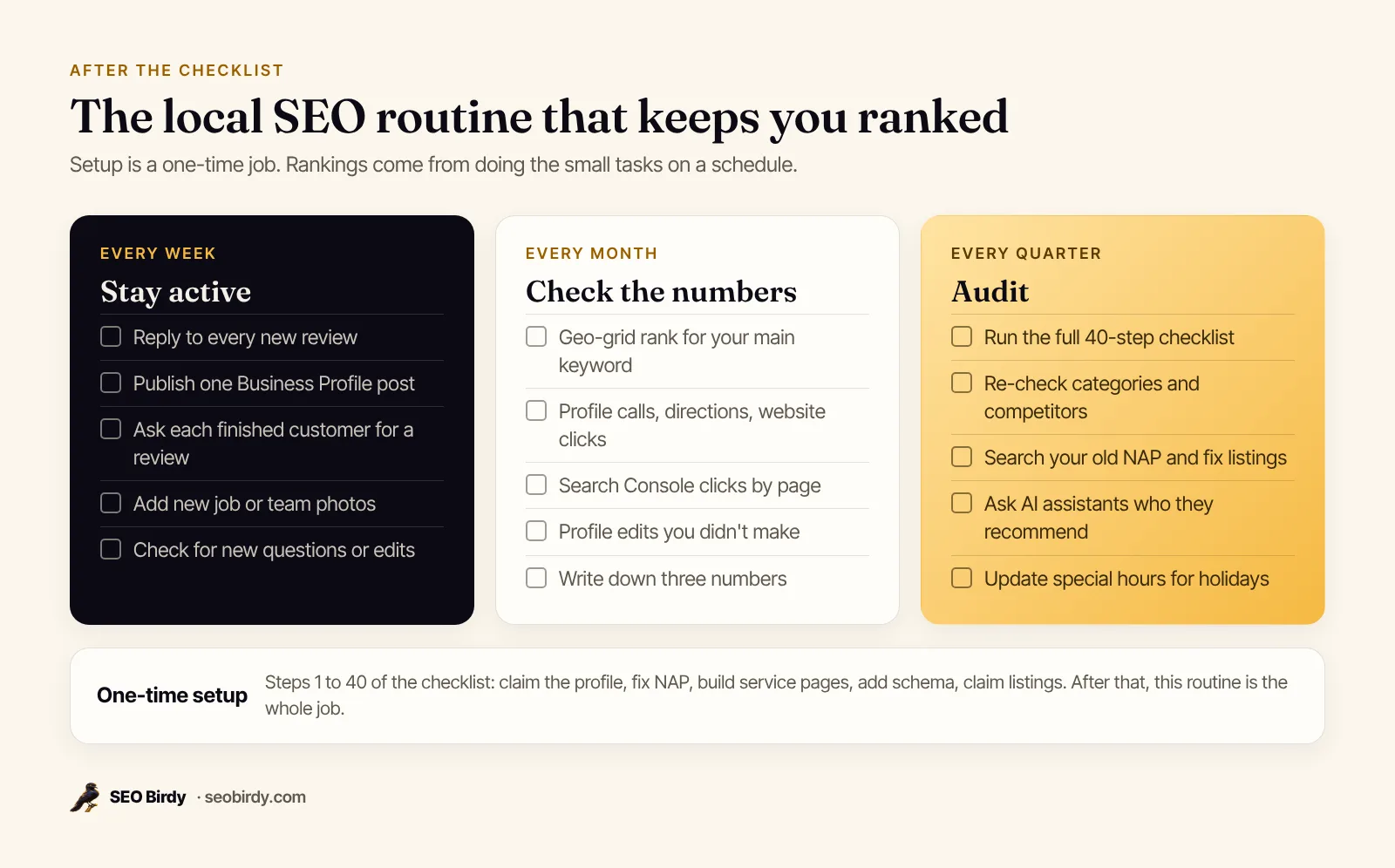
- Review the numbers monthly. Business Profile performance (calls, direction requests, website clicks, search terms) and Search Console clicks by page. Write down three numbers each month so you can see the trend.
To check your SEO ranking for free, search in a private window with your location set, or run a free map rank check. A single search only shows one point on the map, so don't panic over it.
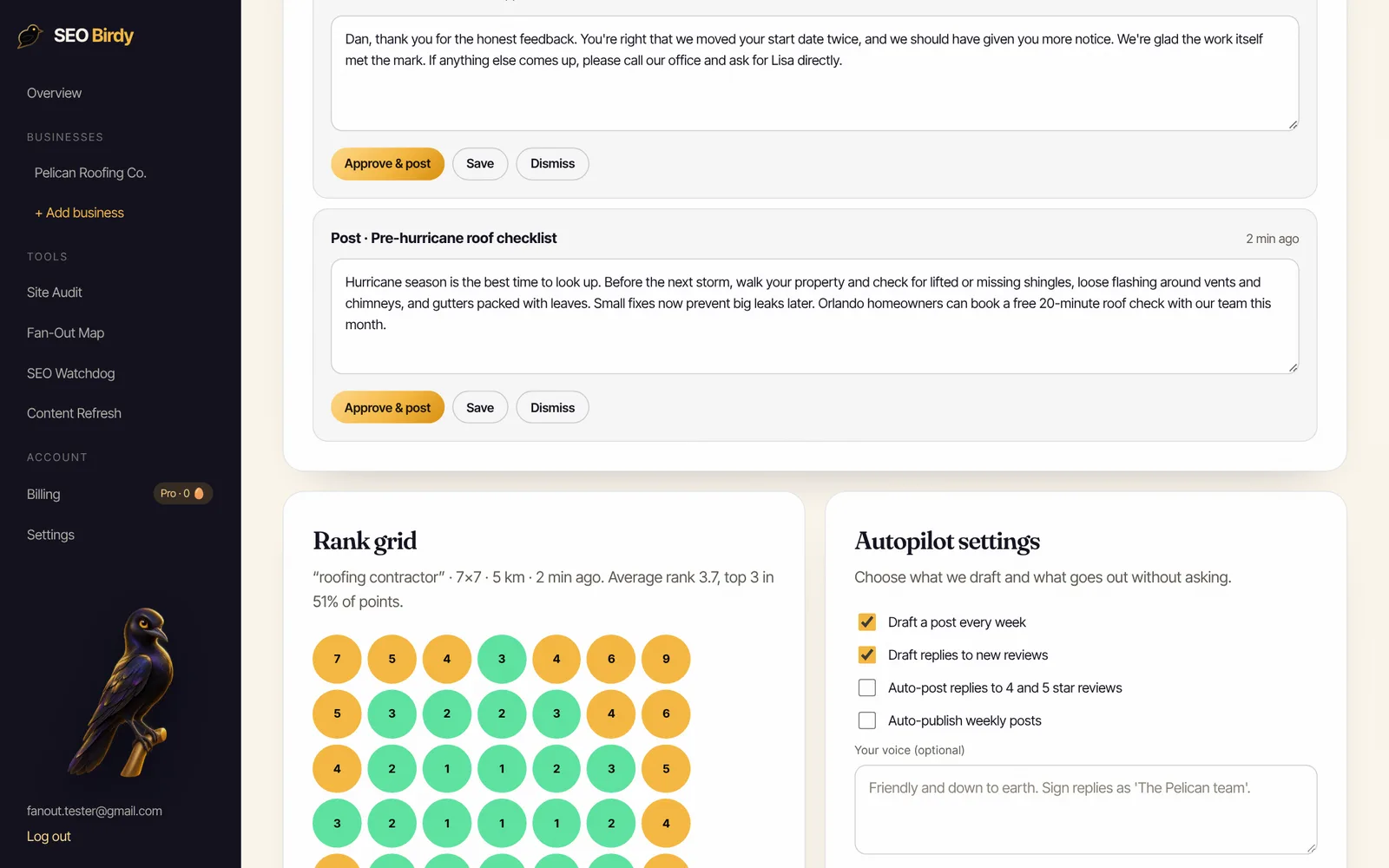
Keep the weekly work going without thinking about it. Maps Autopilot drafts your Google Business Profile posts, writes a reply for every review, and rescans your geo-grid rank map every week. You approve everything.
See Maps Autopilot →How to run a local SEO audit with this checklist
A local SEO audit is this checklist used as a test: go through each step, mark it done, partly done or missing, and fix the missing items in order. Start with the profile and NAP, because errors there undo everything else. Most small businesses can run their first audit in an afternoon.
Here is a simple local SEO audit template. Copy it into a spreadsheet or use the PDF.
| Area | What to check | Pass looks like |
|---|---|---|
| Profile | Name, primary category, hours, service areas | Matches guidelines, specific category, holiday hours set |
| NAP | Profile, website footer, top 5 listings | Identical everywhere, old details removed |
| Website | Title tags, service pages, schema, mobile | One page per service, valid LocalBusiness schema |
| Reviews | Recent reviews, reply rate | New reviews every month, every one answered |
| Links | Local organizations, partners, news | A handful of real local links |
| Tracking | Grid rank, profile actions, Search Console | Numbers recorded monthly |
| AI answers | ChatGPT, Gemini, Perplexity | Named for your main service and city |
What does an SEO audit cost? Doing it yourself costs a few hours. Free tools cover a lot of it: the Website SEO Audit checks any page, and the AI Visibility Audit checks your map position and AI recommendations. If you pay someone, ask for the findings as a prioritized list like the one above, not a 60-page export. For a broader SEO audit checklist for beginners, see our free SEO audit guide.
Local SEO tips by type of business
The checklist is the same for every local business, but the emphasis changes. Service area businesses live or die by service areas and reviews. Storefronts need accurate hours and photos. Regulated professions like dentists and lawyers need careful, factual pages. Here are local SEO examples by industry.
- Dentists: Pick the most specific category (Dentist, Pediatric Dentist, Orthodontist). Give each treatment its own page with insurance and cost questions answered. Local SEO tips for dentists start with making new-patient booking obvious.
- Plumbers and HVAC: Usually service area businesses: hide the address, set service areas, and show emergency hours if you offer them. Local SEO for plumbers depends on reviews that mention the job ("fixed our water heater same day").
- Roofers: Photos of finished roofs, storm and insurance claim pages, and posts before storm season. Local SEO for roofers is seasonal, so plan posts ahead.
- Restaurants: Menu link, accurate hours, fresh photos every month, and replies to reviews. Local SEO for restaurants is mostly the profile.
- Lawyers: One page per practice area, careful factual claims, and listings in legal directories. Local SEO for lawyers rewards depth over volume.
How much does local SEO cost, and is it worth it?
Local SEO costs as little as your time if you do it yourself, because the core platforms are free. Paid help ranges from software that automates the weekly tasks to agencies that do everything. It's worth it when one new customer covers the cost, which for most trades and clinics is a single job or appointment a month.
Typical local SEO services list: profile setup and management, review replies, citation cleanup, service and location pages, schema, link building and reporting. A "SEO package" is just a bundle of these. Before you sign, ask what's included each month and who owns the accounts. Google's guide Do you need an SEO? warns that no one can guarantee a #1 ranking.
If you're weighing local SEO tools vs. hiring, the honest split is: tools for checking and routine work, people for strategy and content. SEO Birdy's pricing starts free, and the seo for small business guide covers when to do it yourself and when to hire.
Common local SEO mistakes to avoid
The most common local SEO mistakes are keyword-stuffed business names, wrong categories, inconsistent NAP, ignoring reviews, thin city pages and judging results from a single search. Each one is easy to fix once you know to look for it, and fixing them often helps more than adding new tactics.
- Stuffing the business name. Fastest route to a suspension.
- Two profiles for one location. Duplicates split reviews and confuse Google. Merge or remove them.
- A virtual office or PO box as your address. Google's guidelines say these aren't eligible.
- Letting the profile go quiet. No photos, no posts, unanswered reviews for months.
- Copy-paste city pages. They don't rank, and they can be treated as doorway pages.
- Checking rank from your desk. You'll always look great from your own parking lot.
Local SEO best practices for 2026 are the same ones that worked before, done more consistently, plus making sure AI assistants can find and trust the same information. For the next step on the map pack itself, read how to rank in Google Maps.
Frequently asked questions
How long does local SEO take to work?
Some fixes show up within days, such as a corrected category or new hours on your Google Business Profile. Others, like reviews and local links, build over months. Google's own SEO Starter Guide says some changes take effect in a few hours while others could take several months. Plan on a steady quarter of work before you judge results, and track rankings from several points in your area, not just your office.
How much does local SEO cost?
Doing it yourself costs time, not money: Google Business Profile, Bing Places, Apple Business and Search Console are free. Agencies and software price local SEO very differently, so compare what is included, not the monthly figure. SEO Birdy's free plan covers an AI visibility check and a map rank check each month; paid plans start at $149 a month, and Maps Autopilot is in the Growth plan at $299.
Can I do local SEO myself, or should I hire someone?
You can do most of it yourself. Most of this checklist is owner work: completing your profile, asking for reviews, replying to them, fixing listings and writing a clear page for each service. The parts that take skill are technical fixes and schema, and the part that takes discipline is doing the weekly tasks every week. Many owners do the setup themselves and then hand the routine to software or an agency.
Do I need a website for local SEO?
You can appear in Google Maps with only a Business Profile, but a website makes every other step stronger. Google reads your site to judge relevance, AI assistants cite websites when they recommend businesses, and your service pages are where many customers decide. A small site with one page per service, your address and phone, and LocalBusiness schema is enough to start.
What are local SEO citations?
A citation is any online mention of your business name, address and phone number, usually on a directory or listing site such as Bing Places, Apple Business, Yelp, the Better Business Bureau, your chamber of commerce or an industry directory. Citations help search engines confirm that your business is real and where it is. Accuracy matters more than volume: one wrong old address can confuse customers and search engines.
How often should I do a local SEO audit?
Run a full local SEO audit once a quarter and a quick check every month. The monthly check covers new reviews, profile edits you did not make, ranking changes and broken pages. The quarterly audit goes through this whole checklist again, because categories, competitors and Google's interface change. Also audit after any move, rebrand, new phone number or website redesign.
What are the most important local SEO factors?
Google names three: relevance, distance and prominence. Relevance is how well your profile matches the search, distance is how far you are from the searcher, and prominence is how well known you are, which includes reviews, links and mentions across the web. You can't change distance, so this checklist focuses on making your business more relevant and more prominent.
We build SEO Birdy's audits and autopilots, and we test every recommendation against live search results and AI answers before we publish it. Our guides follow Google Search Central and Bing Webmaster guidelines.