The on-page SEO checklist: 24 checks to run before a page goes live
A 24-point on-page SEO checklist for titles, meta descriptions, headings, content, images, links and schema, with a free printable PDF and a free page audit.


An on-page SEO checklist is a list of everything you control inside a single page that helps it rank: the title tag, meta description, headings, content, images, internal links and structured data. Work through the 24 checks below on every page that matters, starting with the ones that decide whether the page can appear at all.
On-page SEO is the part of SEO you can finish this afternoon, with nothing more than access to your website's editor. This guide gives you the full list, why each check matters, and how to test your work, written for local businesses and the agencies that run their sites. Every Google-specific claim links to Google's own documentation.
Get the printable on-page SEO checklist. All 24 checks as tick boxes, a worksheet for drafting a title, meta description and H1 with character counts, and the order to fix things in.
Download “On-Page SEO Checklist” (PDF)What is on-page SEO, and what does it include?
In simple words, on-page SEO (or on-page optimization) refers to the work you do inside a page so search engines understand it and people click it: the title tag, meta description, URL, headings, content, images, internal links and structured data. Technical SEO makes the site crawlable; off-page SEO builds reputation elsewhere.
On-page SEO is concerned with one page at a time. When a page doesn't rank, knowing which of the three buckets the problem sits in tells you who fixes it and how fast.
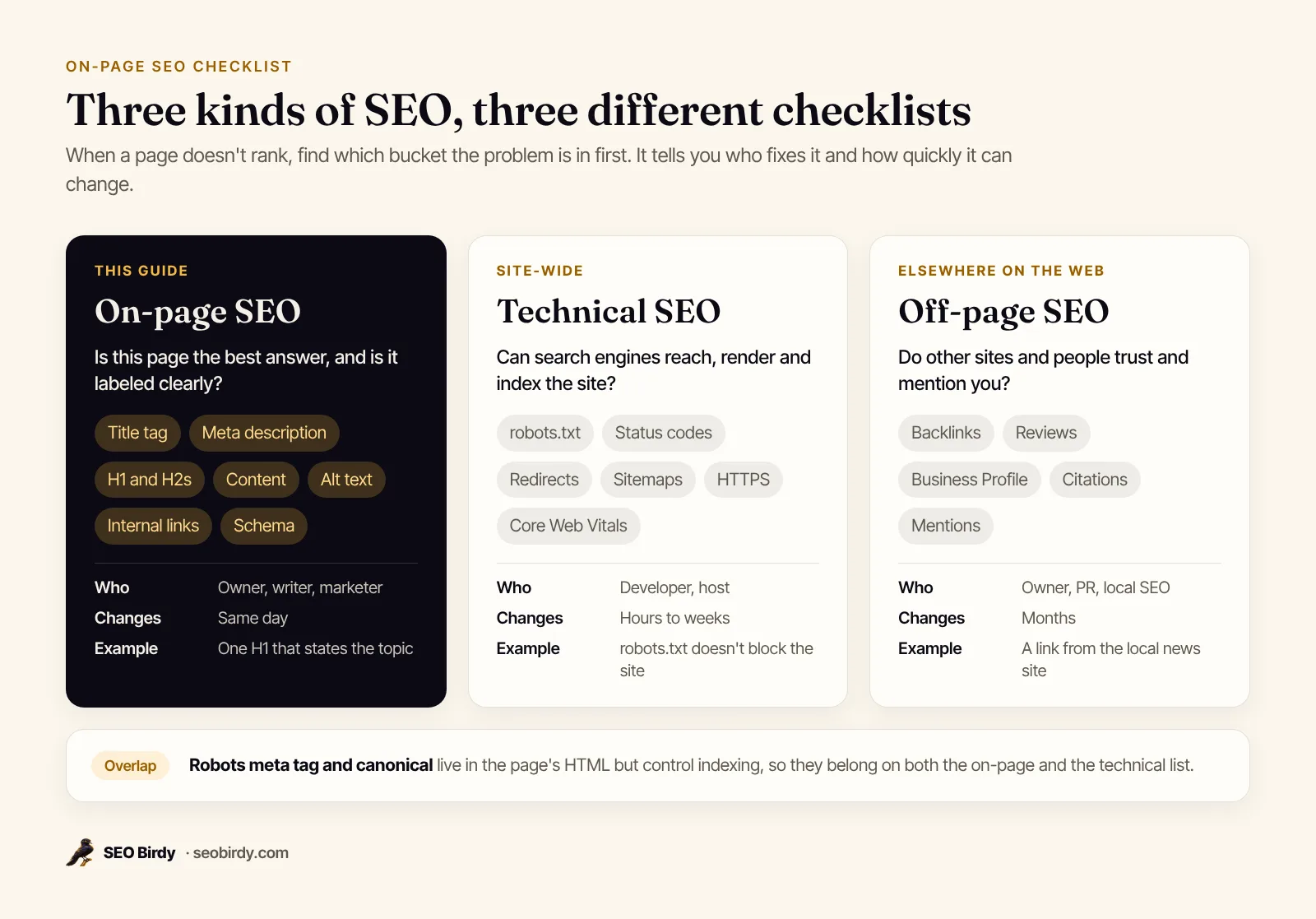
Two page-level tags, the robots meta tag and the canonical, are technically part of the page's HTML, so they appear on both lists. If you want the site-wide side, our technical SEO checklist covers crawling, indexing and speed in the same format.
Why is on-page SEO important, and what are the benefits?
Because it's the part search engines read first. Google's SEO Starter Guide explains that the title link and snippet in results come largely from your title element, headings and page content. The benefits follow from that: more clicks from the rankings you already have, relevance for more searches, and changes you can make today without a developer.
The on-page SEO checklist at a glance
Here's the full on-page SEO factors list for 2026: 24 checks, grouped the way you'll work through them and explained below. Print the PDF, or copy the table into Excel or Google Sheets and use it as a task list, one row per page.
If you only have time for 10 checks, these are the key factors and elements to start with: 1, 3, 6, 8, 9, 10, 14, 17, 20 and 24.
| # | Check | Pass when |
|---|---|---|
| 1 | Title tag | Unique, describes the page, main topic first, about 50 to 60 characters |
| 2 | Brand in the title | Business name at the end, after a pipe, hyphen or colon |
| 3 | Meta description | Unique, 120 to 160 characters, answers the search and gives a reason to click |
| 4 | Open Graph tags | og:title, og:description and og:image set |
| 5 | URL | Short, readable words, hyphens, no random IDs |
| 6 | H1 | Exactly one, states the page's topic |
| 7 | H2 and H3 headings | Phrased the way people search, in a logical order |
| 8 | Search intent | The page type matches what searchers want (service page, guide, product) |
| 9 | First 100 words | Direct answer plus the main keyword, said naturally |
| 10 | Subtopics | Follow-up questions answered in their own sections |
| 11 | Natural language | No keyword stuffing, no repeated phrases |
| 12 | Experience | Specifics, real photos, who you are and why to trust you |
| 13 | Freshness | Dates, prices, staff and offers still correct |
| 14 | Alt text | Every meaningful image described; decorative images alt="" |
| 15 | Image files | Descriptive file names, placed near related text |
| 16 | Image size | Compressed, modern format, width and height set |
| 17 | Internal links out | At least 3 to 5 links to related pages with descriptive anchors |
| 18 | Internal links in | Other pages link to this one; it isn't an orphan |
| 19 | External links | Cite sources where useful; paid or user links qualified |
| 20 | Structured data | JSON-LD matching the page type, valid in the Rich Results Test |
| 21 | Local schema | LocalBusiness on the homepage and location pages |
| 22 | Local details | Name, address, tap-to-call phone and city in the copy |
| 23 | FAQ | The questions customers ask before buying, answered on the page |
| 24 | Page-level tags | Self-referencing canonical, no stray noindex, viewport and lang set |
How do you write a title tag and meta description that earn the click?
Write a unique title that states the page's topic first and your brand last, in roughly 50 to 60 characters, and a unique meta description of 120 to 160 characters that answers the search and gives a reason to click. These two lines are your listing in Google, so they decide whether a ranking turns into a visit.
1. Title tag
Google's title link documentation asks for "descriptive and concise" text in every page's <title> element, and warns against vague titles like "Home", keyword stuffing and boilerplate repeated across pages. There's no official title tag length limit; Google truncates titles to fit the device width. In practice, 50 to 60 characters keeps the important words visible on most screens.
Lead with what the page is about, in the words your customers use:
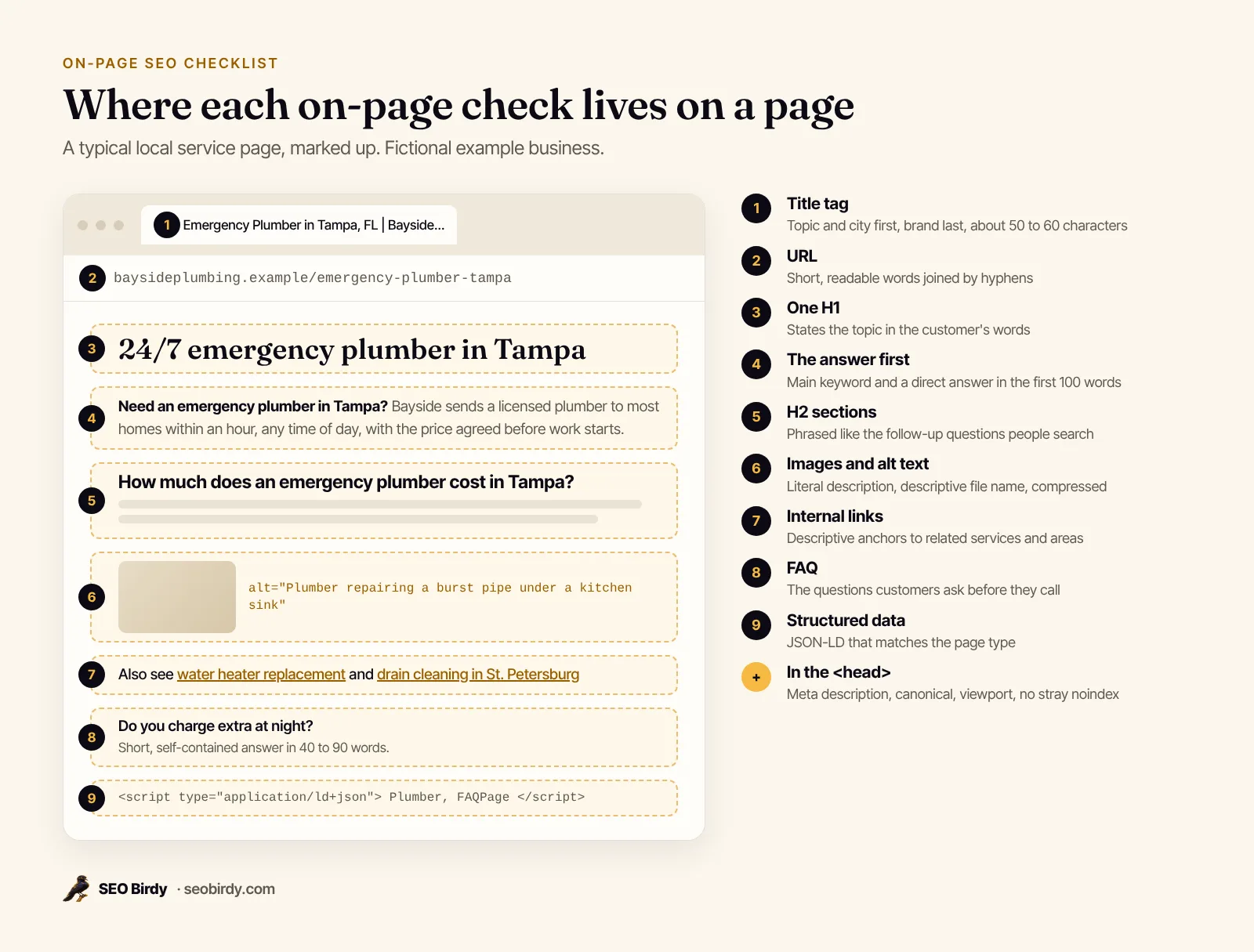
<title>Emergency Plumber in Tampa, FL | Bayside Plumbing</title>
That title (49 characters) names the service, the city and the business, in that order. Bayside Plumbing is a made-up example. Why does Google rewrite a title? When it's missing, vague, stuffed or doesn't match the page, Google may build the title link from your headings or from anchor text instead.
2. Brand at the end
Google suggests including your site name "at the beginning or end of each <title> element, separated from the rest of the text with a delimiter such as a hyphen, colon, or pipe." For local service pages, the end is usually better: searchers scan for the service first. Your homepage title can carry a little more about the business.
3. Meta description
Google uses the meta description for the snippet "if we think it gives users a more accurate description than would be possible purely from the on-page content," according to its snippet documentation. Make it unique, specific and written like a short ad: the answer, a detail that proves it, and a reason to click. How long should a meta description be? Aim for 120 to 160 characters. Does it affect rankings? Google said in 2009 that it doesn't use the description meta tag in ranking; it earns clicks instead.
<meta name="description" content="24/7 emergency plumbing across Tampa Bay. Licensed plumbers, upfront prices and most calls reached within an hour. Call or book online.">
Our guide on how to write a meta description has a formula and examples.
4. Open Graph tags
Open Graph tags control the preview when someone shares your page in a text message or on social media. Set og:title, og:description and a 1200 × 630 og:image.
How should headings and URLs be structured?
Give each page one H1 that states its topic, H2s for each main section phrased the way people search, H3s for the details under them, and a short URL made of readable words. Headings are the outline search engines and readers both skim, and the URL shows up as a breadcrumb in results.
5. URL
An SEO-friendly URL structure uses words that are useful to people; Google's starter guide says a URL of random identifiers is less helpful. Short beats long: lowercase, with hyphens between words, so /emergency-plumber-tampa beats /services?id=4471. The same guide notes that keywords in the URL "alone have hardly any effect beyond appearing in breadcrumbs," so don't rename old URLs just to add a keyword. If you do change one, 301-redirect the old address.
6. One H1 that states the topic
Google looks at "the main visual title, heading elements, and other large and prominent text" when it builds a title link, and it recommends putting your main title "in the first visible <h1> element on the page." One H1 per page keeps that signal clear. It can be longer and more natural than the title tag, as long as it's about the same thing.
7. H2 and H3 headings
Break the page into sections with H2s that match real questions ("How much does a water heater replacement cost in Tampa?") and H3s for the steps or options inside them. Google says heading order doesn't matter for ranking, but semantic order helps screen reader users, and question-style headings give AI answers a clean passage to lift.
What makes on-page content rank?
Content ranks when it's the most useful answer to the search: the right type of page, a direct answer near the top, every follow-up question covered, written naturally by someone who clearly knows the subject. Google's helpful content guidance asks whether a page provides "original information, reporting, research, or analysis" and leaves visitors satisfied.
8. Match the search intent
Search the keyword yourself and look at what ranks. If the results are service pages with prices and phone numbers, a 3,000-word history of plumbing won't rank. If they're how-to guides, a thin sales page won't either. Build the page type Google already rewards.
9. Answer in the first 100 words
Say the answer in the first two sentences and use the main keyword naturally while you do it. Readers decide in seconds whether they're in the right place, and short, self-contained passages are the easiest for AI answers to quote.
10. Cover the follow-up questions
A complete answer covers the questions people ask next: cost, timing, options, problems, how to choose. AI search engines split a search into many of these sub-questions before they answer, a process called query fan-out. Our free Fan-Out Map shows those sub-questions for any keyword, built from real Google searches, and which ones your page already answers.
11. Write naturally, never stuff keywords
Google's starter guide calls keyword stuffing "tiring for users," and its spam policies carry the penalty: sites that break them "may rank lower in results or not appear in results at all." There's no ideal keyword density. How long should content be for SEO? The guide says there's "no magical word count target"; write as much as the answer needs. Use the main phrase where it reads naturally (title, H1, opening, a heading or two) and let related words do the rest.
12. Show your experience
Specifics beat adjectives. Name the neighborhoods you serve, show real photos of your work, quote your actual price ranges, and say who wrote the page. Google says E-E-A-T itself isn't a ranking factor, but the first-hand experience and accuracy behind it are what its helpful content guidance describes.
13. Keep it current
Out-of-date prices, staff who've left and last year's offers make visitors leave. Review important pages every few months; our guide to content decay explains how to spot pages that are slipping.
How do you optimize images and alt text for on-page SEO?
Give every meaningful image short, literal alt text that describes what it shows, mark decorative images with an empty alt="", use descriptive file names, place images near the text they support, and serve them compressed with their width and height set. Alt text helps blind visitors, Google Images and the page's relevance at once.
14. Alt text
Google's image SEO guide calls alt text "the most important attribute" for image metadata and says Google uses it with computer vision and the page content to understand the image. Describe the picture as you would to someone on the phone:
<img src="/img/tankless-water-heater-install-tampa.jpg" alt="Plumber installing a wall-mounted tankless water heater in a Tampa garage" width="1200" height="800">
Decorative images, like a background swirl, get alt="" so screen readers skip them. More examples are in our guide to alt text for SEO.
15. File names and placement
tankless-water-heater-install-tampa.jpg tells Google more than IMG_4471.jpg. Do images need captions? They help: Google's image guide says it extracts information about an image from the page, "including captions and image titles," and recommends placing images near relevant text.
16. Size and format
Large images hurt page speed, most of all on phones. Resize to the largest size the layout shows, compress them, and use WebP or AVIF where your site supports it. Setting width and height lets the browser reserve the space, so text doesn't jump as images load, which helps the Cumulative Layout Shift score in Core Web Vitals.
How should you use internal links and anchor text?
Link every important page from at least three related pages on your site, using anchor text that describes the destination ("water heater replacement" rather than "click here"), and link out from each page to the next steps a reader needs. Internal links help Google discover pages and understand which ones matter most.
17. Links from this page
Add links where they help the reader: from a service page to the matching location page, from a guide to the service it describes. Google's starter guide says link text tells users and Google "something about the page you're linking to." How many internal links per page? There's no fixed number; our audit passes a page at five or more. Don't add nofollow to links between your own pages.
18. Links to this page
A page nothing links to (an orphan page) is hard for search engines to find. Link every new page from your navigation, a hub page or a related article, and list it in your XML sitemap.
19. External links
Should you link to other websites? Yes, when it helps: a manufacturer's warranty page or a city permit office is useful to readers and costs you nothing. If a link is paid or sponsored, Google asks you to qualify it with rel="sponsored"; use rel="ugc" for links in comments and reviews.
Which structured data belongs on the page?
Add JSON-LD structured data that matches what the page is: LocalBusiness (or a more specific type like Plumber or Dentist) on the homepage and location pages, Service or Product on offer pages, Article on blog posts, FAQPage where you answer questions, and BreadcrumbList as breadcrumb schema. Then validate it in Google's Rich Results Test.
20. Schema that matches the page type
Google's introduction to structured data explains that markup gives explicit clues about a page's meaning and can make it eligible for rich results. Only mark up what's visible on the page, and test every template in the Rich Results Test after changes.
21. LocalBusiness schema
For local businesses, LocalBusiness markup confirms your name, address, phone, hours and service area in a format search engines and AI assistants can read without guessing. Our guide to local business schema has copy-and-paste JSON-LD.
22. Name, address, phone and city
This is how to optimize a service page or homepage for local SEO. Put the business name, address and phone number on the website where people look (header or footer, and the contact page), with the phone as a tap-to-call link (<a href="tel:+18135550142">). Mention the city and nearby areas in the headings and copy, the way customers say them. Keep these details identical to your Google Business Profile; the local SEO checklist covers the off-page side.
23. A short FAQ
Answer the four to eight questions customers ask before they buy: price ranges, timing, insurance, guarantees. Each answer should stand on its own in 40 to 90 words. It helps the people reading, and it gives search engines and AI assistants ready-made answers to quote.
24. Page-level tags in the head
Four tags quietly decide whether all the work above counts. Each page should have a self-referencing canonical (Google recommends one on the canonical page itself), no stray noindex left over from a staging site, a responsive viewport tag, and a lang attribute on the <html> element.
<html lang="en">
<head>
  <meta name="viewport" content="width=device-width, initial-scale=1">
  <link rel="canonical" href="https://www.example.com/emergency-plumber-tampa">
</head>
If you're not sure what a noindex tag does or how one ends up on a live page, read our guide to the noindex tag.
How do you check on-page SEO in WordPress, Shopify or plain HTML?
Open the page, view its source (Ctrl+U or Cmd+Option+U), and search for <title>, name="description", <h1, alt= and rel="canonical" to confirm each one is there and says what you expect. Then edit them in your CMS's SEO fields, or run a free page audit that does the checking for you.
WordPress
You can edit the title tag in WordPress without a plugin: in most themes the post title becomes the title tag, and the URL slug is in the editor's sidebar. Most themes don't add a meta description field on their own, so the description and social tags usually come from an SEO plugin's panel under the editor. Check Settings → Reading once: the "Discourage search engines from indexing this site" box makes WordPress print a noindex, nofollow robots meta tag on every page, according to the WordPress documentation.
Shopify and other hosted builders
For ecommerce, Shopify, Wix and Squarespace each have SEO settings on every page (and, on Shopify, every product and collection) where you set the title tag, meta description and URL handle. Alt text is set on each image in the media library. Product and collection pages are where duplicate titles pile up, so check them in bulk.
Plain HTML websites
On an HTML website, edit the <head> directly. On template-driven sites, one edit to the layout file fixes (or breaks) every page.
Run a free on-page audit
SEO Birdy's free Website SEO Audit fetches the page the way a search engine does and checks indexability, the title and meta description, headings, alt text, structured data, the canonical, Open Graph, internal links, content depth, the viewport and server response time. Where something falls short, it writes a suggested title, description, alt text and JSON-LD from the page's own content.
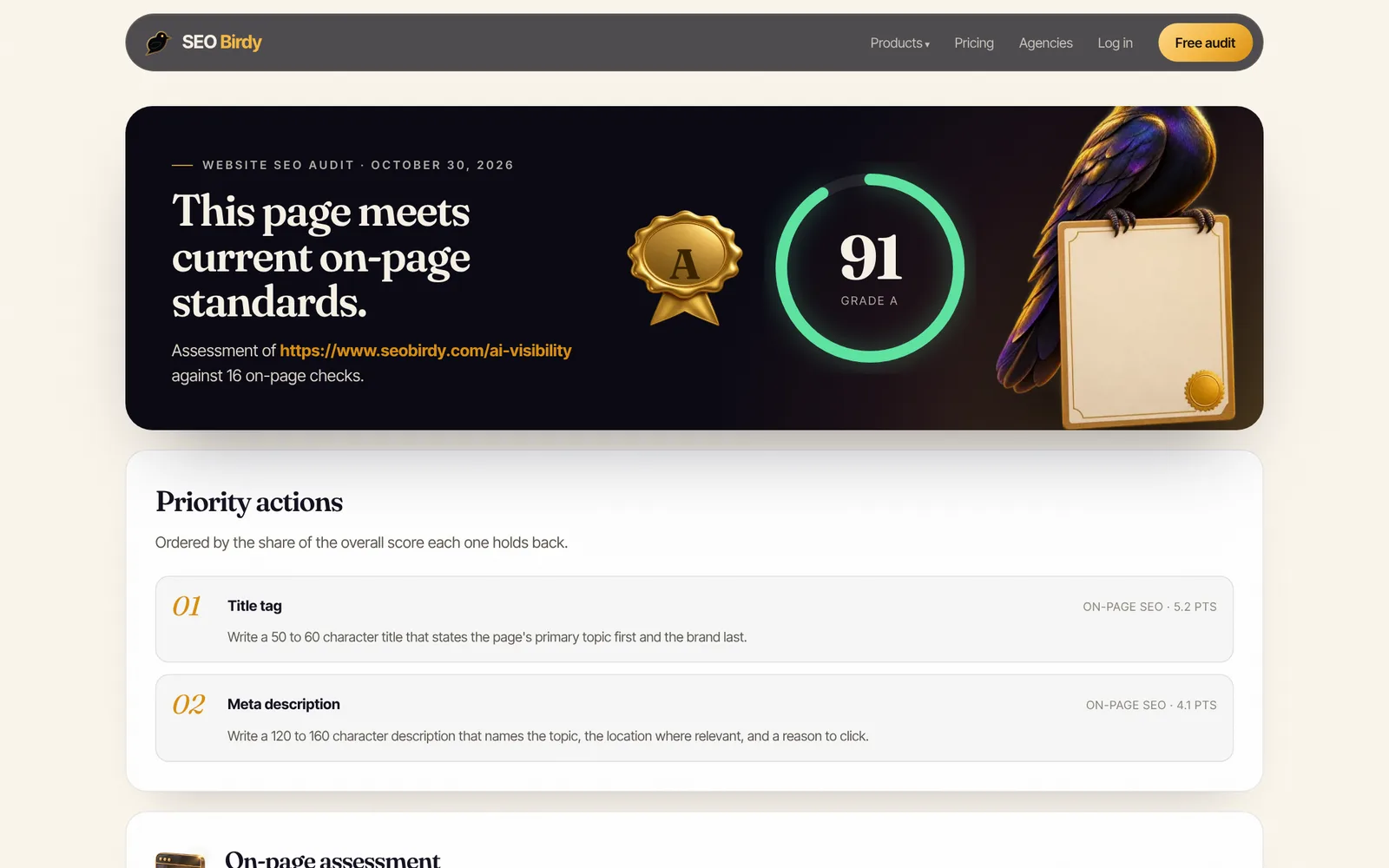
Run this checklist on any page in under a minute. Paste a URL and the free Website SEO Audit checks the title, meta description, headings, alt text, schema, canonical and more, then writes the fixes for you to copy into your CMS.
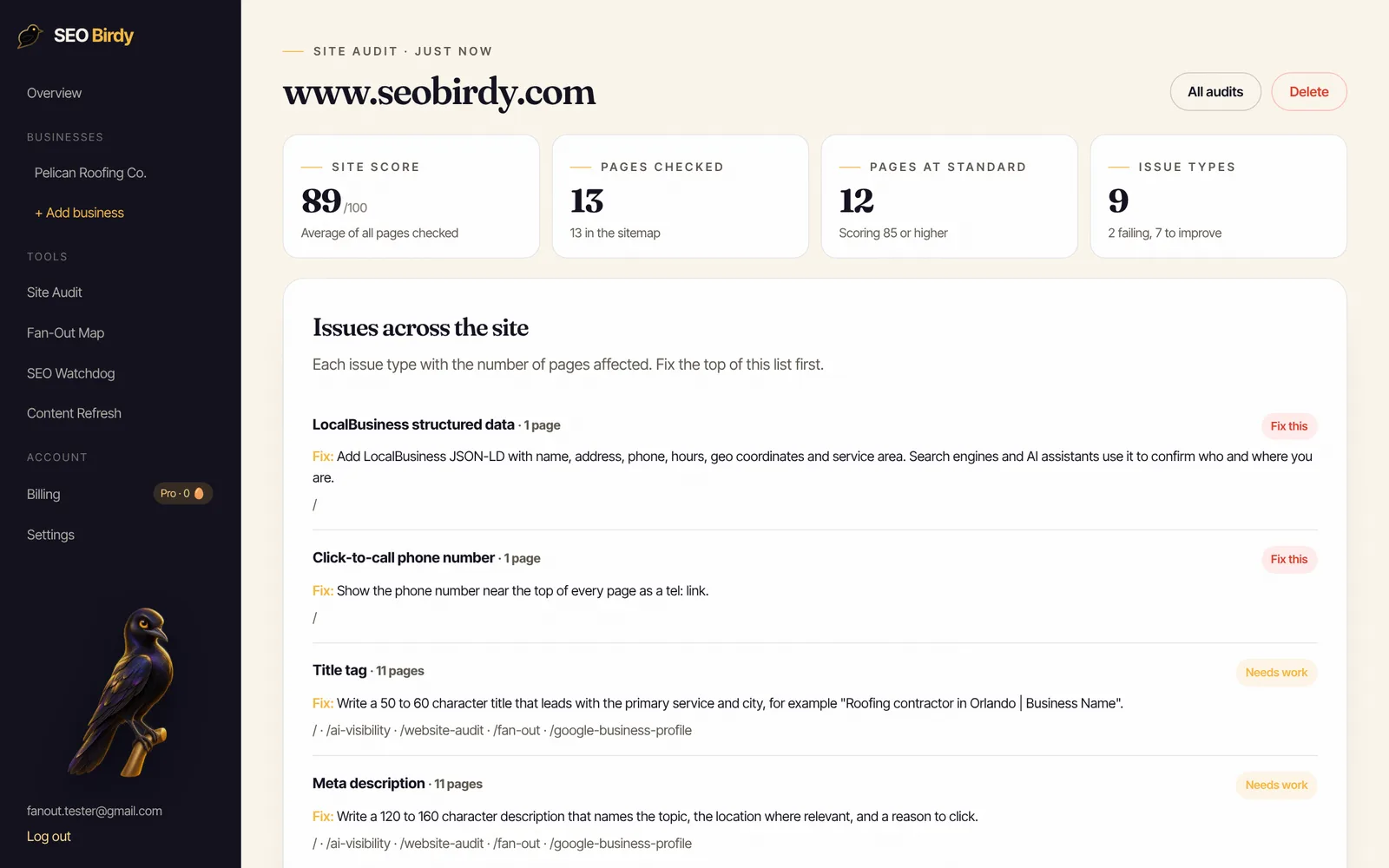
Audit a page for free →For more than a handful of pages, a site audit crawls every URL in your sitemap and groups the problems by type, so you can fix a template once instead of page by page. The free audit covers one page at a time; full-site audits come with the paid plans, from 50 pages on Starter to 500 on Pro (see pricing).
What on-page SEO mistakes should you fix first?
Fix any issue that stops the page appearing first (a stray noindex, a canonical pointing elsewhere, an error status), then missing or duplicate titles and descriptions, then a missing or duplicated H1, then thin content, and finally the polish: alt text, internal links, schema and Open Graph. Work from "can't rank" to "could rank better."
The usual suspects on small business sites:
- A leftover noindex. The staging site's "hide from search engines" setting survives the launch. Check the page source for
noindexbefore anything else. - The same title on every page. "Home | Bayside Plumbing" on twelve pages tells Google nothing. Bing's webmaster guidelines warn that missing, duplicate or overly short titles and descriptions "may reduce indexing reliability, ranking, and eligibility for grounding results and citations."
- No meta description at all. Google will write a snippet from the page, but it may pick a cookie banner or a menu label.
- Two or three H1s. Usually the logo and a slider headline are marked up as H1s by the theme.
- A thin service page. Two sentences and a contact form can't answer the questions people search.
- Images with no alt text. Often hundreds of them, uploaded in bulk.
- Orphan pages. A new location page that nothing links to.
Does on-page SEO still matter in 2026, with AI Overviews and ChatGPT?
Yes, the same basics apply. Google's guide to AI features and your website says a page must be indexed and eligible to show with a snippet to appear as a supporting link in AI Overviews or AI Mode, with no extra requirements. Assistants like ChatGPT and Copilot can only cite pages they can find and read. A clear title, a direct answer near the top, question-style headings and accurate schema make your page easier to quote. To see whether AI assistants already recommend your business, run the free AI Visibility Audit; our guide to a free SEO audit shows how to combine both reports.
How often should you run this checklist?
Run it on every new page before it goes live, on your ten most important pages every quarter, and on any page after a redesign, theme change or plugin update. Those are the moments titles get overwritten and noindex tags appear. If you'd rather be told when something changes, SEO Watchdog checks your pages daily and emails you when a title, canonical or noindex changes.
Frequently asked questions
What is included in on-page SEO?
On-page SEO covers everything you control inside a single page: the title tag, meta description, URL, headings, body content, keyword use, images and alt text, internal links, structured data and the page-level tags in the HTML head such as the canonical and robots meta tag. Backlinks, reviews and mentions on other sites are off-page SEO. Server setup, sitemaps and crawl rules are technical SEO.
Is there an on-page SEO checklist PDF I can print?
Yes. SEO Birdy's free on-page SEO checklist PDF has all 24 checks from this guide as tick boxes, a worksheet for drafting a page's title, meta description and H1 with character counts, and the order to fix problems in. Print one per page you're optimizing, or keep it next to your CMS while you edit.
How do I check the on-page SEO of a website?
Start with one important page. Read its title and meta description in the page source, confirm there is one H1, check every image has alt text, and count the internal links. A free tool such as SEO Birdy's Website SEO Audit runs these checks in under a minute and writes suggested fixes. For a whole site, run a site audit that crawls every page in the sitemap.
How long does on-page SEO take to work?
Google has to recrawl and reprocess a page before it notices changes, which its documentation says can take a few days to a few weeks. You can ask for a recrawl with the URL Inspection tool in Search Console. Ranking changes after that depend on the competition, so judge results over four to eight weeks rather than days.
Does on-page SEO still matter with AI search?
Yes. Google says a page must be indexed and eligible for a snippet to appear as a supporting link in AI Overviews or AI Mode, and Bing's guidelines say missing or duplicate titles and meta descriptions can reduce eligibility for grounding results and citations. Clear headings, a direct answer near the top, and structured data make a page easier for both search engines and AI assistants to read and quote.
What are the most important on-page SEO factors?
Content that fully answers the search comes first, because no tag can rescue a page that doesn't help. After that, the title tag usually matters most, followed by the H1 and headings, the meta description for clicks, internal links that tell search engines the page is important, and structured data that confirms what the page is about.
What is the difference between on-page SEO and technical SEO?
On-page SEO is about one page's content and HTML: what it says and how it's labeled. Technical SEO is about whether search engines can reach, render and index the site at all: robots.txt, status codes, redirects, sitemaps, HTTPS and speed. The two overlap on page-level tags such as noindex and canonical, which this checklist includes.
We build SEO Birdy's audits and autopilots, and we test every recommendation against live search results and AI answers before we publish it. Our guides follow Google Search Central and Bing Webmaster guidelines.