The technical SEO checklist: 32 checks that keep your site crawlable, indexable and fast
A 32-point technical SEO checklist for robots.txt, sitemaps, status codes, redirects, canonicals, HTTPS, Core Web Vitals and IndexNow, plus a printable PDF.


A technical SEO checklist covers everything that decides whether search engines can find, crawl, render and index your site: robots.txt, XML sitemaps, status codes, redirects, canonicals, HTTPS, mobile rendering and speed. If any of these break, your content can't rank, however good it is.
Technical SEO sounds like developer territory, and some fixes are. But most of the checks below take a browser, Google Search Console and ten minutes, and they catch the problems that silently knock small business sites out of Google.
This guide gives you 32 checks in the order search engines meet your site, with how to test and fix each one. Every Google-specific rule links to Google Search Central, and Bing's rules are covered where they differ.
Get the printable technical SEO checklist. All 32 checks as tick boxes, a status code cheat sheet, a safe robots.txt template and a monthly monitoring routine.
Download “Technical SEO Checklist” (PDF)What is technical SEO, and why does it matter?
Technical SEO is the work that makes a site easy for search engines to discover, crawl, render, index and serve. In simple words, it's the plumbing under your content, and it focuses on access rather than words. Google's technical requirements are short: Googlebot isn't blocked, the page returns HTTP 200, and it has indexable content.
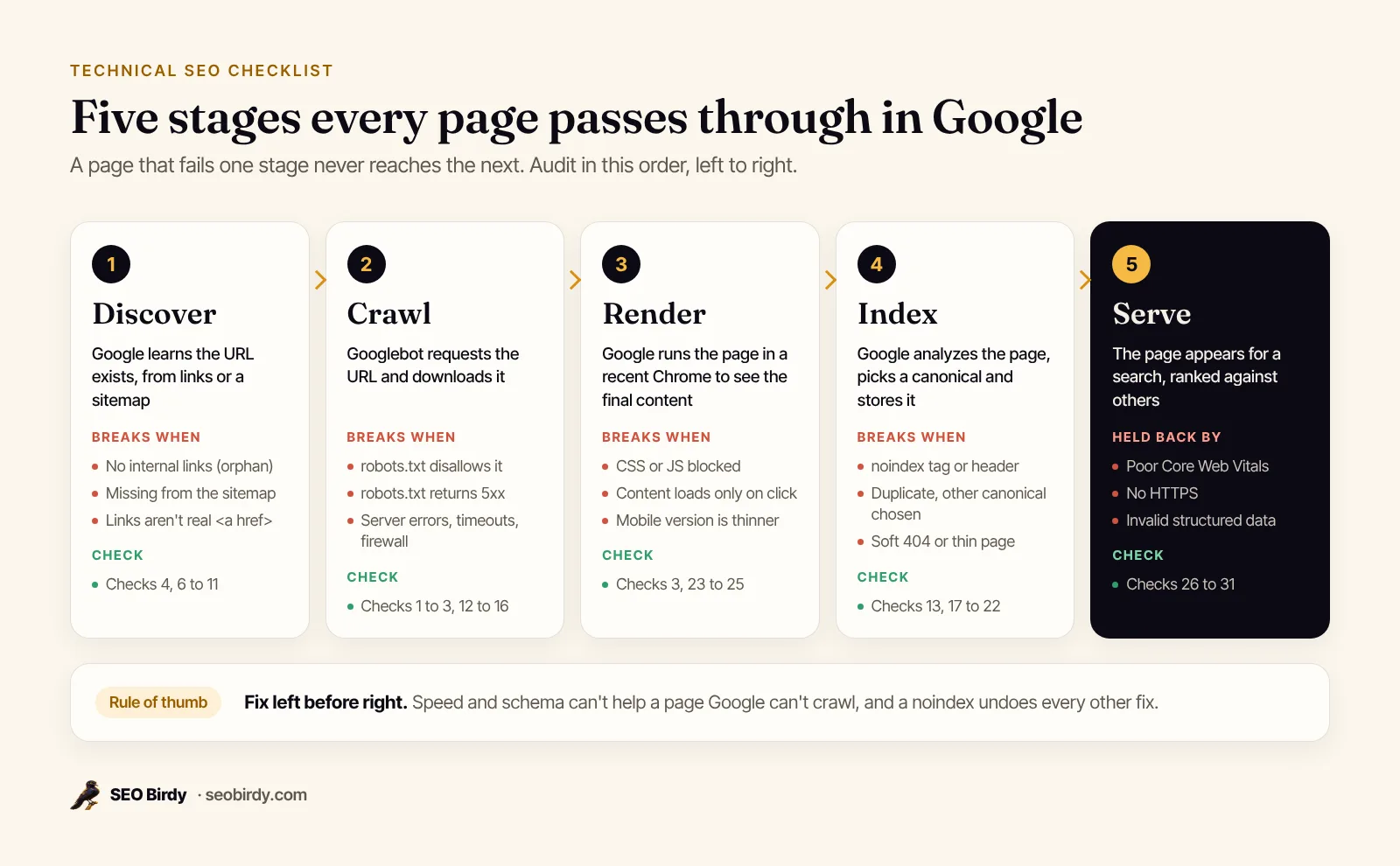
Everything else here is about meeting those conditions reliably, on every page. Google describes Search as three stages (crawling, indexing and serving), and "not all pages make it through each stage."
How is technical SEO different from on-page SEO?
On-page SEO is about each page's words and labels; technical SEO is about whether the site can be reached and indexed at all. They meet at the robots meta tag and the canonical, which is why both appear in our on-page SEO checklist too.
The technical SEO checklist at a glance
Here are all 32 technical SEO factors, grouped by the stage they protect: the complete list for 2026, from basic checks every site needs to advanced ones only some sites do. Copy it into Excel or a spreadsheet as an audit template, or print the PDF.
| # | Check | Pass when |
|---|---|---|
| 1 | robots.txt responds | /robots.txt returns 200 (or 404), never 5xx or a timeout |
| 2 | Nothing important blocked | No Disallow: / for all crawlers; key sections allowed |
| 3 | CSS and JavaScript allowed | Files needed to render the page aren't disallowed |
| 4 | Sitemap declared | Sitemap: line with the full sitemap URL |
| 5 | AI crawlers decided | OAI-SearchBot, GPTBot, Google-Extended allowed or blocked on purpose |
| 6 | Crawlable links | Important pages linked with <a href>, a few clicks from home |
| 7 | No orphan pages | Every page you want indexed has internal links to it |
| 8 | XML sitemap valid | UTF-8, absolute URLs, under 50,000 URLs and 50 MB per file |
| 9 | Sitemap is clean | Only canonical, indexable URLs that return 200 |
| 10 | Accurate lastmod | Changes only when the main content changes |
| 11 | Sitemap submitted | In Google Search Console and Bing Webmaster Tools |
| 12 | Key pages return 200 | Homepage, services, locations, top posts |
| 13 | Removed pages return 404 or 410 | No soft 404s ("not found" pages returning 200) |
| 14 | 301s for permanent moves | One hop, no chains or loops |
| 15 | Internal links go direct | Links point to final URLs, not to redirects |
| 16 | No server errors | 5xx and timeouts investigated in Crawl Stats |
| 17 | No stray noindex | Not in a meta tag or an X-Robots-Tag header on pages you want indexed |
| 18 | Intentional noindex | Thank-you, cart, internal search pages noindexed and still crawlable |
| 19 | One site version | http, https, www and non-www all redirect to one |
| 20 | Canonicals correct | Self-referencing, pointing to 200 URLs, matching the sitemap |
| 21 | Duplicates consolidated | Parameters, trailing slashes and print versions canonicalized |
| 22 | Index status checked | Page indexing report and URL Inspection reviewed |
| 23 | Mobile parity | Mobile version has the same content, links and schema |
| 24 | Viewport set | <meta name="viewport" content="width=device-width, initial-scale=1"> |
| 25 | Renders without JavaScript surprises | Main content and links visible in the rendered HTML |
| 26 | HTTPS everywhere | Valid certificate, no mixed content, http redirects to https |
| 27 | Core Web Vitals good | LCP ≤ 2.5 s, INP < 200 ms, CLS < 0.1 at the 75th percentile |
| 28 | Fast server response | HTML arrives quickly, ideally under about a second and a half |
| 29 | Structured data valid | No errors in the Rich Results Test or Search Console |
| 30 | hreflang (if needed) | Language versions reference each other, with self-references |
| 31 | Bing covered | Bing Webmaster Tools verified; IndexNow set up if you can |
| 32 | Monitoring on | Alerts for noindex, errors, robots.txt changes and SSL expiry |
Can search engines crawl your site?
Search engines can crawl your site when robots.txt responds properly and doesn't block important URLs or the files needed to render them, and when every page you care about is reachable through plain HTML links. Check robots.txt first: one wrong line can block an entire site.
1. robots.txt responds
Open https://yourdomain.com/robots.txt. A 200 with sensible rules is fine, and so is a 404, which Google treats as "no crawl restrictions." A server error is the dangerous case. According to Google's robots.txt specification, if robots.txt returns a 5xx, Google stops crawling the site for the first 12 hours, then uses the last good copy for up to 30 days.
The same spec says Google supports only four fields (user-agent, allow, disallow and sitemap), ignores crawl-delay, caches the file for up to 24 hours, and stops reading after 500 KiB.
2. Nothing important is blocked
The classic mistake is a staging rule that survives launch:
User-agent: *
Disallow: /
That blocks every compliant crawler from every URL. A safe default for most small business sites is short:
User-agent: *
Disallow: /wp-admin/
Allow: /wp-admin/admin-ajax.php

Sitemap: https://www.example.com/sitemap.xml
Google's robots.txt introduction says it's "not a mechanism for keeping a web page out of Google." A blocked URL can still be indexed from links, just without a description. To keep a page out of results, use a noindex tag and leave the page crawlable.
3. CSS and JavaScript are allowed
Google renders pages the way a browser does, so blocking the stylesheets and scripts a page needs can stop Google seeing the page properly. Google's guide warns that if missing resources make a page harder to understand, "don't block them."
4. The sitemap is declared
Add a Sitemap: line with the full URL. Google and Bing both read it, so new sitemaps are found even before you submit them.
5. AI crawlers are a decision, not an accident
Technical SEO for LLMs and generative search starts in robots.txt. Blocking every AI crawler wholesale can cost you visibility you wanted, because the tokens do different jobs. OpenAI's crawler documentation says OAI-SearchBot surfaces sites in ChatGPT search and sites that block it "will not be shown in ChatGPT search answers," while GPTBot collects training data. Google's crawler list says Google-Extended controls Gemini training and grounding and "does not impact a site's inclusion in Google Search." Decide for each one.
6. Links are crawlable, and pages are close to home
Google can only follow links that are <a> elements with an href. Buttons that navigate with JavaScript and links that only appear after a click hide pages. For pagination, give each page its own URL and link to the next one; Google's pagination guide covers infinite scroll. Good site architecture keeps click depth low: important pages within about three clicks of the homepage.
7. No orphan pages
A page with no internal links to it relies on the sitemap alone. Compare your sitemap with the pages your navigation and content link to, and add links to anything missing.
Is your XML sitemap helping or hurting?
XML sitemap best practices are simple. A sitemap helps when it lists every canonical, indexable URL you want in search, with accurate last-modified dates, in a valid file submitted to Google and Bing. It hurts when it's full of redirects, 404s and noindexed pages, because it tells search engines your list can't be trusted.
8. The sitemap is valid
Google's sitemap guide sets the size limits: UTF-8 encoding, absolute URLs, and at most 50,000 URLs or 50 MB uncompressed per file. Larger sites split into several sitemaps under a sitemap index. Most CMSs generate one automatically; check that yours exists at /sitemap.xml or the address your robots.txt names.
Do you need one at all? Google says a site of "about 500 pages or fewer" that's well linked internally might not, but a sitemap costs nothing and helps new sites with few links.
9. Only canonical URLs that return 200
Bing's webmaster guidelines put it plainly: sitemaps should "list only canonical URLs" and remove deleted or redirected URLs promptly. Leave out noindexed pages too; listing a URL in a sitemap while telling Google not to index it sends mixed signals.
10. Accurate lastmod, and skip the rest
Does lastmod matter? It matters only when it's honest. Google ignores <priority> and <changefreq>. It uses <lastmod> only if it's "consistently and verifiably" accurate, meaning it changes when the main content, structured data or links change, not when the copyright year in the footer does.
11. Submitted to Google and Bing
Submit the sitemap in the Sitemaps report in Search Console and in Bing Webmaster Tools. The reports then show how many URLs were discovered and flag fetch errors. If you're new to Search Console, start with our Google Search Console for beginners guide.
Do your status codes and redirects send the right signals?
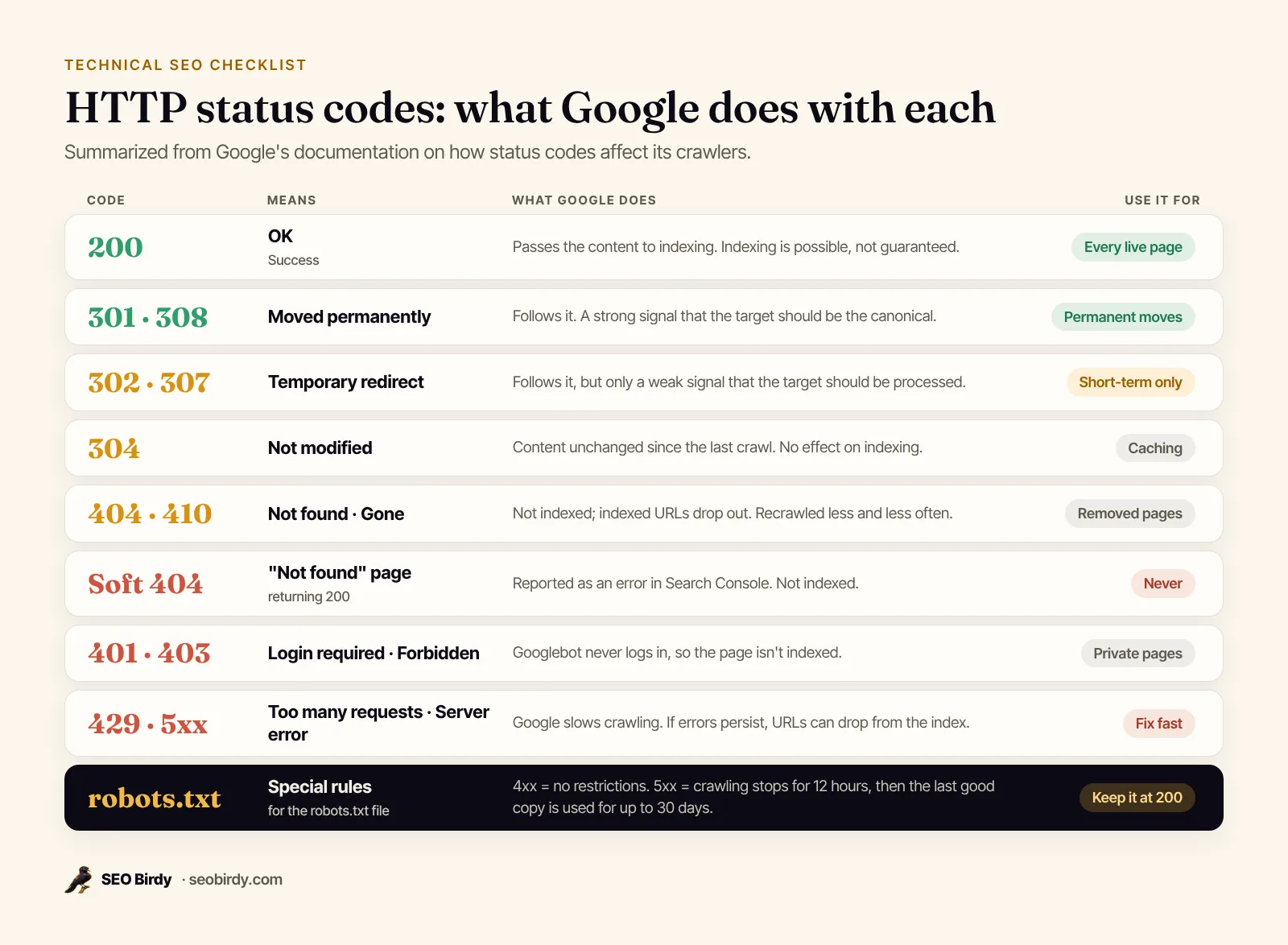
Every important URL should return 200, every removed page 404 or 410, and every permanently moved page a single 301 to its new home. Status codes are how your server tells crawlers what happened to a URL, and wrong ones cause many of the indexing problems that follow a redesign.
12. Key pages return 200
In Chrome, open DevTools, go to the Network tab and reload; the first row shows the status. Google's HTTP status code documentation notes that even a 200 doesn't guarantee indexing, but anything else rules it out.
13. Removed pages return 404 or 410, and there are no soft 404s
A deleted page should say so with a 404 or 410. To fix 404 errors that matter, update internal links that point to the dead URL, and 301-redirect it if the content moved. A soft 404 is a "not found" page that returns 200 instead, or a thin page Google decides is effectively empty; Search Console reports these separately. Don't redirect every deleted page to the homepage either: Google's site move guide warns that redirecting many old URLs to one irrelevant URL "might be treated as a soft 404 error."
14. 301s for permanent moves, in one hop
When a URL changes for good, use a 301 (or 308). Google treats it as "a strong signal that the redirect target should be processed," while a 302 is only a weak one. Bing's guidelines say to use a 302 only for very short-term changes, "less than 2 days." Google's crawlers follow up to 10 redirect hops, but chains slow crawling and break easily. To fix a redirect chain or loop, point every old URL straight at the final destination.
15. Internal links point to final URLs
After a migration, update menus, footers and in-content links to the new URLs. Redirects are for outside links and old bookmarks.
16. Server errors and timeouts are investigated
Frequent 5xx errors make Google crawl less; its guide to how Search works says "HTTP 500 errors mean 'slow down'." Check the host status in Search Console's Crawl Stats report, and if a firewall or bot protection is blocking Googlebot, ask your host to allow verified Google crawlers.
Are the right pages indexed, and only once?
The right pages are indexed when nothing tells search engines to skip them (no stray noindex, no blocking), when each piece of content has one canonical URL, and when Search Console confirms it. Duplicate and alternate URLs not being indexed is normal; your important pages missing is not.
17. No stray noindex
A noindex can arrive in a <meta name="robots"> tag or an X-Robots-Tag HTTP header, from a theme setting, a plugin or a staging config. Google's noindex documentation is clear that Google "will drop that page entirely from Google Search results." Search your page source for noindex, and check headers with curl -I https://yourdomain.com/page.
18. Intentional noindex, still crawlable
Thank-you, cart and checkout pages, internal search results and thin tag archives usually shouldn't be in search. Noindex them, and don't also block them in robots.txt: Google has to crawl a page to see its noindex. Our noindex tag guide has the exact syntax for every CMS.
19. One version of the site
http://example.com, http://www.example.com, https://example.com and https://www.example.com are four different URLs to a crawler. Pick one (usually https with or without www) and 301-redirect the other three to it, at the path level, so http://example.com/services lands on https://www.example.com/services.
20. Canonicals are correct
Google lists the canonical signals in order of strength: redirects and rel="canonical" are strong, sitemap inclusion is weak. Canonical tag best practices follow from that. Every indexable page should carry a self-referencing canonical, canonicals should point to URLs that return 200 and aren't noindexed, and the URL in your canonical, your sitemap and your internal links should be the same one. If Search Console says "Duplicate, Google chose different canonical than user," Google found those signals in conflict.
21. Duplicates are consolidated
Tracking parameters (?utm_source=), sort and filter parameters, trailing-slash variants and printer-friendly pages create duplicate URLs. Canonicalize them to the clean version. Google says not to use robots.txt for canonicalization, and not to use noindex to pick a canonical within your site, because noindex "will completely block the page from Search."
22. Index status is checked
For a small site, a site:yourdomain.com search gives a rough picture. Google's own Page indexing report help suggests sites under 500 pages start there, then use URL Inspection for specific pages. Statuses like "Crawled - currently not indexed" are common and not always a problem. If important pages show as not indexed, our guide to a page not indexed by Google explains every status and its fix.
Does your site work on mobile and render properly?
Your site works for Google when the mobile version has the same content, links and structured data as desktop, the viewport is set, and the main content shows up in the rendered HTML without depending on clicks or fragile JavaScript. Google indexes the mobile version, so that's the one that counts.
23. Mobile parity
Google's mobile-first indexing guide says it "uses the mobile version of a site's content, crawled with the smartphone agent, for indexing and ranking." If your mobile theme hides service descriptions, reviews or FAQ content to save space, Google may never see them. Use the same content, headings, alt text and structured data on both.
24. Viewport set
Without <meta name="viewport" content="width=device-width, initial-scale=1">, phones render a shrunken desktop page. Looking for the old mobile-friendly test? Google retired it in December 2023 and points to Lighthouse in Chrome instead.
25. Renders without JavaScript surprises
Client-side rendering works for SEO when it's done carefully. Google renders JavaScript with a recent version of Chrome, but its JavaScript SEO basics list the traps: links that aren't real <a href> elements, content that only loads after a click, and error pages that return 200. One catches people out: if the original HTML says noindex, Google "may skip rendering and JavaScript execution," so JavaScript that removes the noindex later may never run. Use URL Inspection's live test and "View tested page" to see what Google renders.
Is your site secure and fast enough?
Your site is secure and fast enough when every page loads over HTTPS with a valid certificate, the HTML arrives quickly, and real visitors get good Core Web Vitals: Largest Contentful Paint within 2.5 seconds, Interaction to Next Paint under 200 milliseconds and Cumulative Layout Shift under 0.1.
26. HTTPS everywhere
Google's page experience guide asks, "Are your pages served in a secure fashion?" Does HTTPS help ranking? It's part of the page experience Google's core ranking systems "look to reward." Check that the certificate is valid and set to renew automatically, that http redirects to https, and that no images or scripts load over http (mixed content, which browsers warn about or block). An expired certificate shows visitors a full-page browser warning. A hacked site is worse: Google's Security issues report explains that affected pages can carry a warning label in results.
27. Core Web Vitals are good
Google says Core Web Vitals "are used by our ranking systems," and web.dev's Web Vitals guide sets the targets at the 75th percentile of page loads, on mobile and desktop separately:
| Metric | Measures | Good |
|---|---|---|
| Largest Contentful Paint (LCP) | Loading: when the main content appears | Within 2.5 seconds |
| Interaction to Next Paint (INP) | Responsiveness: delay after taps and clicks | 200 milliseconds or less |
| Cumulative Layout Shift (CLS) | Visual stability: how much the layout jumps | 0.1 or less |
Search Console's report shows field data from real Chrome users; PageSpeed Insights adds a lab test for one URL. For local business sites, the usual fixes are compressing and sizing images, setting image dimensions, cutting third-party scripts and chat widgets, and better hosting or caching. Google also says good scores don't guarantee top rankings, so fix the worst pages and move on.
28. Fast server response
Server response time comes first because everything waits for the HTML. If your server takes three seconds to answer, no front-end tuning can make LCP good. Our free Website SEO Audit passes a page when the HTML arrives in under 1.5 seconds from our server, and SEO Watchdog flags pages that take longer than 3 seconds.
Have you covered structured data, hreflang and Bing?
Structured data should validate without errors, multi-language sites need hreflang annotations that reference each other, and Bing deserves its own setup: Bing Webmaster Tools, your sitemap and ideally IndexNow, which notifies Bing and other participating engines the moment a URL changes.
29. Structured data is valid
Test each template (homepage, service page, post) in Google's Rich Results Test and watch the enhancement reports in Search Console. Broken JSON-LD fails silently: the page looks fine, but rich results and some of the context search engines and AI assistants rely on disappear. Markup should describe content that's visible on the page. For local businesses, start with our local business schema guide.
30. hreflang, only if you need it
If you publish the same content in several languages or for several countries, hreflang tells Google which version to show whom. Each version lists all the others and itself; Google's localized versions guide covers the formats. A single-language local business site doesn't need it.
31. Bing Webmaster Tools and IndexNow
Bing's guidelines tie its index to Copilot answers and "grounding results," not just Bing.com. Verify your site in Bing Webmaster Tools (it can import from Search Console) and submit your sitemap. Then consider IndexNow: you host a key file, then ping a participating engine whenever a URL is added, updated or deleted, up to 10,000 URLs per request. One submission is shared with every participating engine; Google isn't among them.
How do you run a technical SEO audit and keep the site healthy?
Run the audit in the order of the checklist: robots.txt, sitemap, status codes, indexing, canonicals, mobile, HTTPS and speed, then structured data and Bing. Fix whatever blocks crawling or indexing first. Then put monitoring in place, because most technical problems arrive suddenly, with a plugin update or a redesign, not slowly.
A one-afternoon audit for a small site
- Read robots.txt in the browser. Look for
Disallow: /and aSitemap:line. - Open the sitemap. Spot-check ten URLs: do they load, return 200 and match their canonical?
- Open Search Console's Page indexing report. Read the reasons under "Why pages aren't indexed" and check that the important pages aren't among them.
- Inspect your five most important URLs with URL Inspection, including the live test.
- Test the four site versions (http, https, www, non-www) and confirm they end on one URL in one hop.
- Click through on your phone like a customer: menu, service page, contact form.
- Check Core Web Vitals and HTTPS in Search Console.
- Run the Rich Results Test on the homepage and one service page.
- Write down what you fixed and when, so you can match changes to traffic later.
With limited time and resources, prioritize by consequence: anything that removes pages from the index (noindex, robots.txt blocks, 5xx errors, broken redirects) beats anything that makes them slightly worse (speed, schema warnings).
WordPress and Shopify notes
On WordPress, check Settings → Reading first: the "Discourage search engines" box adds a sitewide noindex, nofollow robots meta tag, according to the WordPress documentation. The same checklist fits a law firm, a dental practice or a roofer; local sites are small, so a careful afternoon covers it. Shopify and other hosted ecommerce platforms handle robots.txt, sitemaps and HTTPS for you, so your technical work there is mostly duplicates (product URLs inside collections), redirects when you delete products, and page speed from apps.
Monitor what breaks without warning
An audit is a snapshot. The problems that hurt most (a theme update that adds noindex sitewide, a robots.txt edit, an expired certificate, a host outage) can arrive the day after your audit and go unnoticed for weeks. Search Console emails you about some new issues, but only after Google has recrawled the pages. The KPIs worth tracking monthly are simple: indexed page count, pages with errors, Core Web Vitals pass rate and organic clicks.
SEO Watchdog checks your site every day: every page it monitors from your sitemap, plus robots.txt, the sitemap and your SSL certificate. It opens an issue when a page starts returning errors, picks up a noindex (in the HTML or the X-Robots-Tag header), loses its title, or slows past 3 seconds; when robots.txt blocks everything or goes offline; when the sitemap disappears; and when the certificate is within three weeks of expiring. It also logs changes worth reviewing, like an edited title, a moved canonical, removed structured data or a page losing most of its text.
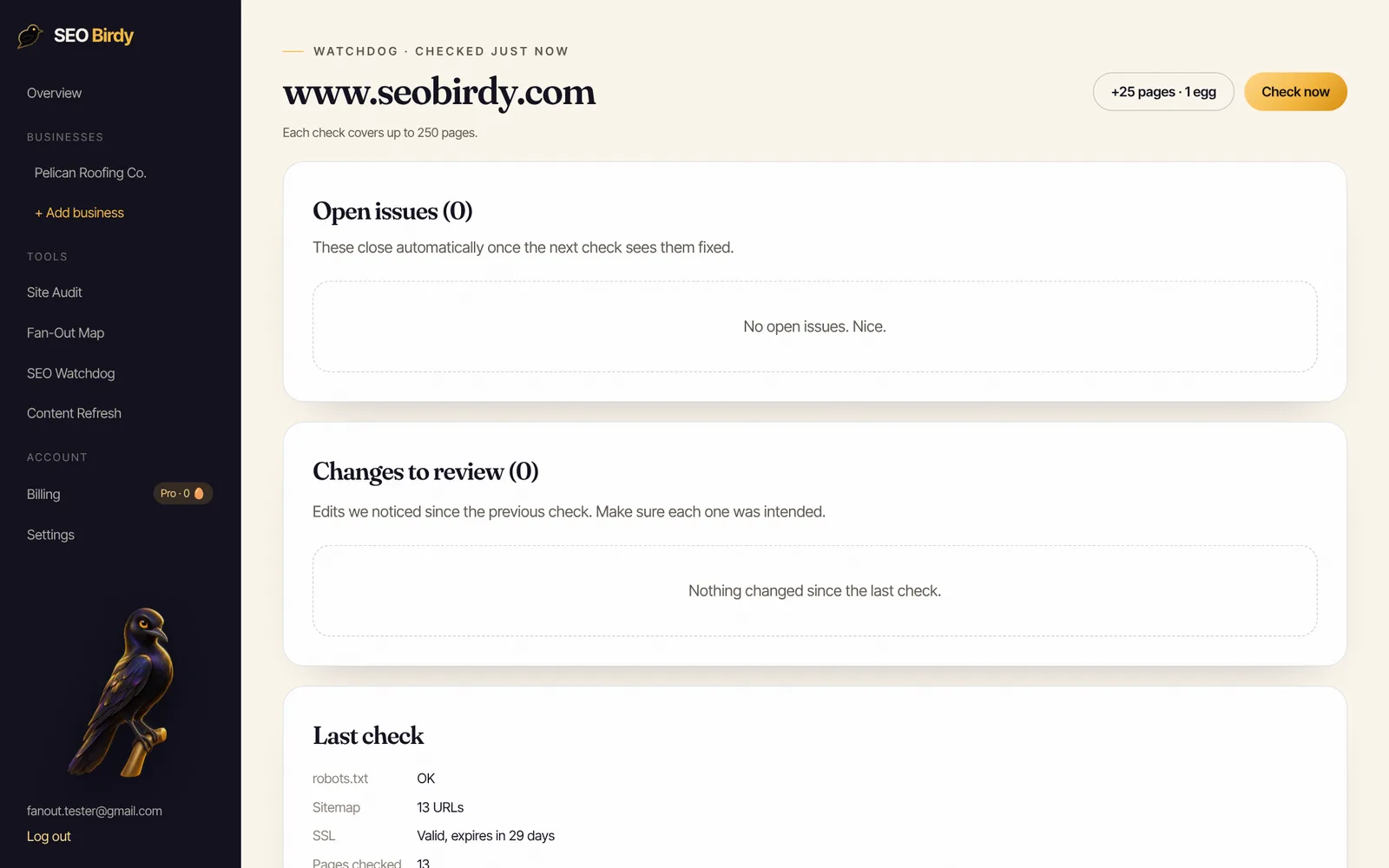
Know the day something breaks, not the month after. SEO Watchdog checks your pages, robots.txt, sitemap and SSL every day and emails you in plain English when a noindex, error, robots.txt change or expiring certificate appears. Issues close on their own once the next check sees them fixed.
See SEO Watchdog →Watchdog comes with the paid plans: 1 site and 50 pages on Starter, 2 sites at 100 pages on Growth, and 5 sites at 250 pages on Pro (see pricing). For the on-page side of each URL, the free Website SEO Audit checks one page at a time.
Frequently asked questions
What does technical SEO include?
Technical SEO covers everything that decides whether search engines can find, crawl, render and index your site: robots.txt, XML sitemaps, HTTP status codes, redirects, canonical tags, noindex rules, HTTPS, mobile rendering, JavaScript, Core Web Vitals, structured data validity and hreflang. It doesn't cover the words on the page or links from other sites; those are on-page and off-page SEO.
Is there a technical SEO checklist PDF?
Yes. SEO Birdy's free technical SEO checklist PDF has all 32 checks from this guide as tick boxes, a cheat sheet of HTTP status codes and how Google treats each one, a safe robots.txt template for a small business site, and a monthly routine for keeping the site healthy. It's free to download and print.
How do I do a technical SEO audit?
Check robots.txt, then your XML sitemap, then the status codes of your important URLs, then indexing (the Page indexing report and URL Inspection in Search Console), then canonicals, HTTPS, mobile rendering and Core Web Vitals. Fix anything that blocks crawling or indexing first. A small business site can be audited by hand in an afternoon; larger sites need a crawler.
How often should you do a technical SEO audit?
Run a full audit at least twice a year and after every redesign, migration, theme change or major plugin update. Between audits, monitor the things that break without warning, such as a noindex tag, robots.txt edits, server errors and SSL expiry, with daily automated checks and the email alerts Search Console sends for new indexing issues.
Is technical SEO part of on-page SEO?
No, but they overlap. Technical SEO is about the site as a whole: can search engines reach and index it. On-page SEO is about each page's content and labels: title, headings, text, images. The robots meta tag and canonical tag live in a page's HTML but control indexing, so they appear on both checklists.
Does Google support IndexNow?
Google isn't on IndexNow's list of participating search engines, which names Bing, Naver, Seznam.cz, Yandex and Yep. For Google, use an XML sitemap with accurate lastmod dates and request indexing for individual URLs in Search Console. Submitting to one IndexNow engine shares the URL with all participating engines.
What are the most common technical SEO issues?
On small business sites, the most common errors are a noindex tag left on after a launch, robots.txt blocking the whole site, redirect chains after a redesign, broken internal links to deleted pages, two versions of the site (www and non-www, or http and https) both live, sitemaps listing redirected URLs, and slow mobile pages caused by large images.
We build SEO Birdy's audits and autopilots, and we test every recommendation against live search results and AI answers before we publish it. Our guides follow Google Search Central and Bing Webmaster guidelines.