Local business schema: what it is, copy-paste examples, and how to add it
Local business schema explained: which LocalBusiness type to use, the properties Google reads, copy-paste JSON-LD examples, and how to add and test it.


Local business schema is a block of structured data, usually JSON-LD code, that tells search engines the facts about a local business in a format they read directly: its type, name, address, phone number, hours, location on the map and the areas it serves. It uses the LocalBusiness vocabulary from schema.org, and Google uses it to understand and display business details.
This guide shows you which LocalBusiness type to pick, which properties matter, and gives you copy-paste JSON-LD examples for a service-area business, a storefront and a restaurant. Then it covers how to add the code on WordPress, Shopify, Squarespace and Wix, how to test it, and the mistakes that get markup ignored.
Get the local business schema cheat sheet. Copy-paste JSON-LD for eight common business types, the properties table, hours patterns and a pre-publish checklist on six printable pages.
Download “Local Business Schema Cheat Sheet” (PDF)What is local business schema?
Local business schema is structured data that describes a physical business, or a business that serves customers in a set area, using the LocalBusiness type from schema.org. It's code on your page that visitors don't see, but search engines read. It states the facts plainly so a crawler doesn't have to guess them from your design.
Three terms get mixed up, so here's how they fit together:
- Structured data is the general idea. Google's introduction to structured data calls it a standardized format for providing information about a page and classifying the page content.
- Schema.org is the shared vocabulary most structured data uses. Its LocalBusiness type has dozens of subtypes, from Dentist to RoofingContractor.
- JSON-LD is the format you write it in. Google supports JSON-LD, Microdata and RDFa, and recommends the one that's easiest to maintain, which in most cases is JSON-LD. It sits in its own script tag, so you never have to touch your visible HTML.
So what is schema markup in SEO, with an example? It's the difference between a page that says "Call us at 813-555-0142" somewhere in the footer, and a page that also says, in code, "this is a Plumber, its telephone is +1-813-555-0142, it's open 7:00 to 18:00 Monday to Friday, and it serves Tampa and St. Petersburg".
Does local business schema help SEO?
Local business schema helps search engines understand your business details accurately, and Google's documentation says those details can appear in a knowledge panel when someone searches for you. It doesn't guarantee any search feature, and Google doesn't describe it as a ranking boost. Its job is accuracy: confirming who you are, what you do and where.
Here's what Google says it does and doesn't do:
- It can feed business details in search. Google's local business structured data guide says search results may display a prominent knowledge panel with details about a business that matched the query.
- It's not a promise. Google's structured data policies say it does not guarantee that your structured data will show up in search results.
- It must be honest. The same policies say not to mark up content that isn't visible to readers, or misleading content such as fake reviews.
Does schema help AI search? Google's page on AI features and your website says there's no special schema.org structured data you need to add to appear in AI Overviews or AI Mode, and that your structured data should match the visible text on the page. So schema isn't a shortcut into AI answers, but clear, consistent facts are easier for any system to use. Markup that matches your Google Business Profile and your listings removes one more source of doubt. Our guides on how to get your business on ChatGPT and how to rank in AI Overviews cover the rest of what those systems look for.
Which LocalBusiness type should you use?
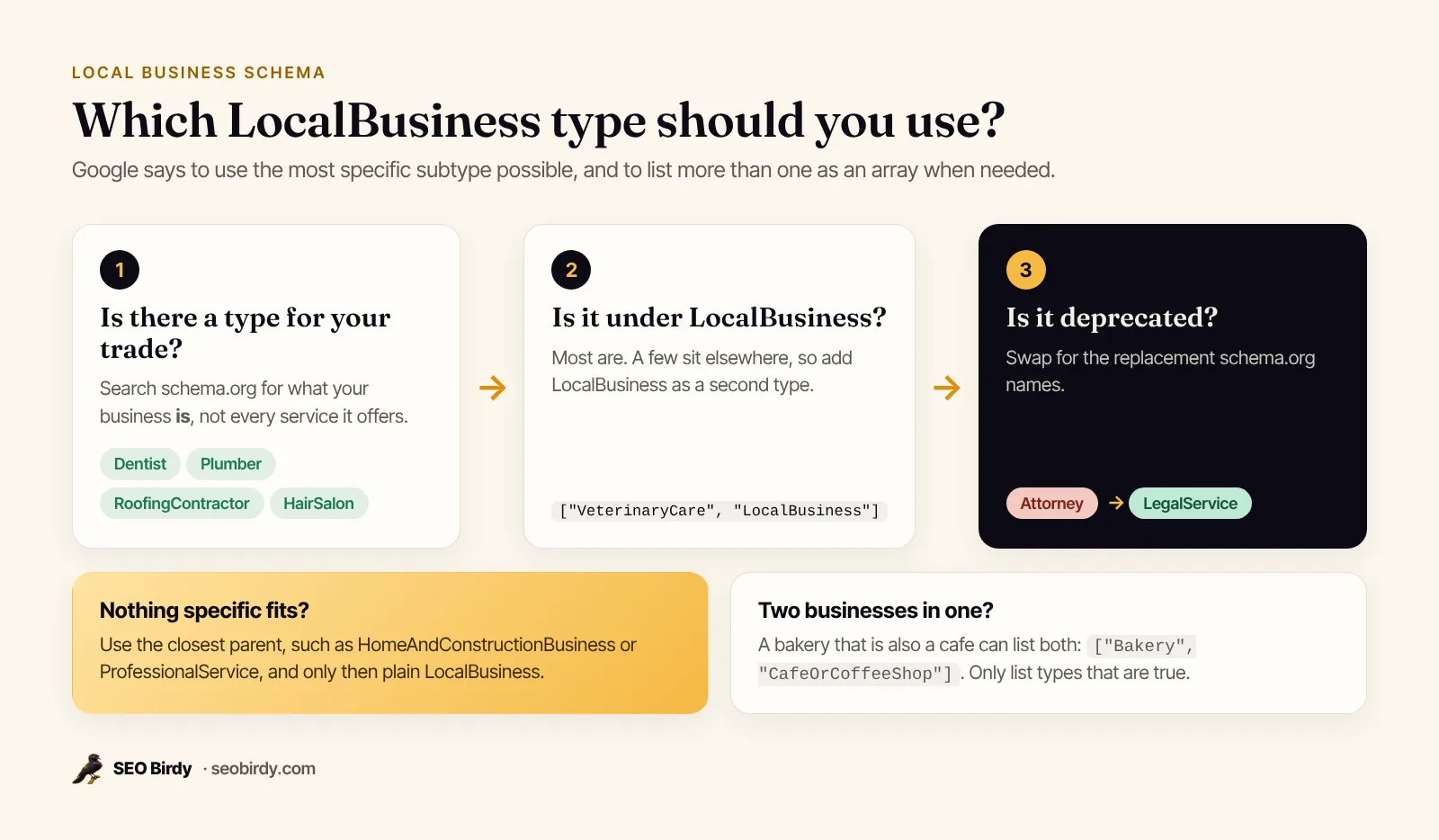
Use the most specific LocalBusiness subtype that describes what your business is. Google's guide says to use the most specific subtype possible, and to list several as an array if more than one applies. A dental practice is a Dentist, a plumbing company is a Plumber, and only fall back to plain LocalBusiness when nothing more specific fits.
These are the local business schema types most of our readers need. Every one is a real schema.org type, and the parent shows where it sits in the vocabulary.
| Business | schema.org type | Parent type |
|---|---|---|
| Dental practice | Dentist | MedicalBusiness, LocalBusiness |
| Plumber | Plumber | HomeAndConstructionBusiness |
| Roofer | RoofingContractor | HomeAndConstructionBusiness |
| Heating and air | HVACBusiness | HomeAndConstructionBusiness |
| Electrician | Electrician | HomeAndConstructionBusiness |
| Restaurant | Restaurant | FoodEstablishment |
| Hair salon | HairSalon | HealthAndBeautyBusiness |
| Law firm | LegalService | LocalBusiness |
| Auto repair shop | AutoRepair | AutomotiveBusiness |
| Accountant | AccountingService | FinancialService |
| Real estate agent | RealEstateAgent | LocalBusiness |
Two traps to know. First, schema.org marks Attorney as deprecated and says LegalService is more inclusive and less ambiguous, so use LegalService for law firms. Second, VeterinaryCare is a MedicalOrganization, not a LocalBusiness subtype, so a vet clinic should list both types: ["VeterinaryCare", "LocalBusiness"].
What properties does local business schema need?
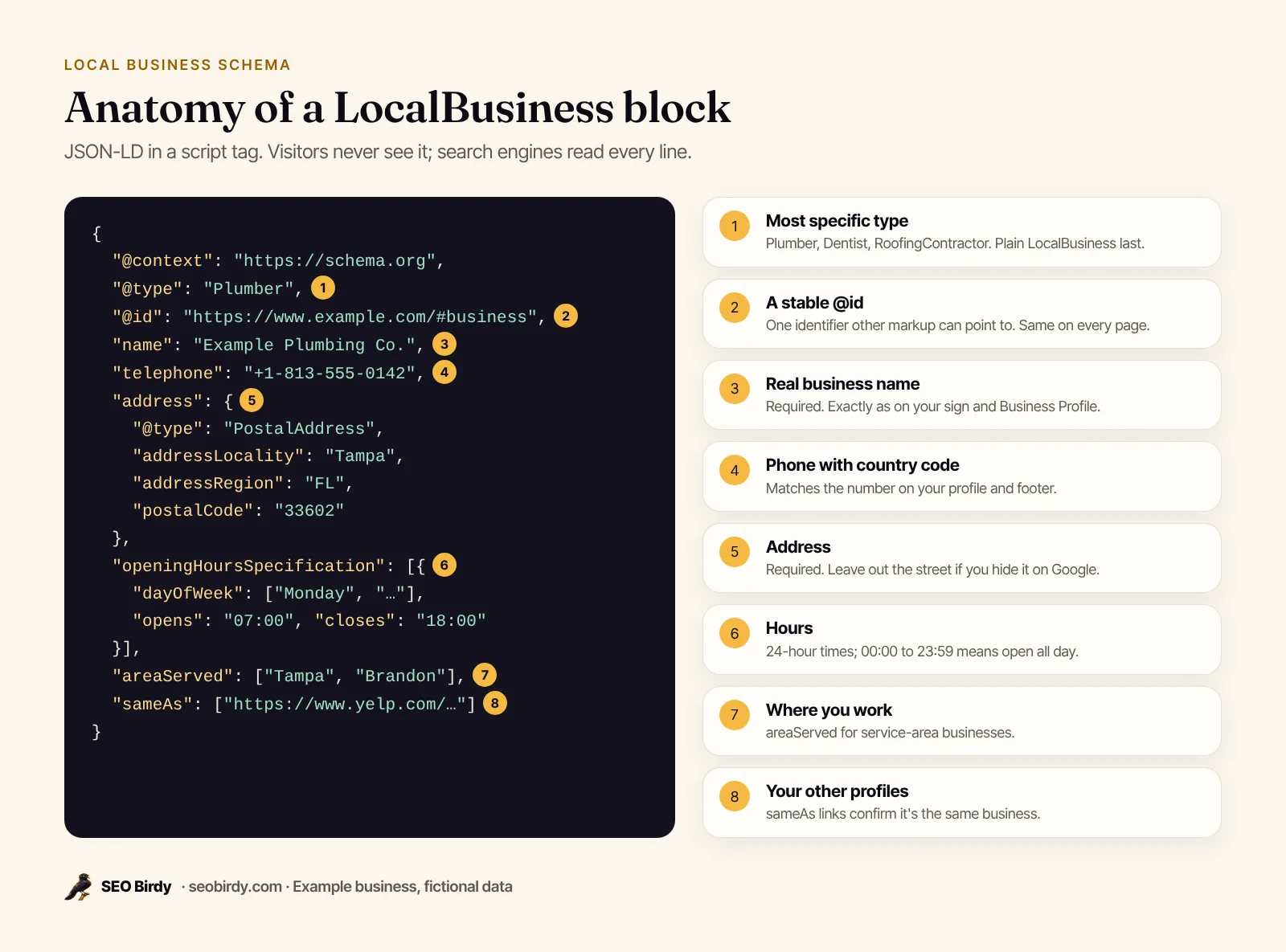
Google requires only two properties for local business markup, name and address, and recommends about a dozen more. In practice, a complete block includes the business type, name, address, telephone, url, opening hours, geo coordinates, image and sameAs links, all matching your Google Business Profile exactly.
| Property | Status for Google | What to put in it |
|---|---|---|
@type | Needed | The most specific subtype, such as Plumber |
name | Required | Your real business name, as on your sign and profile |
address | Required | A PostalAddress with street, city, state, ZIP, country |
telephone | Recommended | With country and area code, such as +1-813-555-0142 |
url | Recommended | The page for this location; Google says it must be a working link |
geo | Recommended | Latitude and longitude with at least 5 decimal places |
openingHoursSpecification | Recommended | Days, opening and closing times in 24-hour format |
priceRange | Recommended | Short text like $$; Google says under 100 characters |
image | Common | A real photo of the business or your logo |
sameAs | Common | Your profiles on other sites, such as Facebook or Yelp |
areaServed | Common | The cities or regions you serve |
@id | Good practice | A stable identifier like https://www.example.com/#business |
What is @id (URL) in local business schema? It's a name tag for the business entity, written as a URL with a fragment such as #business. It isn't a page anyone visits. It lets other markup on your site refer to the same business instead of describing it again, which matters once you have a location page, a services page and a homepage all talking about one company.
The telephone format matters too: Google's guide asks for the country code and area code. Hours use 24-hour times like 08:00 and 17:30, and the geo coordinates should match the pin on your Google Business Profile.
Local business schema examples you can copy
The quickest way to create local business schema is to copy an example that matches your business and replace the values with your own. Below are three tested JSON-LD examples: a service-area business, a storefront with an address, and a restaurant. Each is valid JSON and uses only real schema.org types and properties.
All three use fictional businesses, example.com URLs and 555 phone numbers. Replace every value, and delete any property you can't fill truthfully.
Service-area business example (plumber)
A service area business hides its street address on Google, so the markup leaves out streetAddress and lists where it works in areaServed. This is the right pattern for plumbers, roofers, cleaners and anyone who drives to customers.
{
  "@context": "https://schema.org",
  "@type": "Plumber",
  "@id": "https://www.example.com/#business",
  "name": "Example Plumbing Co.",
  "url": "https://www.example.com/",
  "telephone": "+1-813-555-0142",
  "image": "https://www.example.com/images/van.jpg",
  "priceRange": "$$",
  "address": {
    "@type": "PostalAddress",
    "addressLocality": "Tampa",
    "addressRegion": "FL",
    "postalCode": "33602",
    "addressCountry": "US"
  },
  "areaServed": [
    { "@type": "City", "name": "Tampa" },
    { "@type": "City", "name": "St. Petersburg" },
    { "@type": "City", "name": "Brandon" }
  ],
  "openingHoursSpecification": [
    {
      "@type": "OpeningHoursSpecification",
      "dayOfWeek": ["Monday", "Tuesday", "Wednesday", "Thursday", "Friday"],
      "opens": "07:00",
      "closes": "18:00"
    }
  ],
  "sameAs": [
    "https://www.facebook.com/exampleplumbing",
    "https://www.yelp.com/biz/example-plumbing-tampa"
  ]
}
Storefront example (dental practice)
A business that customers visit shows its full address and adds geo coordinates. This local business schema markup example is for a dentist in Austin with two sets of hours.
{
  "@context": "https://schema.org",
  "@type": "Dentist",
  "@id": "https://www.example.com/#business",
  "name": "Example Family Dental",
  "url": "https://www.example.com/",
  "telephone": "+1-512-555-0187",
  "image": "https://www.example.com/images/office.jpg",
  "priceRange": "$$",
  "address": {
    "@type": "PostalAddress",
    "streetAddress": "100 Example Ave, Suite 200",
    "addressLocality": "Austin",
    "addressRegion": "TX",
    "postalCode": "78701",
    "addressCountry": "US"
  },
  "geo": {
    "@type": "GeoCoordinates",
    "latitude": 30.26715,
    "longitude": -97.74306
  },
  "openingHoursSpecification": [
    {
      "@type": "OpeningHoursSpecification",
      "dayOfWeek": ["Monday", "Tuesday", "Wednesday", "Thursday"],
      "opens": "08:00",
      "closes": "17:00"
    },
    {
      "@type": "OpeningHoursSpecification",
      "dayOfWeek": "Friday",
      "opens": "08:00",
      "closes": "13:00"
    }
  ],
  "isAcceptingNewPatients": true,
  "sameAs": ["https://www.facebook.com/examplefamilydental"]
}
Restaurant example
Restaurants add the cuisine, a menu link and whether they take reservations. Google's guide documents menu and servesCuisine for food establishments. Schema.org now lists hasMenu as the newer name for menu; we use menu here because it's the property Google documents. This one stays open past midnight on Friday and Saturday, which Google handles with a closing time after midnight in the same entry.
{
  "@context": "https://schema.org",
  "@type": "Restaurant",
  "@id": "https://www.example.com/#business",
  "name": "Example Taqueria",
  "url": "https://www.example.com/",
  "telephone": "+1-305-555-0119",
  "image": "https://www.example.com/images/dining-room.jpg",
  "priceRange": "$",
  "servesCuisine": ["Mexican", "Tacos"],
  "menu": "https://www.example.com/menu/",
  "acceptsReservations": true,
  "address": {
    "@type": "PostalAddress",
    "streetAddress": "200 Example St",
    "addressLocality": "Miami",
    "addressRegion": "FL",
    "postalCode": "33130",
    "addressCountry": "US"
  },
  "geo": {
    "@type": "GeoCoordinates",
    "latitude": 25.76168,
    "longitude": -80.19179
  },
  "openingHoursSpecification": [
    {
      "@type": "OpeningHoursSpecification",
      "dayOfWeek": ["Sunday", "Monday", "Tuesday", "Wednesday", "Thursday"],
      "opens": "11:00",
      "closes": "22:00"
    },
    {
      "@type": "OpeningHoursSpecification",
      "dayOfWeek": ["Friday", "Saturday"],
      "opens": "11:00",
      "closes": "02:00"
    }
  ]
}
Special hours: open 24 hours, closed days and holidays
Google's guide gives three patterns. For open 24 hours, set opens to 00:00 and closes to 23:59. For a day you're closed all day, set both to 00:00. For a holiday or seasonal closure, add an entry with validFrom and validThrough dates.
{
  "@context": "https://schema.org",
  "@type": "Locksmith",
  "name": "Example Lock and Key",
  "address": {
    "@type": "PostalAddress",
    "addressLocality": "Orlando",
    "addressRegion": "FL",
    "addressCountry": "US"
  },
  "openingHoursSpecification": [
    {
      "@type": "OpeningHoursSpecification",
      "dayOfWeek": ["Monday", "Tuesday", "Wednesday", "Thursday", "Friday", "Saturday", "Sunday"],
      "opens": "00:00",
      "closes": "23:59"
    },
    {
      "@type": "OpeningHoursSpecification",
      "opens": "00:00",
      "closes": "00:00",
      "validFrom": "2026-12-25",
      "validThrough": "2026-12-25"
    }
  ]
}
How do you add local business schema to your website?
You add local business schema by pasting the JSON-LD inside a <script type="application/ld+json"> tag on the page that represents your business. For one location that's usually the homepage, or the contact page if that's where your address lives. The script can go in the head or the body, and it should appear once per page.
Here's what the finished code looks like in your HTML:
<script type="application/ld+json">
{ "@context": "https://schema.org", "@type": "Plumber", "name": "Example Plumbing Co." }
</script>
Should schema go in head or body? Google reads it in either place. Google can also read markup added by JavaScript: its guide to generating structured data with JavaScript says Google Search can process structured data that's in the DOM when it renders the page, including blocks added with a Google Tag Manager Custom HTML tag. Google suggests pulling values from the page with variables rather than retyping them, so the markup can't drift from what visitors see.
Which pages need local business schema? Put it on the page that represents each location. You don't need to repeat the full block on every blog post. Service pages can carry a Service block that points back to your business by its @id.
WordPress, Shopify, Squarespace and Wix
How you add local business schema depends on your platform, but there are only two routes: a plugin or setting that writes the markup for you, or a place to paste your own script.
- WordPress: Many SEO and schema plugins can output LocalBusiness markup from a settings screen. If you'd rather paste your own, use a plugin or theme option that adds code to the header, or a Custom HTML block on the page. Check that two plugins aren't both outputting business schema.
- Shopify: Some themes already output basic structured data. Add your own block in the theme code editor (often in
theme.liquid), or use an app. Check the live page first so you don't add a second, conflicting block. - Squarespace: Paste the script into the Code Injection settings for the site, or for a single page.
- Wix: Add it through the site's custom code settings, or the structured data option in a page's advanced SEO settings.
Should you use a schema generator?
A local business schema generator is fine if you check its output. Most generators produce valid code, but they often default to plain LocalBusiness, skip @id and areaServed, or add review fields you shouldn't use. Generate, compare against the examples above, and test before you publish.
Check your schema in under a minute. The free Website SEO Audit reads any page, lists the schema.org types it finds, flags the ones the page should carry, and writes a valid JSON-LD example for you to paste in.
Audit a page for free →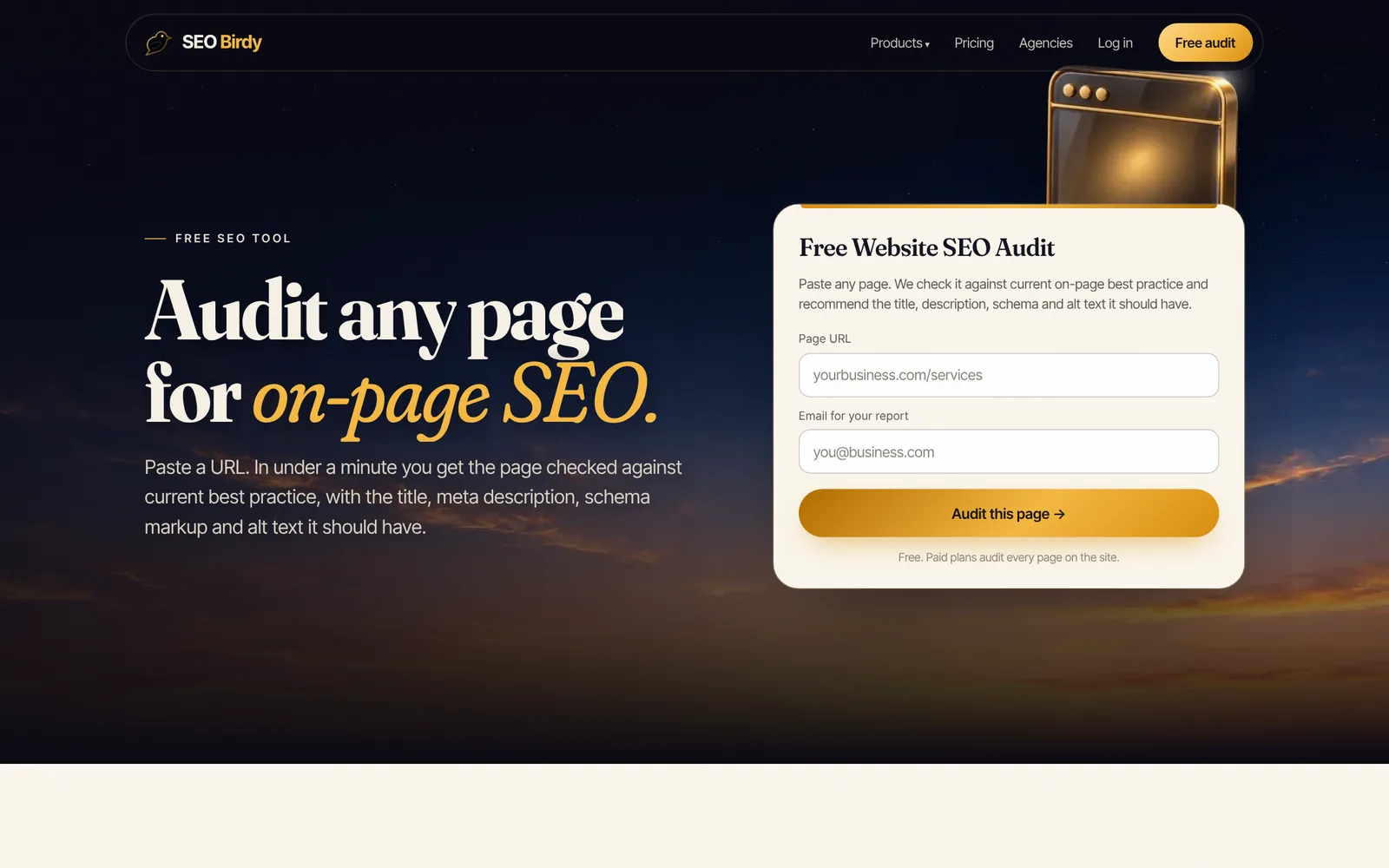
How do you mark up multiple locations?
For a business with several locations, give each location its own page and its own LocalBusiness block with that location's address, phone, hours and geo coordinates. Give each block a unique @id, and link them to the parent company with parentOrganization, so search engines see one brand with several branches.
Here is a location page for the second office of the fictional dental practice. The homepage carries an Organization block with the @id https://www.example.com/#organization.
{
  "@context": "https://schema.org",
  "@type": "Dentist",
  "@id": "https://www.example.com/locations/round-rock/#business",
  "name": "Example Family Dental Round Rock",
  "url": "https://www.example.com/locations/round-rock/",
  "telephone": "+1-512-555-0163",
  "address": {
    "@type": "PostalAddress",
    "streetAddress": "300 Example Blvd",
    "addressLocality": "Round Rock",
    "addressRegion": "TX",
    "postalCode": "78664",
    "addressCountry": "US"
  },
  "geo": {
    "@type": "GeoCoordinates",
    "latitude": 30.50826,
    "longitude": -97.67890
  },
  "parentOrganization": { "@id": "https://www.example.com/#organization" }
}
What about one building with several departments, like a car dealer with a service center? Google's guide documents the department property for that: one nested LocalBusiness per department, named "{store name} {department name}", with only the properties that differ, such as hours or phone.
Local business vs organization schema: which should you use?
Use LocalBusiness when the business has a physical location or serves customers in a defined area, which covers almost every local business. LocalBusiness is already a kind of Organization in schema.org, so it carries every Organization property. Use a separate Organization block only for a parent brand with several locations, or a company with no local presence.
| Situation | Use |
|---|---|
| One location, or one service area | One LocalBusiness subtype block on the homepage |
| Several locations | Organization on the homepage, a LocalBusiness block on each location page |
| One building, several departments | LocalBusiness with department entries |
| Online-only company | Organization, using Google's organization markup guide |
Can a page have both organization and LocalBusiness schema? Yes, as long as they describe different things, such as the brand and one of its branches, and they're connected with @id references. Two blocks that both claim to be the same business with different details just create confusion.
Other schema types local business websites use
Beyond LocalBusiness, a handful of other schema markup types are useful on a local business site:
- Service: one per service page, with
providerpointing to your business@idandareaServedfor the places you cover. - FAQPage: fine to keep for structure, but since August 2023 Google only shows FAQ rich results for well-known, authoritative government and health websites. Google says there's no need to remove existing markup.
- BreadcrumbList, WebSite and Article: for site structure and blog posts.
- Product: only if you sell products with prices on the page.
How many types of schema markup are there? Schema.org defines hundreds. Google's search gallery lists the much shorter set that can produce rich results in Google Search.
How do you test local business schema?
Test local business schema with Google's Rich Results Test and the Schema Markup Validator. The first shows whether Google can read your markup and whether it's eligible for Google features; the second checks it against the whole schema.org vocabulary. Always test the live URL after publishing, not just the code you pasted.
- Run the Rich Results Test on your page URL. It reports detected structured data, errors and warnings. Google says to use the URL option for markup added with JavaScript.
- Run the Schema Markup Validator to catch misspelled property names and wrong types that Google's tool may not complain about.
- Run a page audit. The free Website SEO Audit shows which schema types a page carries and which it's missing, alongside its title, headings and alt text.
- Compare it with your profile. Name, address, phone and hours in the markup should match your Google Business Profile character for character.
- Watch Search Console. After Google recrawls, check the Manual Actions report and any rich result reports for the types you use.
If a checker says "no local business schema identified on the page", it found no block with a LocalBusiness type. Usually the markup is on another page, uses only Organization, was removed by a theme or plugin update, or has a JSON syntax error such as a trailing comma.
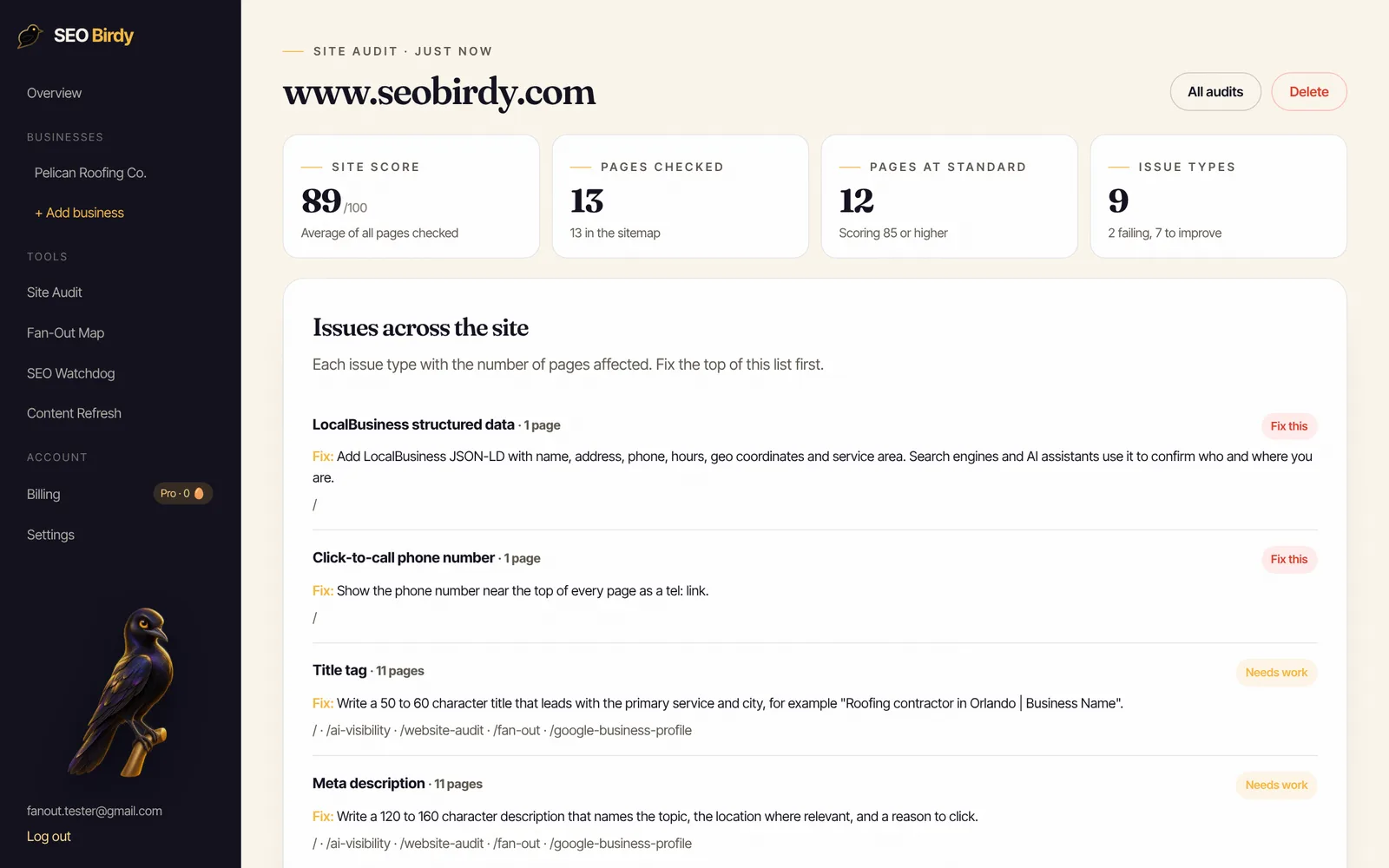
Markup also disappears quietly. A theme change or plugin update can strip it without any error. SEO Watchdog checks your pages every day and alerts you when LocalBusiness or other schema goes missing. Our technical SEO checklist covers the other silent problems worth monitoring.
Common local business schema mistakes
The most common local business schema mistakes are marking up your own reviews for stars, details that don't match the page or profile, using plain LocalBusiness instead of a subtype, keyword-stuffed names, and broken JSON. Each one either gets the markup ignored or, in the case of fake or misleading data, risks a manual action.
- Self-serving review stars. Google's review snippet guidelines say pages using LocalBusiness or any other Organization markup are ineligible for the star review feature when the business controls the reviews. Can you add review stars to local business schema? Not for your own business.
- Markup that doesn't match the page. Hours, phone or address in code that differ from the page. Google's policies say markup must describe visible content.
- Keyword stuffing the name. "Example Plumbing Tampa Best Emergency Plumber" in
name. Use the real name. - A street address you hide on Google. If your profile hides it, your schema should too.
- Too-short geo coordinates. Google asks for at least 5 decimal places.
- A long priceRange. Google won't show a price range of 100 characters or more.
- Broken JSON. A trailing comma or a curly quote pasted from a word processor breaks the whole block.
If Google finds spammy markup, it can apply a structured data manual action. Google's policies say that removes rich result eligibility but doesn't affect rankings, and you can see it in Search Console.
Schema is one part of on-page SEO. For the rest, work through the on-page SEO checklist and the local SEO checklist, and if you're fixing images while you're in the code, see our guide to alt text for SEO.
Frequently asked questions
Where do I add local business schema on my website?
Put the JSON-LD script on the page that represents the business: usually the homepage for a single-location business, or each location's own page for a multi-location business. The script can go in the head or the body. Google reads JSON-LD in either place, and it also reads markup added by JavaScript, including Google Tag Manager, as long as it is in the rendered page.
Does local business schema help SEO?
It helps search engines understand your business name, type, address, phone, hours and service area without guessing, and Google's documentation says it can show those details in a knowledge panel. Google doesn't promise that markup changes rankings or that any feature will appear. Treat it as accuracy insurance: it removes doubt about your facts for search engines and AI assistants.
What is @id in local business schema?
The @id is a unique identifier for your business entity, written as a URL, such as your homepage address followed by #business. It isn't a page people visit. It lets other markup on your site, like a location page or a service, point to the same business instead of describing it again. Keep it the same on every page.
Can I add review stars to my local business schema?
Not for your own business. Google's review snippet guidelines say pages that use LocalBusiness or any other Organization structured data are ineligible for the star review feature when the business controls the reviews about itself. Adding aggregateRating for your own reviews won't produce stars and risks a manual action. Spend that effort on getting more Google reviews instead.
Is there a free local business schema generator?
Many free generators exist, and some SEO plugins include one. Any of them is fine if the output uses the most specific LocalBusiness type, matches your Google Business Profile exactly, and passes the Rich Results Test. You can also copy an example from this guide and change the values, which is often faster and gives you more control.
Should a service area business include its address in schema?
Include the parts of your address you show publicly. If you hide your street address on Google Business Profile, leave streetAddress out of your schema too and list your city, state and ZIP code, then describe where you work with areaServed. Your markup should never show information that your visible page and profile don't.
What does no local business schema identified on the page mean?
It means the checker looked at the page and didn't find any markup with a LocalBusiness type or subtype. Common causes are that the markup is on a different page, it uses only Organization, a plugin was switched off, a theme update removed it, or the JSON has a syntax error so nothing can be read. Test the live URL again after fixing it.
We build SEO Birdy's audits and autopilots, and we test every recommendation against live search results and AI answers before we publish it. Our guides follow Google Search Central and Bing Webmaster guidelines.