How to rank in AI Overviews and get your pages cited by Google
How to rank in AI Overviews: meet Google's four eligibility rules, rank for the searches behind the search, and answer each sub-question better than anyone.


To rank in AI Overviews, your page first has to be eligible: crawlable, indexed, allowed to show a snippet, and included in Search Console's generative AI setting. Then it has to be one of the best pages for at least one of the related searches Google runs behind the scenes, with a clear, direct answer Google can link as support.
That's how to rank in AI Overviews in two sentences, and it's grounded in Google's own documentation rather than guesswork. This guide breaks it into five steps: rank for the searches behind the search, map and answer the sub-questions, write answer-first content, fix the technical basics, and, for local businesses, keep your Business Profile and reviews strong. Then it shows how to measure your AI Overview visibility in Search Console and how to opt out if you'd rather not appear.
What are AI Overviews, and how does Google choose sources?
AI Overviews are AI-written summaries at the top of some Google results, with links to the pages that support them. Google builds them by searching its own index, often across several related searches, then generating a summary from the pages it retrieved. Pages are found with Google's normal ranking systems.
Google's guide to optimizing for generative AI search names the two techniques. Grounding, or retrieval-augmented generation, uses Search ranking systems to fetch pages. Query fan-out sends related searches to find more sources: in AI Mode, Google describes it as "breaking down your question into subtopics and issuing a multitude of queries simultaneously."
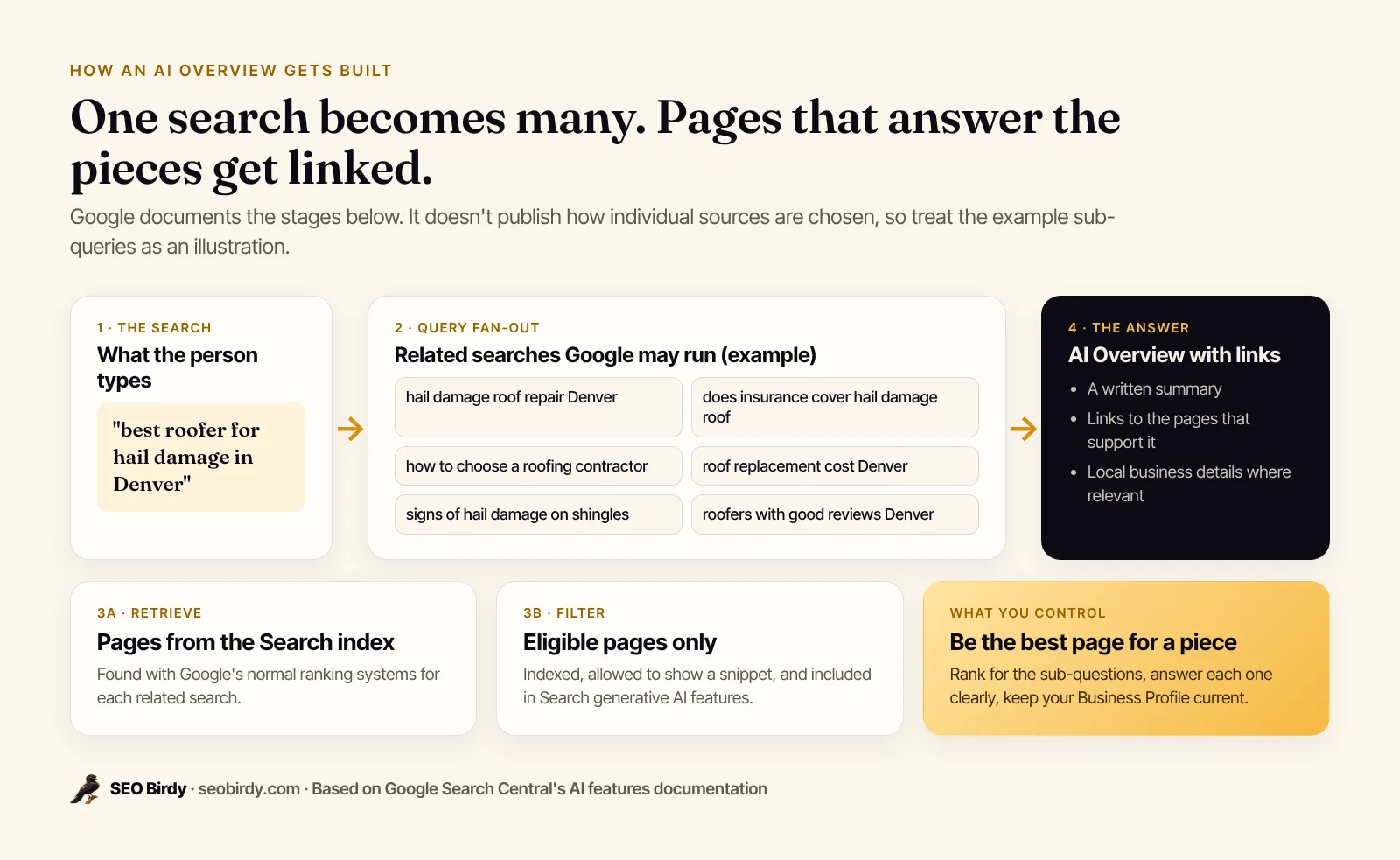
What Google doesn't publish is how it picks one eligible page over another for a given summary. Its Search help page says AI Overviews appear "when our systems determine that generative AI can be especially helpful," and the selection itself is not documented. So anything beyond the documented stages is informed inference. The practical reading is simple: the pages most likely to be cited are the ones that already rank well for some piece of the question and answer it clearly.
AI Overviews reach a lot of people. Google says AI Overviews has over 2.5 billion monthly active users, and AI Mode more than one billion.
AI Overviews vs AI Mode vs ChatGPT search
AI Overviews appear inside normal Google results. AI Mode is a separate, conversational Google search experience built for longer questions and follow-ups; the same eligibility rules and the same Search Console reporting cover both. ChatGPT search is a different system with its own crawler. Our guide on getting your business on ChatGPT covers that side.
Can your page appear in AI Overviews? The eligibility rules
Your page can appear in AI Overviews if Googlebot can crawl it, it's indexed, it's allowed to show a snippet, and your site is included in Search generative AI features in Search Console. That's the complete list. Google says there are "no additional requirements to appear in AI Overviews or AI Mode, nor other special optimizations necessary."
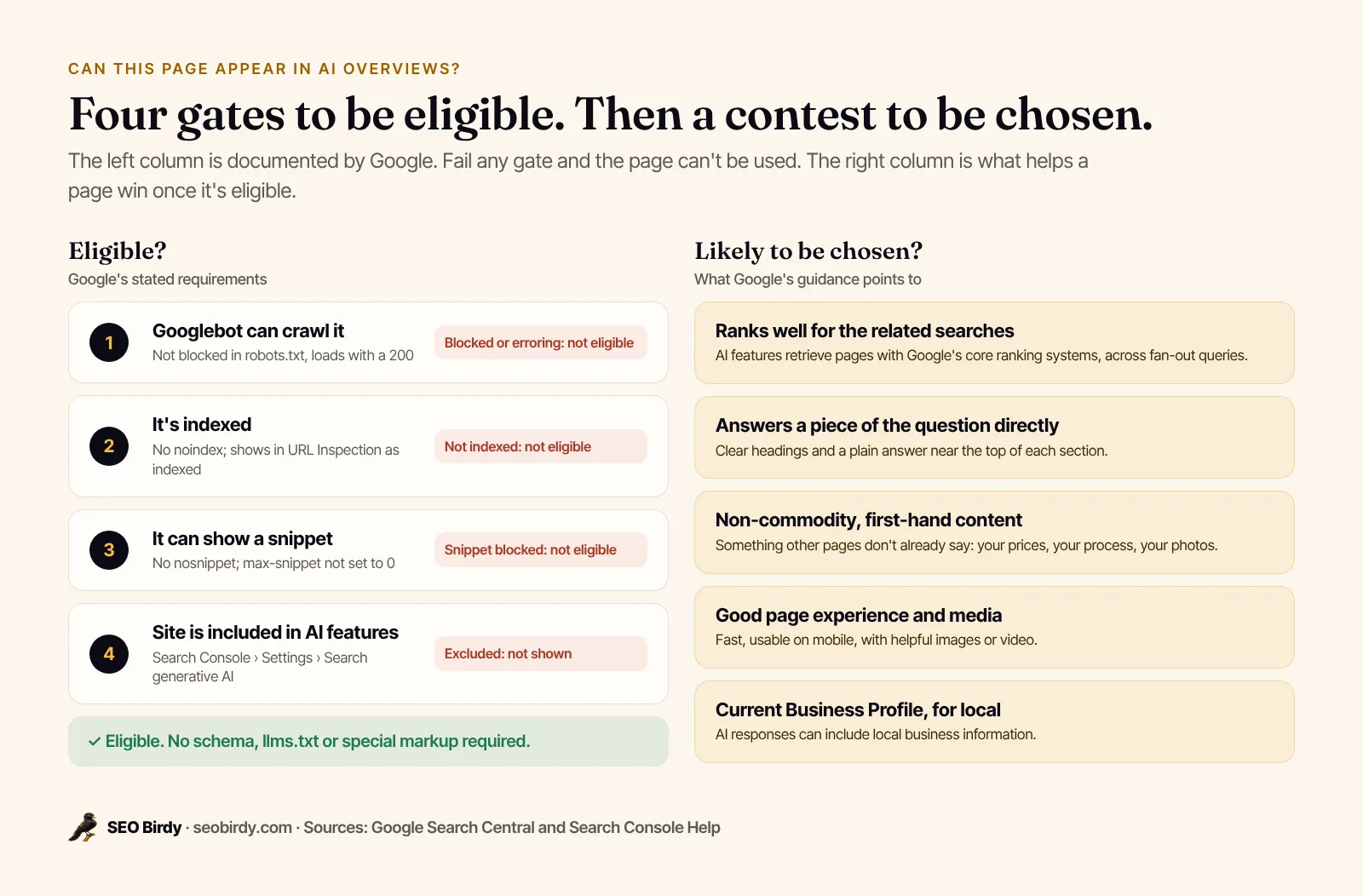
Each gate, and how to check it:
- Crawlable. robots.txt allows Googlebot and the page returns a 200. Check with URL Inspection in Search Console.
- Indexed. No
noindextag, and URL Inspection reports the page as indexed. - Snippet allowed. No
nosnippetand nomax-snippet:0. Google's robots meta tag documentation says nosnippet also "will prevent the content from being used as a direct input for AI Overviews and AI Mode." - Included in AI features. In Search Console, go to Settings, then Search generative AI. Sites are included by default, but check that nobody switched it off.
There's no form to submit a page to AI Overviews and no way to pay for placement. Google's AI features documentation also says you don't need new machine-readable files, AI text files or special schema markup to appear. If you pass the four gates, the rest is competition.
Step 1: Rank for the searches behind the search
The most reliable way into AI Overviews is ranking well for the main search and the related searches Google fans it out into. Because AI features retrieve pages with Google's core ranking systems, a page that ranks for none of those searches has little chance of being cited, however well it's written.
This is why classic SEO still matters. Keyword rankings, relevance, links from other sites and a healthy site all feed the retrieval step. Google's AI optimization guide says it plainly: optimizing for generative AI search "is optimizing for the search experience," which is SEO.
The difference is the target. You're no longer chasing one keyword. A roofer in Denver isn't just competing for "best roofer in Denver"; Google may also pull sources for "does insurance cover hail damage," "roof replacement cost Denver" and "how to choose a roofing contractor." Ranking well for any of those creates a way into the overview, even if you're not first for the head term.
Step 2: Map the fan-out and answer every sub-question
To cover the fan-out, list the sub-questions a complete answer to your keyword needs, check which ones your page answers, and add clear sections for the gaps. Google runs those related searches whether your page covers them or not; you want to be the best source for as many as you can.
A practical way to find them:
- Start with the real searches people type around your keyword: autocomplete, "People also ask" and your Search Console queries.
- Group them into aspects: cost, timing, who it's for, how-to, problems, comparisons, places.
- Check your page section by section: is each sub-question answered directly, vaguely, or not at all?
- Add an H2 or H3 for each important gap, with the answer in the first sentence.
See the sub-questions AI Overviews fan your keyword into. The free Fan-Out Map builds 100+ sub-queries from real Google searches, grouped by aspect, then checks your page and marks each one covered, partial or missing, with the section that answers it.
Make a free Fan-Out Map →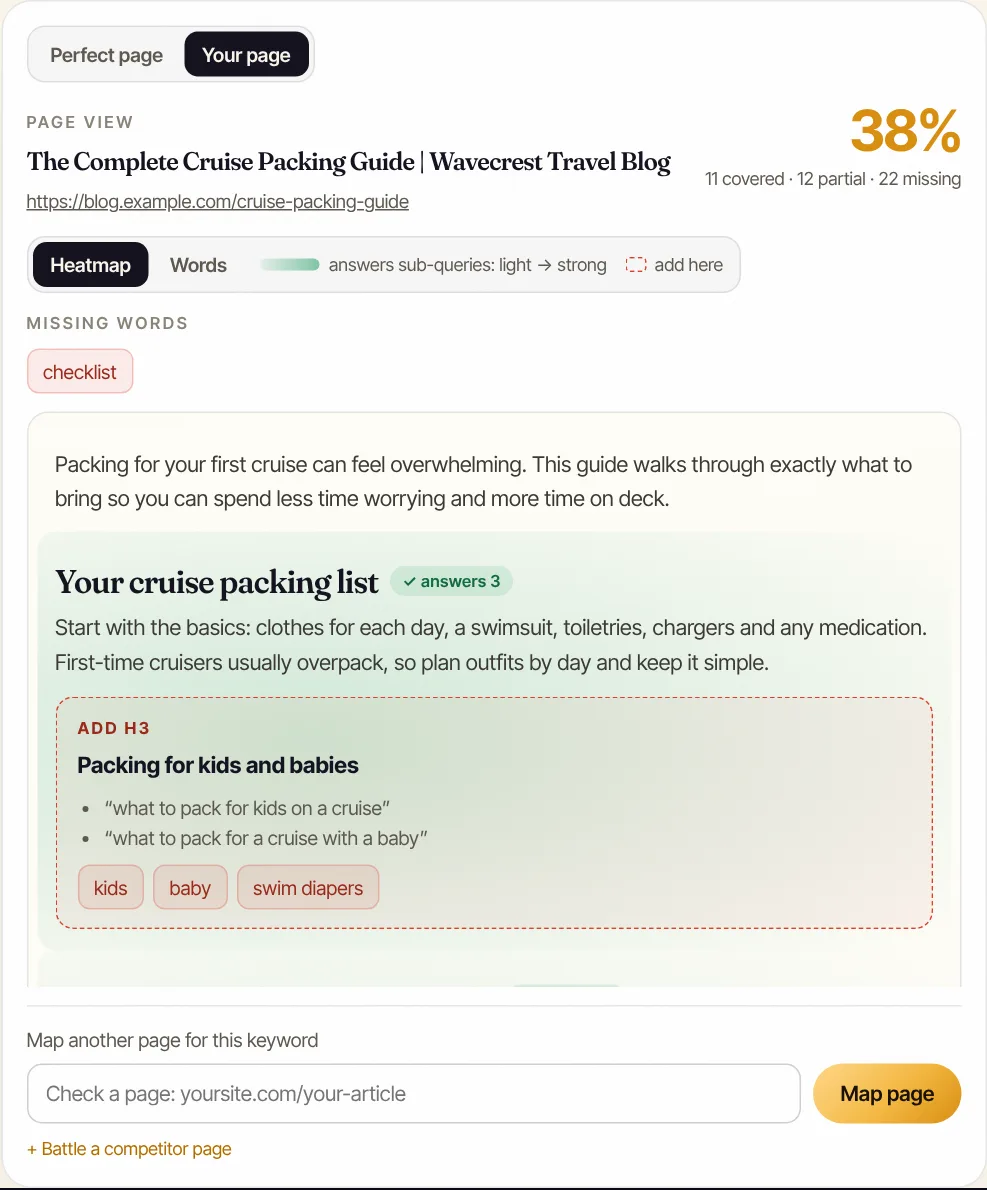
The map also generates an outline that answers every sub-query, biggest aspects first, which works as a content brief for a new page or a rewrite.
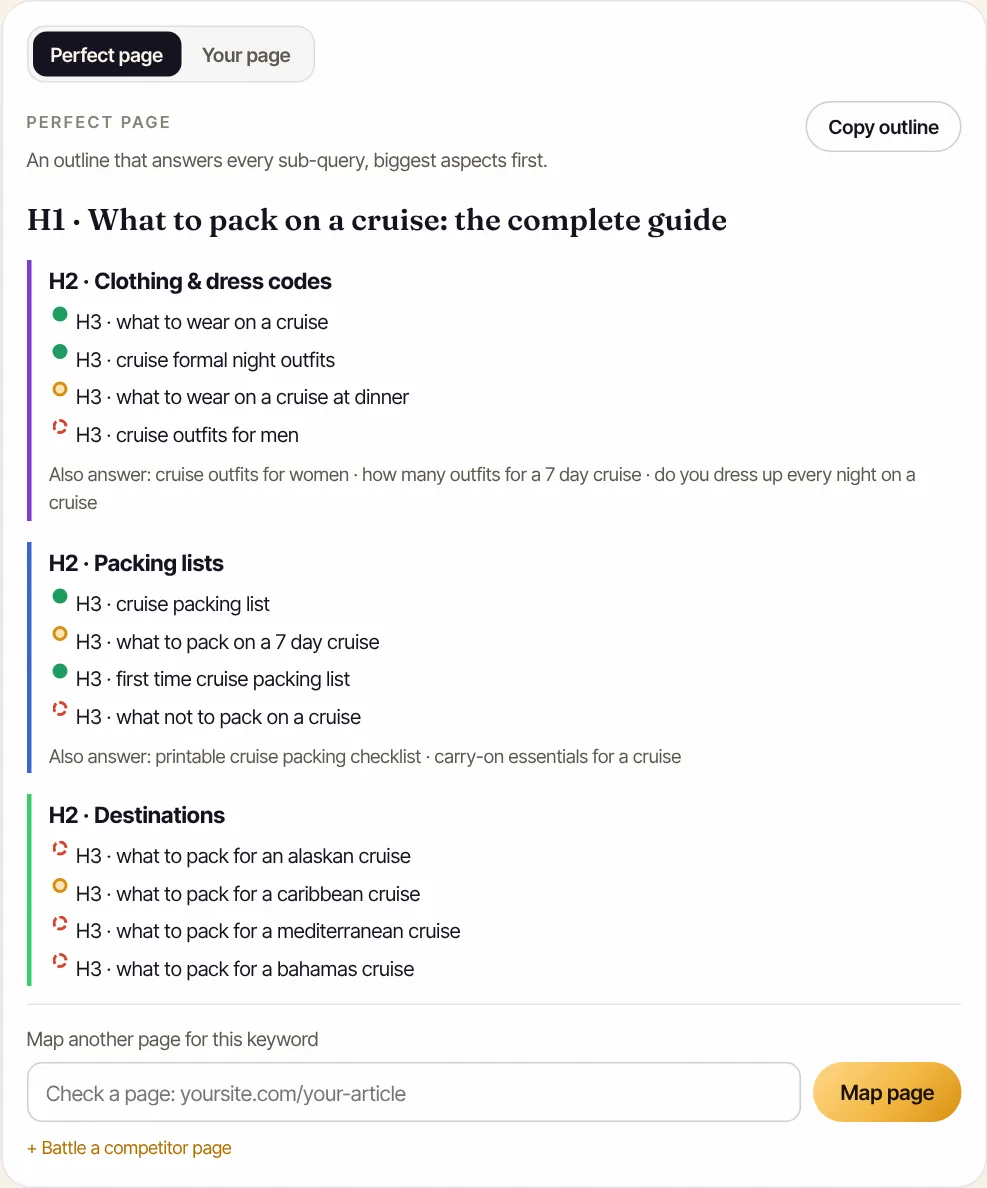
Don't turn this into one page per variation. Google's AI guide says AI systems understand synonyms and you don't need to cover every long-tail phrasing, and its spam policies treat mass-produced pages made to catch query variations as scaled content abuse. One strong page per topic, with a section per real sub-question, is the goal. Our guide to query fan-out goes deeper, and a content brief template helps you turn a map into a plan.
Step 3: Write answer-first, non-commodity content
Write each section so its first sentence answers the heading directly, then add the detail only you can provide: your prices, your process, your local knowledge, your photos. Google's guidance asks for "unique, non-commodity content," and an AI Overview has no reason to cite a page that repeats what fifty others say.
What helps:
- Answer first. "A hail damage roof inspection in Denver is usually free, and takes about an hour" gives Google a passage that directly supports a summary.
- Use plain headings phrased like searches. "Does insurance cover hail damage?" is clearer than "Coverage considerations."
- Use lists and tables where they fit. Steps, comparisons and price ranges are easy to scan and to reference.
- Add FAQs in customers' words. Short, self-contained answers.
- Show experience. Who wrote it, their license or credentials, real job photos. Google's helpful content guidance describes this as E-E-A-T.
What doesn't: chopping pages into tiny chunks or writing to a word count. Google says "there's no requirement to break your content into tiny pieces" and "there's no ideal page length." Long enough to answer the question completely, and no longer, is the right length.
Step 4: Fix the technical basics that block AI Overviews
The technical basics for AI Overviews are the same as for Search: let Googlebot crawl the page, make sure the important content is in text Google can read, keep the page fast and usable on mobile, support the text with good images or video, and make sure any structured data matches what's on the page.
Google's AI features documentation lists these best practices:
| Check | What to look for |
|---|---|
| Crawling allowed | robots.txt doesn't block Googlebot; CDN or firewall doesn't either |
| Content in text form | Key facts aren't only in images, PDFs or script-loaded widgets |
| Internal links | The page is linked from related pages, so Google finds it |
| Page experience | Fast, stable, mobile friendly, main content easy to find |
| Images and video | High-quality media that supports the text |
| Structured data | Matches the visible text exactly |
If your site relies on JavaScript to show content, check that Google renders it with the URL Inspection tool's live test. Blocking Google-Extended doesn't affect this: Google says that token "does not impact a site's inclusion in Google Search," and AI Overviews are part of Search. A free Website SEO Audit checks indexability, headings, structured data, alt text and speed on any page in under a minute.
Step 5: How do local businesses get into AI Overviews?
Local businesses get into AI Overviews with a complete, accurate Google Business Profile, a page for each service and area, recent reviews, and clear answers to the questions customers ask before they hire. Google says generative AI responses "can include product listings, product information, and information about local businesses."
Google's guide says Business Profiles help your services appear "in both AI responses and other Google Search results," so start there: categories, services, hours, photos and description, all current. Our Google Business Profile optimization guide covers every field.
Then work on the website and reputation side:
- Service and area pages. A page for "water heater replacement in Phoenix" gives Google something specific to cite for that sub-question.
- Prices or ranges. Cost questions are among the most common fan-out branches, and a real range beats "call for a quote."
- Reviews. Google's local ranking guidance says more reviews and positive ratings can help local ranking. Google doesn't say how reviews feed AI Overviews, but they're part of the local information it shows.
- Near me searches. These often show the map pack rather than, or alongside, an overview. Strong map rankings matter here; see how to rank in Google Maps.
Want to know how a local business ranks on ChatGPT as well as in Google AI Overviews? Pair Search Console's report for AI Overviews with the free AI Visibility Audit, which checks ChatGPT, Gemini, Claude and Perplexity plus your Google Maps position.
How do you track your AI Overview visibility?
Track AI Overview visibility in Google Search Console's Generative AI performance report, which shows how often links to your site appeared in AI Overviews and AI Mode, by page, country, device and date. AI Overview clicks are included in your regular Performance report under the Web search type, but not broken out separately.
Google's Generative AI performance report counts impressions, not clicks, and won't appear if your site has too few AI impressions. Use it to see which pages get used, then compare those pages with ones that don't. New to Search Console? Start with our beginner's guide.
On clicks and click-through rate: a Pew Research Center study of US users' browsing in March 2025 found people clicked a link inside an AI summary on about 1% of visits that showed one, and clicked a traditional result on 8% of those visits versus 15% when no summary appeared. Google, for its part, says clicks from AI Overviews are higher quality, with visitors more likely to spend time on the site. Measure leads and calls, not just sessions.
To check whether your site appears for a specific search, search it yourself in a private window from your service area, and log the result. Be aware that AI Overviews can vary by location, wording and time, which is also why third-party tools that claim to "track AI Overview rankings" can only sample what appears. Our guide to AI search visibility covers a full tracking routine.
How long does it take, and why do citations change?
A new or updated page has to be crawled and indexed before it can be cited, which can take days to weeks; use URL Inspection's "Request indexing" after important changes. After that, citations shift as Google's systems and the competing pages change. If a page drops out, check indexing, snippet tags and the Search generative AI setting before rewriting anything. If a competitor is cited in the AI Overview and you're not, open their page: it usually answers that sub-question more directly, more specifically, or ranks for it when you don't.
How to limit or opt out of AI Overviews
You can limit how Google uses your content in AI Overviews with three page-level controls, nosnippet, data-nosnippet and max-snippet, or remove your whole site from Google's generative AI features with the Search generative AI setting in Search Console. Google says that setting isn't a ranking signal for the rest of Search.
| Control | What it does | Side effects |
|---|---|---|
nosnippet | Stops the page's text being shown or used as direct input for AI Overviews and AI Mode | Also removes text snippets from regular results |
data-nosnippet | Excludes a specific section of a page | Only that section is affected |
max-snippet:[n] | Limits how much text can be used, including for AI features | Short limits shrink regular snippets too |
| Search generative AI setting | Excludes the whole site from AI Overviews, AI Mode and Discover's AI features | No traffic or impressions from those features |
noindex | Removes the page from Search entirely | Removes it from everything |
Google's new controls announcement also brought Preferred Sources into AI Overviews and AI Mode, so users can choose sites they want to see more of. For most local businesses, opting out costs more than it saves: the overview will still answer the question, just with someone else's page.
AI Overview myths that waste your time
The most common AI Overview myths are that you need special schema, an llms.txt file, chunked content or a tool with "inside" access to Google. Google's own guide lists these as things you don't need to do, and warns about tools that claim internal metrics or guaranteed results.
- "You need llms.txt." Google says AI text files won't help or hurt your Search visibility.
- "Add special AI schema." There's no special markup for AI Overviews. Regular structured data is fine.
- "Rewrite everything into short chunks." No requirement, and no ideal length.
- "Backlinks and E-E-A-T don't matter anymore." AI Overviews retrieve with core ranking systems, so the signals behind good rankings still count.
- "You can game it." Hidden text, fake reviews and inauthentic mentions are spam, and Google says its generative AI features depend on its spam-fighting systems too.
The approach that works is unglamorous and durable: be eligible, rank for the questions behind the question, answer each one better than anyone else, and keep your business details accurate. That's also the core of generative engine optimization across every AI assistant, not just Google's.
Frequently asked questions
Can you pay to appear in Google's AI Overviews?
No. There's no way to buy or submit your way into the organic part of an AI Overview. Google says there are no additional requirements beyond being indexed and eligible to show a snippet, and that the sources come from its normal Search systems.
Do you need structured data to get into AI Overviews?
No. Google says there's no special schema.org markup needed for AI Overviews or AI Mode, and no requirement to create new machine-readable files. Structured data still helps with rich results and makes your business details unambiguous, so keep it if you have it, and make sure it matches what's visible on the page.
Do I need to rank on page one to be cited in an AI Overview?
Not necessarily for the exact search typed. Google's AI features retrieve pages with its ranking systems across several related searches, so a page can be cited because it ranks for one of the sub-questions. Ranking well for the main search and its related searches is still the most reliable route in.
How long does it take to appear in AI Overviews?
There's no fixed timeline. A new or updated page has to be crawled and indexed first, which can take days to weeks, and then it competes with every other eligible page. Request indexing in Search Console's URL Inspection tool after major updates, and judge progress over a month or two in the Generative AI performance report.
Why did my site disappear from AI Overviews?
AI Overviews are generated per search and change as Google's systems and the available pages change, so citations come and go. Check the basics first: is the page still indexed, has a noindex or nosnippet tag crept in, and is your site still included under Settings, Search generative AI in Search Console? Then compare your page with the ones now cited.
Does opting out of AI Overviews hurt my rankings?
Google says its Search generative AI control in Search Console isn't used as a ranking or inclusion signal for other parts of Search. Using nosnippet works differently: it removes text snippets from all results, not just AI features, which can make your regular listing less appealing. Pick the narrowest control that does what you need.
Does ranking in AI Overviews help with ChatGPT?
Indirectly. ChatGPT uses its own crawler and sources, not Google's AI Overviews. But the work that earns AI Overview citations, clear answer-first pages, strong rankings, accurate listings and reviews, is the same work that helps ChatGPT, Gemini and Perplexity find and trust you.
We build SEO Birdy's audits and autopilots, and we test every recommendation against live search results and AI answers before we publish it. Our guides follow Google Search Central and Bing Webmaster guidelines.