SEO content brief template: a free fill-in brief, a worked example, and how to write one
Free SEO content brief template with a filled-in example. Learn what to include, how to outline from real searches, and give writers a brief they can follow.


An SEO content brief template is a reusable form that tells a writer everything needed to produce a page that ranks: the keyword and reader, the questions the page must answer, the outline, the title and meta description, links, sources and the rules. Fill one in before anyone writes, and the draft comes back right the first time.
Below you'll find our free, printable SEO content brief template, a filled-in example for a real-world type of page, and a step-by-step method for building the most important part, the outline, from real searches instead of guesswork.
This guide is for business owners briefing a freelancer, agencies briefing a team, and anyone who has received a draft that was well written but answered the wrong questions.
Get the free SEO content brief template. Six printable pages with fill-in fields for every part of the brief, from search intent and the fan-out table to the editor's pre-publish checklist.
Download “SEO Content Brief Template” (PDF)What is an SEO content brief?
The short definition: an SEO content brief is a document that sets out what a page must cover and how, before it's written. It names the target keyword, the reader and their intent, the questions to answer, the headings, the title and meta description, links, sources and tone. A writer works from it; an editor checks the draft against it.
People use "content brief" for several things. In marketing, a creative brief describes a campaign. In social media, a content creator brief tells an influencer what to film. An SEO content brief is narrower and more specific: it's about one page meant to be found in search, so it's built around what searchers ask.
Why use a content brief?
A brief moves the hard decisions to the start, when they're cheap. Without one, the writer guesses the angle, the editor rewrites, and the page still misses what searchers wanted. With one, the research is done once and every draft is checked against the same list.
It also makes quality visible. Google's guidance on helpful content asks whether a page provides "original information, reporting, research, or analysis" and whether it shows "first-hand expertise and a depth of knowledge." A brief is where you write down the experience and proof that answers those questions, so the writer doesn't have to invent it.
What to include in an SEO content brief
A complete SEO content brief includes nine parts: page basics, reader and search intent, what ranks today, the fan-out of questions, the outline, on-page SEO requirements, proof and voice, hand-off notes, and an editor's checklist. The first four are research. The next four are instructions. The last is quality control.
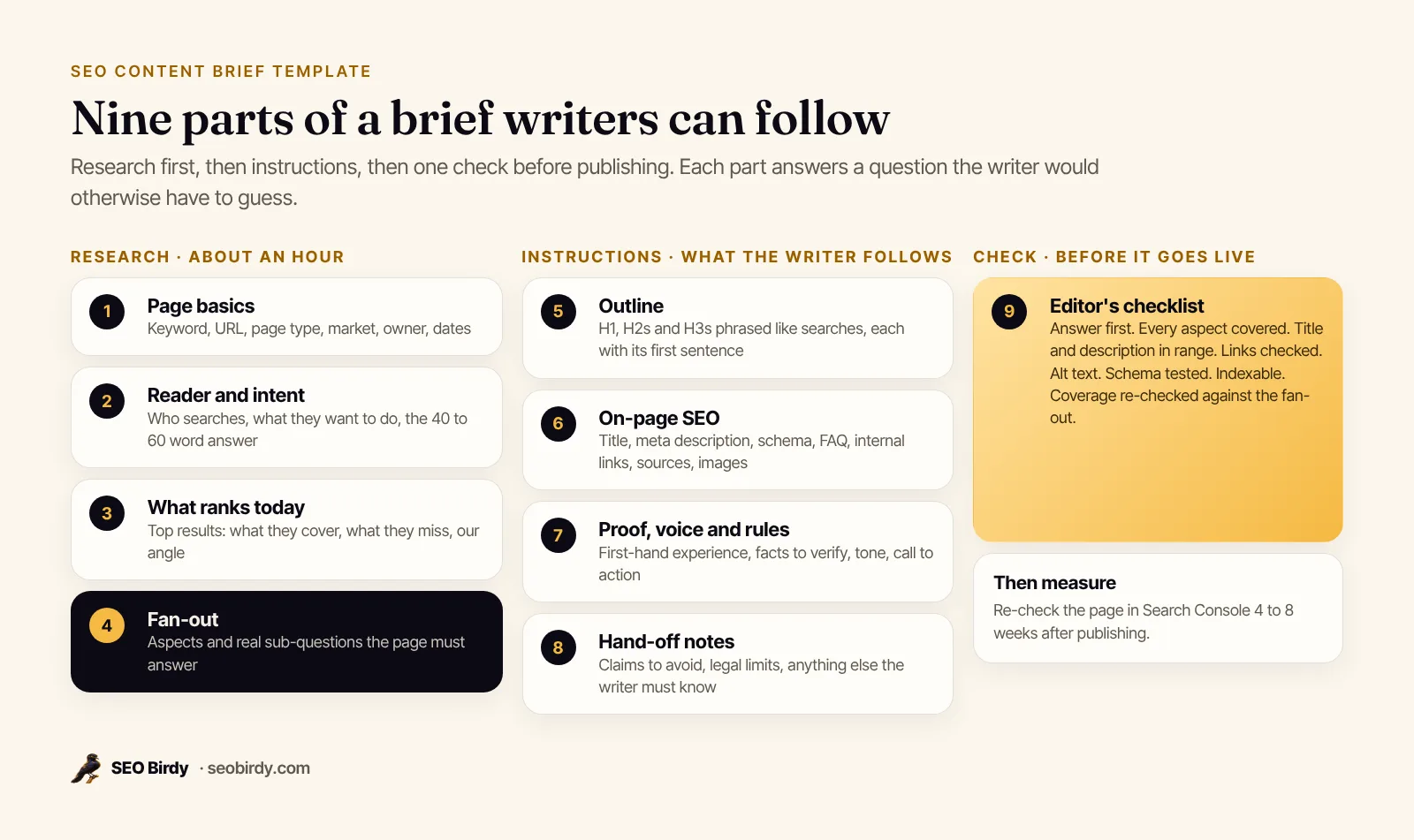
| Part | What goes in it | Why the writer needs it |
|---|---|---|
| 1. Page basics | Primary keyword, secondary keywords, URL slug, page type, market, owner, dates | Fixes the topic and the deadline |
| 2. Reader and intent | Who is searching, what they want to do, the 40 to 60 word answer | Sets the angle and the opening |
| 3. What ranks today | Top three results: what they cover, what they miss, our angle | Shows the bar to clear and the gap to fill |
| 4. Fan-out | Aspects of the topic and the real sub-questions under each | Turns "write about X" into a list of answers |
| 5. Outline | H1, H2s and H3s phrased like searches, each with its first sentence | The structure the writer follows |
| 6. On-page SEO | Title, meta description, schema type, FAQ questions, internal links, sources, images with alt text | The parts editors usually fix later |
| 7. Proof, voice and rules | First-hand experience, facts to verify, tone, call to action | What makes the page credible and on brand |
| 8. Hand-off notes | Claims to avoid, legal limits, anything specific to the business | Prevents expensive rewrites |
| 9. Editor's checklist | Answer first, coverage, links checked, alt text, schema tested, indexable | One final pass before publishing |
Target keyword and search intent
Pick one primary keyword per page and say what the searcher wants to do: learn, compare, buy or find a specific business. The intent decides the format. "Water heater replacement cost" wants prices and factors; "water heater replacement near me" wants a business, a phone number and proof. A brief that gets intent wrong produces a good page for the wrong search.
Word count: estimate, not target
It's fine to estimate length for budgeting. Don't make it the goal. Google says plainly that it has no preferred word count. A better instruction: "cover every aspect in section 4, then stop."
Free SEO content brief template
Here is the template, section by section. Copy it into a Google Doc, Word file or spreadsheet, or download the free PDF and print it. Fill in one per page. It works as a blog content brief and as a website content brief template for service, location and product pages. Start each copy with a two-line summary at the top: the page, the reader and the single most important thing it must answer.
1. Page basics
| Field | Your answer |
|---|---|
| Working title | |
| Page type (blog post, service page, location page) | |
| URL slug | |
| Primary keyword | |
| Secondary keywords (3 to 8) | |
| Market and service area | |
| New page or refresh? | |
| Writer, editor, due date, publish date |
2. Reader and intent. Who is searching, in one sentence. What they want to do (learn, compare, buy, find). What they should do after reading. The main question answered in 40 to 60 words.
3. What ranks today. For the top three results: URL, what it covers well, what it misses. Then one line on your angle: what this page offers that they don't.
4. Fan-out. A table of aspects (cost, timing, comparisons, who it's for, requirements, problems, places) with the real sub-questions under each and the section that will answer them. Plus the searcher words the page must use.
5. Outline. H1, intro, each H2 and H3 with its first sentence, and the aspect it covers. The FAQ at the end.
6. On-page SEO. Title tag, meta description, H1, slug, schema type, five to eight FAQ questions, internal links (anchor text, target, placement), pages that should link back, external sources with the claim each supports, and every image with its alt text and caption.
7. Proof, voice and rules. First-hand experience to include, facts to check, tone, the call to action.
8. Hand-off notes. Anything the writer must know or avoid.
9. Editor's checklist. The pre-publish checks (the full list is in the PDF and in the section below).
SEO content brief example
Here is a filled-in content brief example for a fictional plumbing company in Denver that wants its water heater replacement page to rank. It's shortened, but every part is there, so you can see what a finished brief looks like.
| Part | Example entry |
|---|---|
| Primary keyword | water heater replacement Denver |
| Secondary keywords | water heater replacement cost, tankless vs tank water heater, same day water heater replacement, water heater installation |
| Page type and URL | Service page, /water-heater-replacement-denver |
| Reader | A Denver homeowner whose water heater is leaking or out of hot water, who wants a price range and an install date before calling |
| Intent | Commercial and local: compare options, then call or book |
| The answer (first two sentences) | "Most of our water heater replacements in Denver take [X to Y] hours and many are done the same day. The price depends on the type (tank or tankless), the fuel, the size and whether venting or permits need updating." (The owner fills in the real hours from their own jobs.) |
| What ranks today | Big national cost guides (no local detail), two competitors' service pages (thin, no prices, no FAQs) |
| Our angle | Real local price ranges from the owner, photos from recent installs, a clear repair-or-replace checklist |
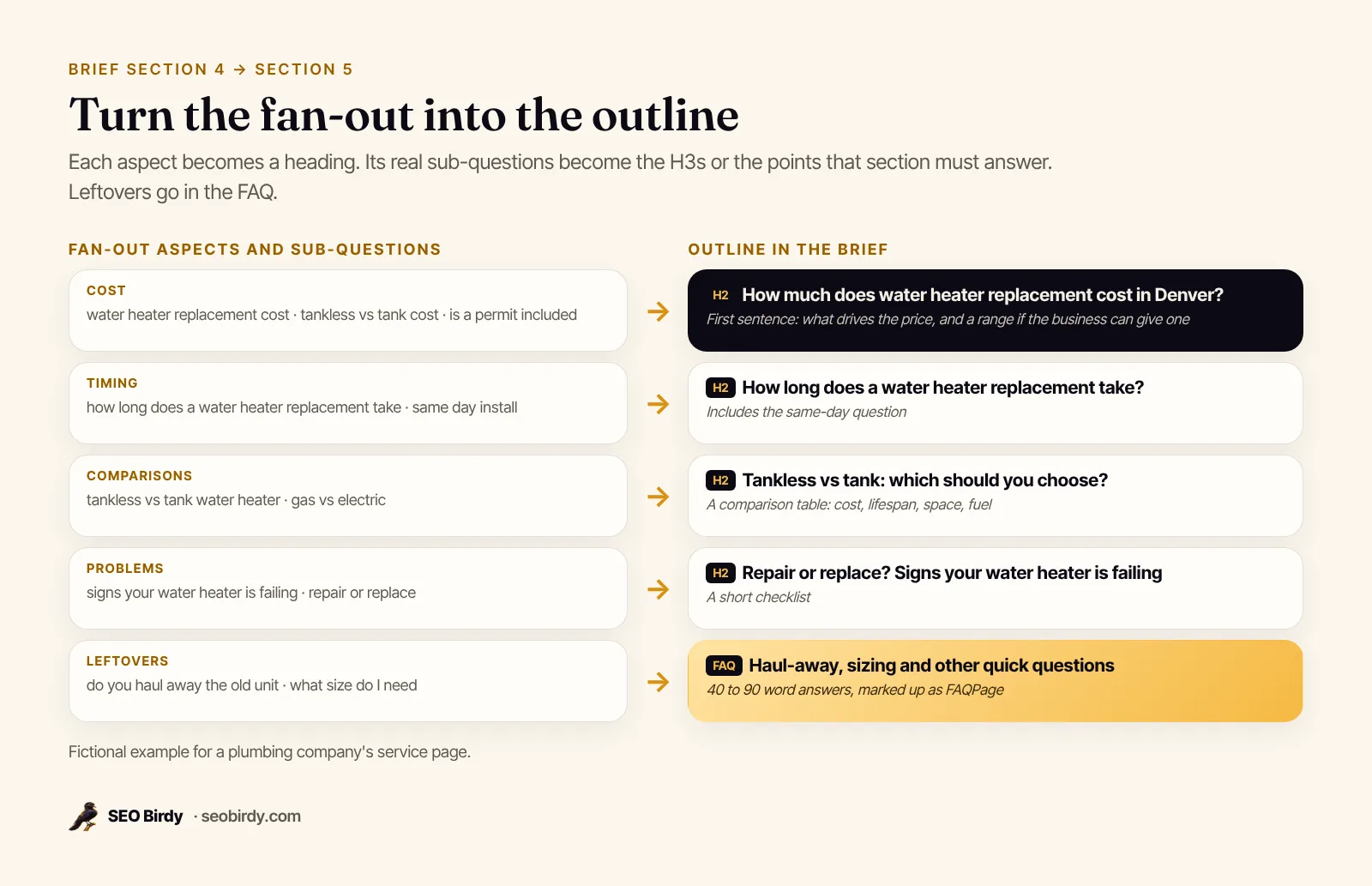
| Fan-out aspects | Cost, timing, tank vs tankless, gas vs electric, signs it's failing, permits, haul-away, sizing, financing |
| Title tag | Water Heater Replacement in Denver: Same-Day Installs |
| Meta description | Water heater leaking or cold? We replace tank and tankless water heaters across Denver, often same day. See prices, timelines and what's included. |
| Schema | Service and LocalBusiness on the page; FAQPage for the FAQ |
| Internal links | Tankless water heater installation, water heater repair, service areas page, financing page |
| Proof | Owner's photos of three installs, warranty terms, license number |
| Call to action | "Call for a same-day quote" button under the intro and after the cost section |
Notice what's not in it: no keyword density target and no list of phrases to repeat. The outline comes from the fan-out, and the fan-out comes from real searches.
How to write an SEO content brief, step by step
To write an SEO content brief, define the reader and intent, study what ranks today, collect the real sub-questions and group them into aspects, turn the aspects into an outline with answer-first sentences, then add the on-page requirements, proof and checklist. Budget about an hour of research for a typical page.
- Start with the reader. Write one sentence about who is searching and what they need. If you can't, you don't know the topic well enough yet. Talk to whoever answers the phone.
- Search the keyword yourself. Use a private window. Read the top results and any AI Overview. Note what each covers, what's missing and what format they use (guide, list, service page, tool).
- Collect the real sub-questions. Pull autocomplete suggestions, People Also Ask questions and, for existing pages, the queries in Google Search Console. This is the fan-out: every angle a complete answer needs. Our guide to query fan-out explains why AI search works this way.
- Group them into aspects. Cost, timing, comparisons, who it's for, requirements, problems, places, how-to. Ten to sixteen aspects is common for a commercial topic; a narrow one may have five.
- Turn aspects into headings. Each big aspect becomes an H2, phrased the way people ask ("How long does a water heater replacement take?"). Its sub-questions become H3s or points to cover. Small leftovers go into the FAQ.
- Write the first sentence of each H2. The direct answer, 40 to 60 words. This is the passage most likely to be quoted in an AI answer or a featured snippet, so it's worth getting right in the brief.
- Add the on-page requirements. Title, meta description, schema, internal links, sources and images (see the next section).
- Add proof and rules. What first-hand experience goes in, which facts must be checked, the tone and the call to action.
- Hand it over with the checklist. The writer knows what "done" looks like.
Build the outline from a Fan-Out Map
Steps 3 to 5 are the slow part by hand. A Fan-Out Map does them in a minute or two: it pulls real Google autocomplete searches for your keyword, groups 100 to 150 sub-queries into aspects, and builds a "perfect page" outline with the biggest aspects first. You can copy that outline, or the whole map as a markdown content brief, straight into section 4 and 5 of the template.
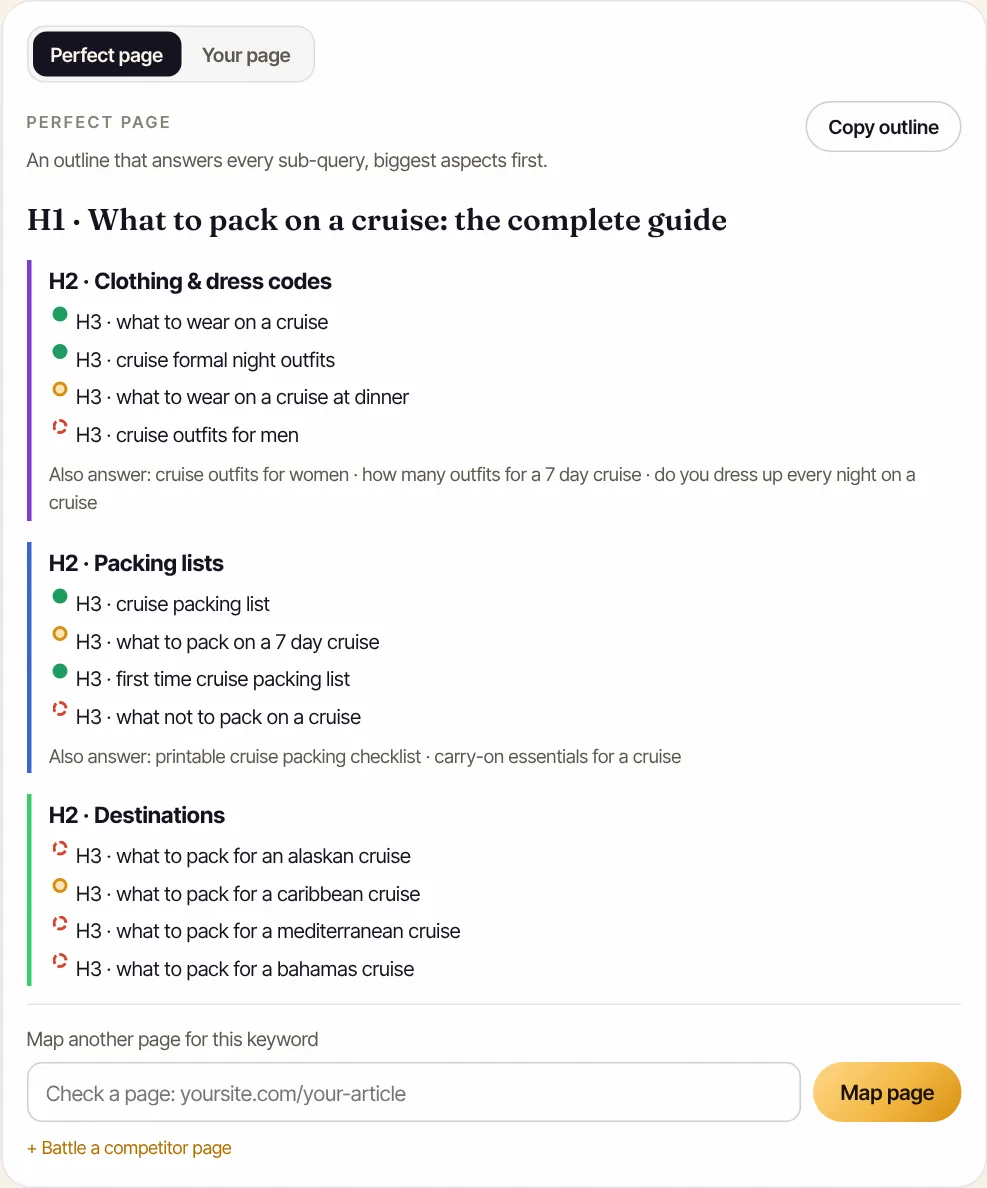
Build the research half of your brief in two minutes. The free Fan-Out Map turns a keyword into aspects and real sub-questions, outlines the perfect page, and exports it all as a content brief you can paste into this template.
Make a free Fan-Out Map →SEO content structure: how the brief should shape the page
A brief should set an SEO-friendly content structure: one H1 with the keyword, a short intro that answers the main question in the first two sentences, H2s that each cover one aspect and open with the answer, H3s for sub-questions, tables for comparisons, numbered steps for processes, and an FAQ for the leftovers.
Specify in the brief:
- Answer first, everywhere. The intro answers the main question. Each H2 answers its heading in the first sentence. Then explain.
- Headings phrased like searches. "Tankless vs tank: which should you choose?" beats "Our Options."
- One idea per paragraph. One to four sentences.
- Tables for comparisons, steps for processes. They're easier to scan and to extract.
- An FAQ for small questions. Five to eight real questions, 40 to 90 words each.
What is SEO content writing?
SEO content writing is writing a page so that it fully answers what searchers ask and is easy for search engines and AI assistants to understand: clear headings, direct answers, the words people actually use, and proof. It isn't stuffing a keyword into every paragraph. SEO-friendly content and SEO-optimized content mean the same thing: helpful first, structured second.
Content architecture: where the page fits
The brief should also say where the page sits in the site's content architecture. A service page links up to the main services page and across to related services; a location page links to the services offered in that city; a blog post links to the service it supports. List these in the internal links table so the new page isn't an orphan.
If you want the full list of on-page checks the finished page should pass, our on-page SEO checklist has it, with a printable PDF.
On-page SEO elements to put in the brief
Put the title tag, meta description, URL slug, schema type, internal links with anchor text, external sources, and image alt text into the brief itself. These are the details editors usually fix after the draft. Deciding them up front saves a round of edits and keeps the page consistent with the rest of the site.
| Element | What to specify | Source of the rule |
|---|---|---|
| Title tag | Keyword near the start, a clear benefit, unique on the site | Google's title link guidance: descriptive, concise, no boilerplate |
| Meta description | The answer plus a reason to click, specific to the page | Google's snippet guidance: unique, descriptive, not a keyword list |
| Internal links | Three or more, with descriptive anchor text and placement | Google: good anchor text is descriptive, reasonably concise and relevant |
| Images | What each shows, real or diagram, alt text and caption | Google uses alt text to understand images |
| Schema | Article, Service, LocalBusiness, FAQPage, HowTo or Product, whichever fits | Must match visible content |
| Sources | The claim, the URL, the date checked | Every number needs a source |
Two details that trip writers up. First, Google says there's no hard limit on title or description length, but both get truncated in results, so brief a title that leads with the topic. Our guide to how to write a meta description covers lengths and examples. Second, anchor text: Google suggests reading only the link text, out of context, to see if it makes sense on its own. "Click here" never does.
Content brief for an agency or freelance writer
When you brief an agency or a freelancer, the content brief becomes the contract for the work: what "done" means, what the writer may and may not claim, and how the draft will be judged. Send it before work starts, agree on it, and review the draft against it, not against new ideas that came up later.
A few habits help:
- Share the brief with edit access. Writers can ask questions in comments instead of email.
- Include the business's real facts. Prices, timelines, guarantees, service areas, license numbers. A freelancer can't invent them and shouldn't try.
- Name the claims to avoid. "Best in Denver," guaranteed results, medical or legal advice the business can't give.
- Give feedback against the checklist. "Section 4's permit question isn't answered" is actionable. "Make it pop" isn't.
- Agree on approval. Who signs off, and how many rounds are included.
Agencies running briefs for many clients can white-label SEO Birdy's tools; see our white-label program.
Content brief generators and AI
An AI content brief generator can speed up the research half: it can group searches into aspects, draft headings and suggest questions. It can't supply your first-hand experience, real prices or judgment about the angle, so use it to draft the brief and a person to finish it. The same goes for AI drafts of the page itself.
Google's position on AI-written content is that it focuses on the quality of content rather than how it's produced. It also warns that generating many pages "for the primary purpose of manipulating search rankings" is scaled content abuse, a spam policy violation. A good brief is the guard against that: it forces each page to have a reader, a purpose and real proof.
When you use a generator, check that:
- The sub-questions come from real searches, not only the model's guesses.
- The outline matches the intent you chose.
- Every fact it adds is verified or removed.
- The proof section is filled in by someone who knows the business.
Content brief vs creative brief vs content outline
A content brief describes one page meant to rank in search. A creative brief describes a campaign or a piece of creative work, like an ad or a video, and focuses on message and audience. A content outline is just the list of headings. The SEO brief contains an outline but adds the research, requirements and rules.
| SEO content brief | Creative brief | Content outline | |
|---|---|---|---|
| Covers | One page for search | A campaign or creative piece | One page's headings |
| Built from | Real searches, ranking pages, business facts | Brand goals, audience research | The brief, or the writer's plan |
| Includes | Keyword, intent, fan-out, outline, title, description, links, schema, proof, checklist | Objective, audience, message, tone, deliverables, budget | H1, H2s, H3s |
| Used by | Writers, editors, SEOs | Designers, video teams, copywriters | Writers |
A content marketing brief or content strategy brief usually sits above all of these: it plans many pieces at once. Each piece then gets its own SEO content brief. Some teams call the per-page version a content development brief or content production brief; the name matters less than the nine parts.
How to check a draft against the brief
Check a draft by working through the brief's last section in order: the answer comes first, every aspect is covered, headings match searches, title and description are within range, links and sources are verified, images have alt text, schema is valid and the page can be indexed. Then measure coverage again after it's live.
- Read the first two sentences. Do they answer the main question?
- Tick off section 4. Every aspect has a section or an FAQ answer.
- Check on-page elements. Title, description, one H1, internal links, alt text.
- Open every external link. It loads and says what you cite.
- Test structured data in Google's Rich Results Test.
- Confirm it's indexable. No noindex, and the canonical points to itself.
- Re-check coverage against the fan-out, aiming for 90% or more.
- Set a date to measure in Search Console, four to eight weeks out.
For steps 3 and 6, paste the live URL into the free Website SEO Audit; our free SEO audit guide explains what each check means. For step 7, map the page against the keyword in the Fan-Out Map and see which sub-questions are still missing.
If the page is a refresh of one that used to rank, the brief has one extra job: keep what already worked. Our guide to content decay covers how to brief a refresh without losing the page's existing rankings.
Frequently asked questions
What does a content brief look like?
A content brief is usually one to three pages, often a Google Doc or a spreadsheet. It opens with the page basics (keyword, URL, audience, intent), then lists the questions the page must answer, the outline with headings, the title and meta description, internal links, sources and images, and ends with a short checklist. A writer should be able to start drafting from it without asking a single question.
How long should an SEO content brief be?
Long enough that the writer doesn't have to guess, short enough that they read it all. For most blog posts and service pages that's one to three pages. The outline and the list of questions to answer are the parts that matter most. Skip anything the writer won't use, like keyword volume tables they can't act on.
Who should write the content brief?
Whoever owns the page's results: an SEO, a content strategist, an editor or the business owner. The writer can draft it if they have the research tools, but someone who knows the business should review the reader, the angle and the facts. For local businesses, the owner's input on prices, timing and common customer questions is often the most valuable part of the brief.
Can ChatGPT write a content brief?
It can draft one if you give it the keyword, the audience and real search data, and it's useful for turning a list of sub-questions into a first outline. It can't see what currently ranks, your Search Console queries or your business's real prices and experience, so it shouldn't be the only input. Always check every fact and heading against real searches before handing the brief to a writer.
What is the difference between a content brief and a content outline?
An outline is the list of headings. A content brief includes the outline plus everything around it: who the reader is, what they want to do, what ranks today, the questions to answer, the title and meta description, links, sources, images, tone and the call to action. The outline tells the writer what to write; the brief tells them why and how.
Should I put a word count in the content brief?
Use it as an estimate for scheduling and budget, not a target. Google says it has no preferred word count, and padding a page to hit a number makes it harder to read and harder for AI search to quote. A better target is coverage: every aspect and sub-question in the brief gets a clear answer, and the page stops there.
Is there a content brief template for Google Docs?
Yes. Copy the sections of our free PDF template into a Google Doc or Word file: page basics, reader and intent, what ranks today, the fan-out table, outline, on-page SEO, proof and voice, hand-off notes and the editor's checklist. Tables work well in Docs. Keep one copy per page and share it with edit access for the writer and editor.
We build SEO Birdy's audits and autopilots, and we test every recommendation against live search results and AI answers before we publish it. Our guides follow Google Search Central and Bing Webmaster guidelines.