How to write a meta description that earns the click, with examples
How to write a meta description people click: a 4-part formula, the right length, 12 examples for local businesses, and how to add it in WordPress or Shopify.


To learn how to write a meta description, start with what it's for: it's the short summary under your page's title in Google, and its only job is to win the click. Write 120 to 160 characters that say what the page offers, prove it with one specific detail, and give a reason to click, using the words people search.
That's the whole skill. The rest of this guide is how to do it well: a four-part formula, how long it should really be, twelve examples for local businesses, why Google sometimes ignores what you wrote, and exactly where to add it in HTML, WordPress, Shopify, Wix and Squarespace. Because the title and description appear together, we cover title tag best practices too.
What is a meta description, and where does it show up?
A meta description is an HTML tag in a page's <head> that summarizes the page in a sentence or two. Search engines can show it as the snippet, the gray text under the blue title link in results. Its purpose is to tell searchers what they'll find before they click. Visitors never see it on the page itself, which is why it's so often left blank or copied across a whole site.
Here's the tag:
<meta name="description" content="24/7 emergency plumbers in Tampa Bay. Licensed, insured and usually at your door within an hour, with the price agreed before we start. Call now.">
MDN's reference for meta names defines it as "a short and accurate summary of the content of the page." Google's snippet documentation is more specific about how it's used: snippets are "primarily created from the page content itself," but Google "sometimes uses the meta description HTML element if it might give users a more accurate description of the page."
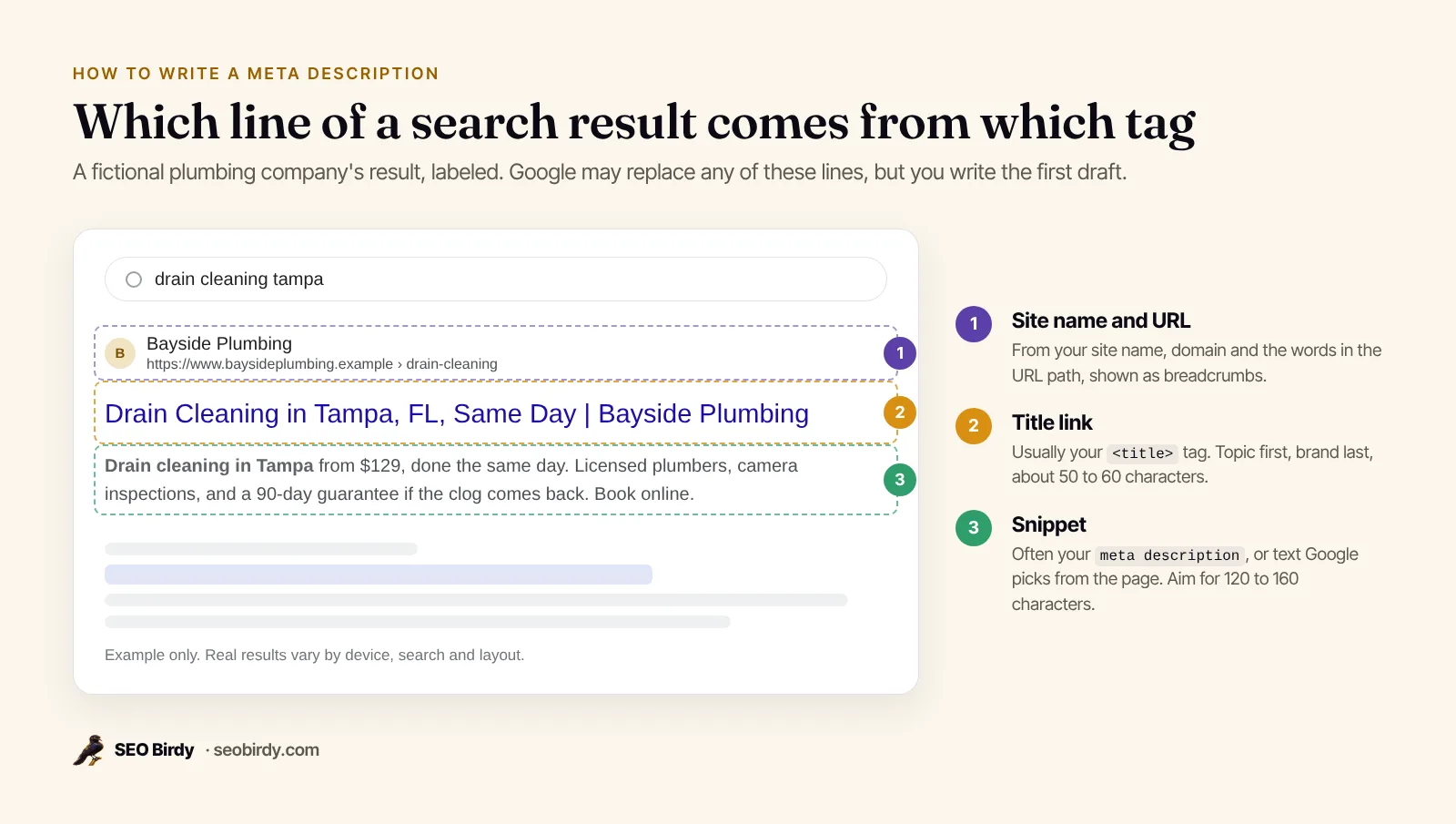
Meta description vs snippet vs title tag
The meta description is what you write. The snippet is what Google shows, which may be your description or text Google picks from the page. The title tag (<title>) is the clickable headline above it. Meta title, SEO title and title tag are three names for the same <title> element.
How do you write a meta description?
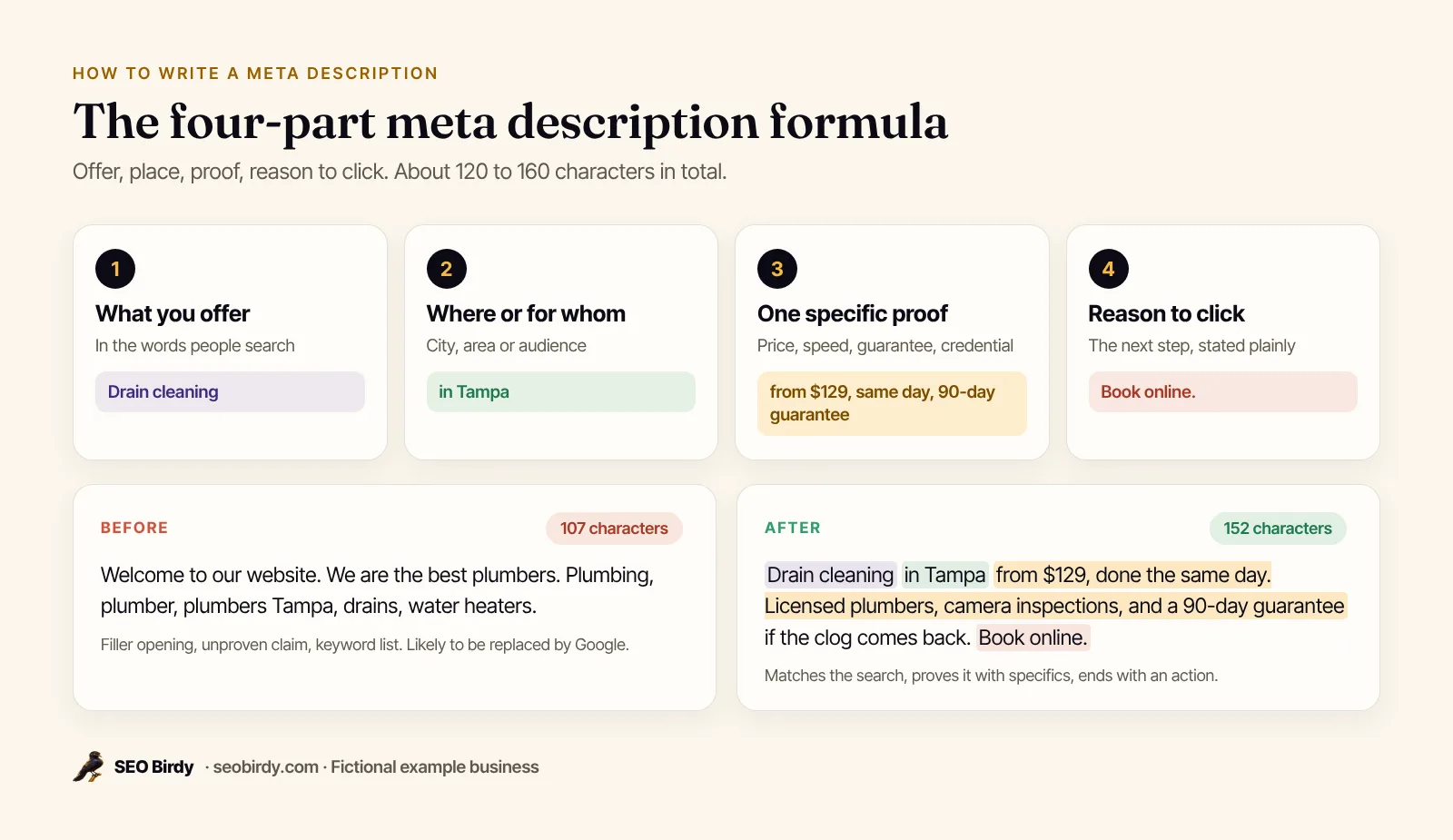
Write one sentence that says what the page offers, for whom or where, and a second that proves it with a specific detail and invites the click. Use the words a customer would search, keep it between 120 and 160 characters, and make sure the page delivers exactly what the description promises.
Follow these steps for each page:
- Find the search the page should win. For a service page that's usually "[service] in [city]"; for a guide it's the question it answers.
- Lead with what you offer, in the searcher's words. "Drain cleaning in Tampa" beats "Welcome to Bayside."
- Add one specific proof point: a price from, a guarantee, a response time, a credential, a number of reviews you can back up. Specifics are what make a result look like the right one.
- End with a reason to click: book online, see prices, get a free quote, read the full guide.
- Count the characters (spaces included) and trim to about 155.
- Read it next to your competitors' results for the same search. If yours could belong to any of them, make it more specific.
Meta description tips for an effective description
There's no perfect meta description, but the effective ones share a few habits:
- Write for the webpage, not the website. Describe this page's offer, not your company in general.
- Match the intent. A "how much" search wants a price range; an "emergency" search wants speed.
- Use numbers. "From $129," "within an hour" and "since 2009" are easier to trust than "affordable," "fast" and "experienced."
- Use active voice and plain verbs. "Book online" beats "Appointments can be scheduled."
- Stuck for ideas? Read your reviews. The details customers praise are the proof points other customers look for.
What should a meta description include?
Include the main keyword or a close variant, the location for local pages, one concrete detail and a call to action. Google's guidance adds that a description "doesn't just have to be in sentence format": for a blog post it can carry the author and date, and for a product page the "price, age, manufacturer," pulled together in one place.
Leave out anything the page doesn't back up. A description that promises "free estimates" on a page that never mentions them will lose the visitor the moment they arrive.
How long should a meta description be?
Aim for 120 to 160 characters, roughly 20 to 30 words. Google sets no limit: its documentation says "there's no limit on how long a meta description can be, but the snippet is truncated in Google Search results as needed, typically to fit the device width." That makes the real limit a width on screen, not a character count.
In practice that means:
| Length | What happens | Verdict |
|---|---|---|
| Under 70 characters | Uses little of the space; Google is more likely to replace it | Too short |
| 70 to 119 characters | Fine, but there's room for a proof point or call to action | OK |
| 120 to 160 characters | Fills the snippet on most screens without being cut | Ideal |
| Over 160 characters | Likely truncated with an ellipsis; the ending may be lost | Too long |
Because truncation is by width, wide letters (W, M, capitals) use up the space faster than narrow ones. Mobile and desktop widths differ too, which is why the safest habit is to put the offer and the proof in the first 120 characters and let the call to action sit at the end, where losing a few words does no harm.
Is there a maximum or minimum length?
No official maximum and no minimum. The practical maximum is the width of the screen, measured in pixels rather than characters, and the practical minimum is whatever still says something useful. That hasn't changed in 2026: length matters only because a description that's cut off loses its ending, and one that's too thin gets replaced.
Our free Website SEO Audit passes a description between 70 and 160 characters and recommends 120 to 160 when it rewrites one.
Meta description examples for local businesses
The examples below follow the formula and fall between 143 and 154 characters. The businesses are fictional; swap in your own services, places and proof points, and only claim what's true.
| Business and page | Example meta description | Chars |
|---|---|---|
| Plumber, emergency page | 24/7 emergency plumbers in Tampa Bay. Licensed, insured and usually at your door within an hour, with the price agreed before we start. Call now. | 145 |
| Dentist, homepage | Family and cosmetic dentistry in South Austin. Same-week appointments, most insurance accepted and evening hours on Thursdays. Book online in two minutes. | 154 |
| Roofer, service page | Roof replacement in Orlando with a 10-year workmanship warranty. Free inspection, written quote in 48 hours and financing available. See recent projects. | 153 |
| Law firm, practice page | Injured in a car accident in Phoenix? Talk to a personal injury lawyer today. Free case review, no fee unless we win, and we answer calls 24/7. | 143 |
| Salon, booking page | Haircuts, color and balayage in Denver's Highlands. Book online with your favorite stylist, see prices up front, and get a reminder text the day before. | 152 |
| HVAC, location page | AC repair and furnace service in Plano, Frisco and Allen. Same-day visits, upfront pricing and a 1-year parts and labor guarantee. Schedule online. | 147 |
| Restaurant, menu page | See our full dinner menu: wood-fired pizza, fresh pasta and local craft beer in downtown Asheville. Open until 10pm, with gluten-free options marked. | 149 |
| Clothing store, category | Women's linen dresses, tops and pants for warm weather, in sizes XS to 3X. Free shipping over $75 and free returns within 30 days. Shop new arrivals. | 149 |
| Blog post | How much does a water heater replacement cost in 2026? Average price ranges for tank and tankless units, what drives the cost, and when repair is enough. | 153 |
| Product page | Stainless steel tankless water heater, 199,000 BTU, for homes with up to 4 bathrooms. Free shipping, 15-year heat exchanger warranty, ships in 2 days. | 150 |
Bad meta description examples, rewritten
Here's a description you'll still find on plenty of small business sites (107 characters):
Welcome to our website. We are the best plumbers. Plumbing, plumber, plumbers Tampa, drains, water heaters.
It opens with filler, claims "best" without proof, and ends in a keyword list, which Google says makes a description "less likely to be displayed as a snippet." Rewritten for the drain cleaning page (152 characters):
Drain cleaning in Tampa from $129, done the same day. Licensed plumbers, camera inspections, and a 90-day guarantee if the clog comes back. Book online.
How to write a meta description for a blog post, product or homepage
- Blog post or article: answer the question in the first sentence, then say what else the post covers. The reader should know they'll get the answer, not a teaser.
- Product page: pack in the details buyers compare: size, model, price or shipping, warranty. For large catalogs, Google says programmatic descriptions built from page data "are encouraged."
- Website homepage: Google suggests "site-level descriptions on the main home page." Say who you are, what you do and where, plus your strongest proof.
- Location page: name the city and nearby areas, and something specific to that location (hours, address, team).
- Privacy policy, terms, login pages: a plain one-line description is fine. Nobody searches for these, so don't spend time on them.
Do meta descriptions affect SEO?
Meta descriptions don't affect rankings directly, but they affect the clicks you get from a ranking, and that's where SEO turns into customers. Google said in 2009 that it doesn't use the description meta tag in ranking, while its snippet guide says good descriptions "can go a long way to improving the quality and quantity of your search traffic."
Are meta descriptions still important, then? Yes, for three reasons:
- Click-through rate. Two results in neighboring positions can get very different numbers of clicks. The one that matches the search and shows a specific reason to choose it wins.
- Keywords in the snippet. People scan for the words they typed. Using the search phrase naturally shows them they've found the right page.
- Bing and AI answers. Bing's webmaster guidelines warn that "missing, duplicate, or overly short title tags and meta descriptions may reduce indexing reliability, ranking, and eligibility for grounding results and citations," the sources Copilot uses for its answers. OpenAI hasn't documented how ChatGPT search uses meta descriptions; its crawler documentation does say sites must allow OAI-SearchBot to appear in ChatGPT search answers at all.
Why is Google not showing my meta description?
Google shows its own snippet when it decides page text answers the particular search better than your description does, so the same page can show different snippets for different searches. It's also likely when your description is missing, duplicated, stuffed with keywords or out of step with the page, or when Google hasn't recrawled since you changed it.
Google is open about this: snippets "are designed to emphasize and preview the page content that best relates to a user's specific search. This means that Google Search might show different snippets for different searches." How often does Google use your meta description? Google doesn't publish a figure, and it varies by search. You can't force your description to appear, but you can make it the best available summary.
Meta description not updating in Google
If you changed a description and the old one still shows, Google hasn't reprocessed the page yet. Its title link documentation says it can take "a few days to a few weeks" to notice changes. Request a recrawl with the URL Inspection tool in Search Console, then check again in a week.
How to stop or limit snippets
If you need control in the other direction, Google's robots meta tag specification offers three tools:
<meta name="robots" content="nosnippet">shows no text snippet at all, and also keeps the page's content from being used as direct input for AI Overviews and AI Mode.<meta name="robots" content="max-snippet:120">caps the snippet at 120 characters.<span data-nosnippet>...</span>keeps one part of a page, such as a disclaimer, out of snippets.
Use these sparingly. For most local businesses, a full snippet and inclusion in AI answers is what you want.
How do you add a meta description in HTML, WordPress, Shopify, Wix and Squarespace?
In HTML, add a <meta name="description" content="..."> tag inside the <head>. In a CMS, look for the page's SEO or search engine listing settings: Shopify, Wix and Squarespace have them built in, while WordPress usually needs your theme or an SEO plugin to add a description field.
HTML
The syntax is one <meta> element with name="description" and your text in the content attribute, placed in the <head>, once per page. Can meta tags be placed in the body? Google says it respects a robots meta tag found in the body, but don't rely on that for anything else; keep every meta tag in the head. The <meta> element is a void element, so it needs no closing tag; <meta ... /> also works. If your description contains double quotes, write them as " or use single quotes inside, or the attribute will end early and cut the text.
WordPress
Most WordPress themes print the title tag automatically, but WordPress has no meta description field of its own. Most sites add one with an SEO plugin, which puts a description box under the editor for each post and page. Without a plugin, some themes reuse the post excerpt, or a developer can output the tag from the theme's header.php. After you save, view the page source and search for name="description" to confirm only one tag is printed.
Shopify
Open the page, product or collection, scroll to Search engine listing and click Edit. Set the page title, meta description and URL handle there. Product and collection pages are where duplicates pile up, so check them in bulk.
Wix and Squarespace
In Wix, open the page's settings and the SEO basics tab. In Squarespace, open the page settings and choose the SEO tab. Both show the title and description fields with a preview. Both also have site-wide SEO defaults, so make sure each important page has its own description.
Webflow
Open the page settings and fill in the meta description under SEO settings. For CMS collection pages, bind the description to a field so every item gets its own.
Next.js and React
In the Next.js App Router, set description in the page's exported metadata object, and Next.js renders the <meta name="description"> tag, as its metadata documentation shows:
export const metadata = {
  title: "Drain Cleaning in Tampa | Bayside Plumbing",
  description: "Drain cleaning in Tampa from $129, done the same day. Licensed plumbers, camera inspections, and a 90-day guarantee if the clog comes back. Book online.",
};
In a client-side React app, render the tag on the server or at build time where you can. Google can render JavaScript, but tags in the initial HTML are read most reliably.
What are title tag best practices?
Write a unique title tag for every page that puts the main topic first, adds the city for local pages, ends with your brand after a pipe or hyphen, and stays around 50 to 60 characters. The title becomes the clickable headline above your description, so the two should read as a pair: the title names the page, the description sells it.
Google's title link guide asks for "descriptive and concise" titles and warns against three things: vague titles like "Home," keyword stuffing, and "repeated or boilerplate text." It also lists where Google looks when it builds a title link: the <title> element first, then the main visible title, headings like the H1, og:title, and links pointing to the page.
Title tag examples
| Page | Title tag | Chars |
|---|---|---|
| Service page | Drain Cleaning in Tampa, FL, Same Day | Bayside Plumbing | 56 |
| Homepage | Bayside Plumbing: Licensed Plumbers in Tampa Bay | 48 |
| Location page | AC Repair in Plano, TX | Northstar Heating & Air | 48 |
| Blog post | Water Heater Replacement Cost in 2026 (Tank vs Tankless) | 56 |
Title tag vs H1
The title tag lives in the <head> and appears in search results and the browser tab. The H1 is the visible headline on the page. They should describe the same topic, but the H1 can be longer and more conversational. Our on-page SEO checklist covers headings, content and the other 20 checks that sit around these two lines.
Which other meta tags matter for SEO?
Besides the description, the meta tags that still work are the robots meta tag, the viewport tag and the charset declaration, plus Open Graph tags for social media. The keywords meta tag doesn't: Google said in the same 2009 post that it doesn't use it in ranking.
| Tag | What it does | Needed? |
|---|---|---|
<meta name="description"> | Suggests the snippet in search results | Every page |
<meta name="robots"> | Controls indexing and snippets (noindex, nosnippet, max-snippet) | Only when you need to restrict something |
<meta name="viewport"> | Makes the page render properly on phones | Every page |
<meta charset="utf-8"> | Declares the text encoding | Every page |
<meta property="og:description"> | The description in Facebook, LinkedIn and text message previews | Recommended |
<meta name="keywords"> | Nothing in Google Search | Skip it |
The og:description is the meta description for social media. It can match your meta description or be written for sharing; if it's missing, many apps fall back to the meta description. Be careful with the robots tag: one stray noindex removes the page from Google entirely, which our guide to the noindex tag explains.
What meta description mistakes should you check for?
Check for missing descriptions, duplicates across pages, keyword lists, descriptions over about 160 characters or under 70, promises the page doesn't keep, and broken quotes in the HTML. The fastest way is to audit the page, fix the template or CMS fields, and recheck.
The common problems, and what to do about each:
- Missing. Google writes a snippet from whatever it finds, sometimes a cookie notice or menu text. Write one for every important page.
- The same description on every page. Google says identical descriptions "aren't helpful when individual pages appear in search results." Usually a theme or plugin default; replace it page by page, starting with the most visited.
- Keyword lists. Read it aloud. If it doesn't sound like a sentence, rewrite it.
- Too long or too short. Count the characters, including spaces.
- Unsupported claims. "Best in Tampa" with no proof. Use a fact you can back up: a guarantee, a credential, a review count.
- Emoji and all caps. They rarely help a local business look trustworthy. Use them only if they genuinely fit your brand.
Meta description generators and AI
A meta description generator or AI tool can draft descriptions quickly, and Google's snippet guide says programmatic generation is appropriate for large sites as long as descriptions are "human-readable and diverse." Treat every draft as a draft: check it against the page, remove invented facts, and trim it to length.
Check your meta descriptions for free
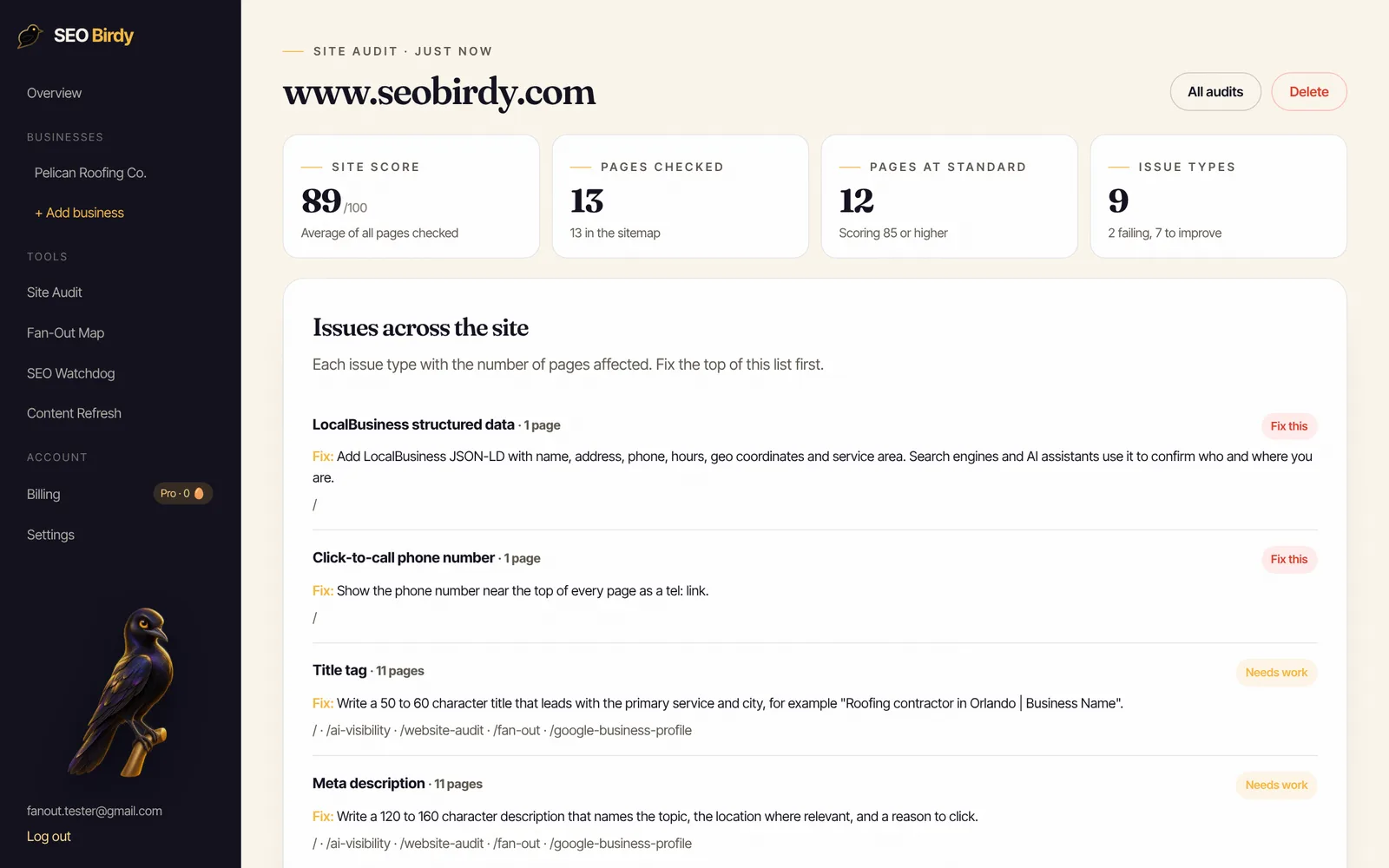
SEO Birdy's free Website SEO Audit reads the page the way a search engine does, measures the title and meta description against these lengths, and when either falls short, writes a suggested replacement from the page's own content, with placeholders where it doesn't know a fact about your business.
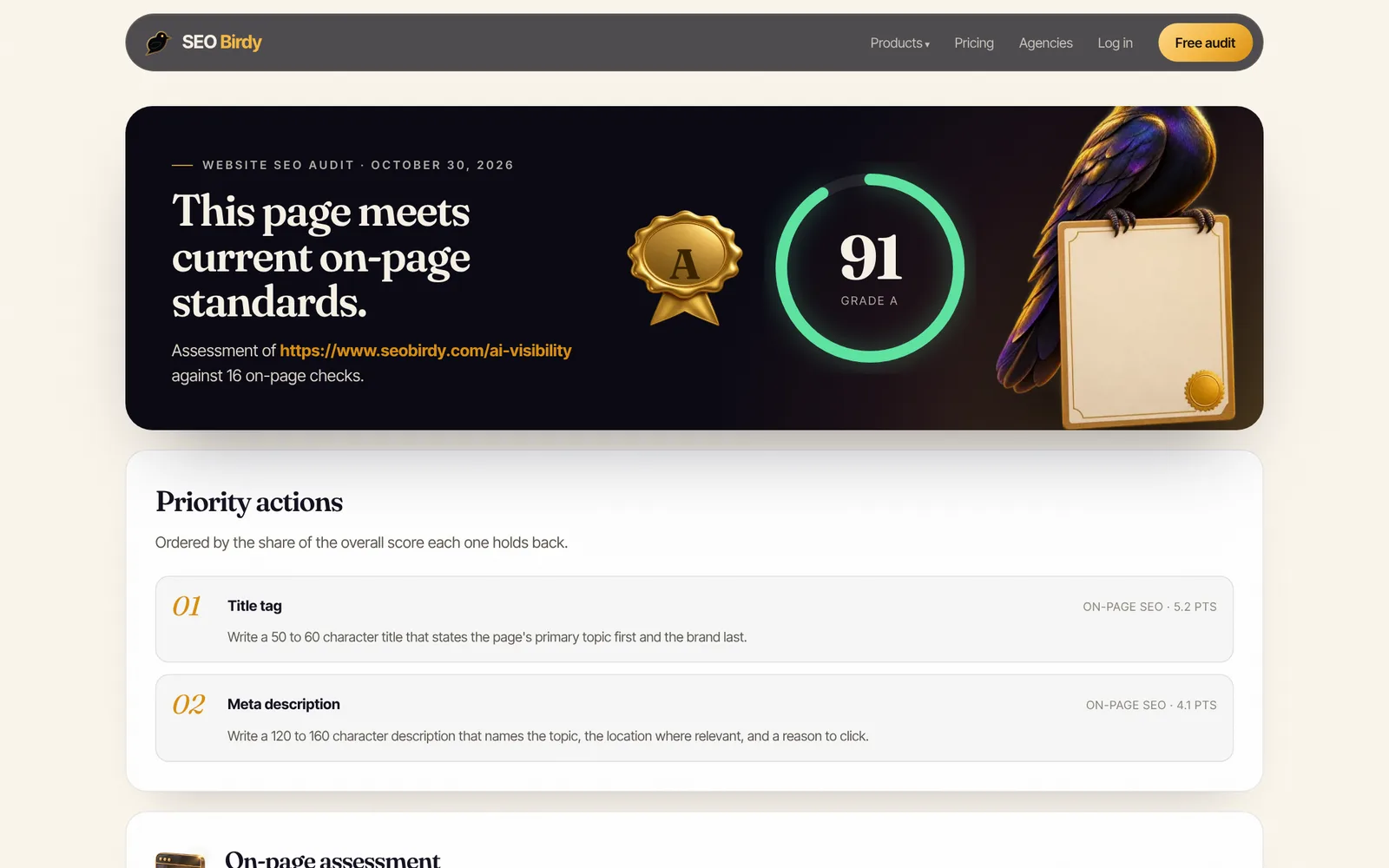
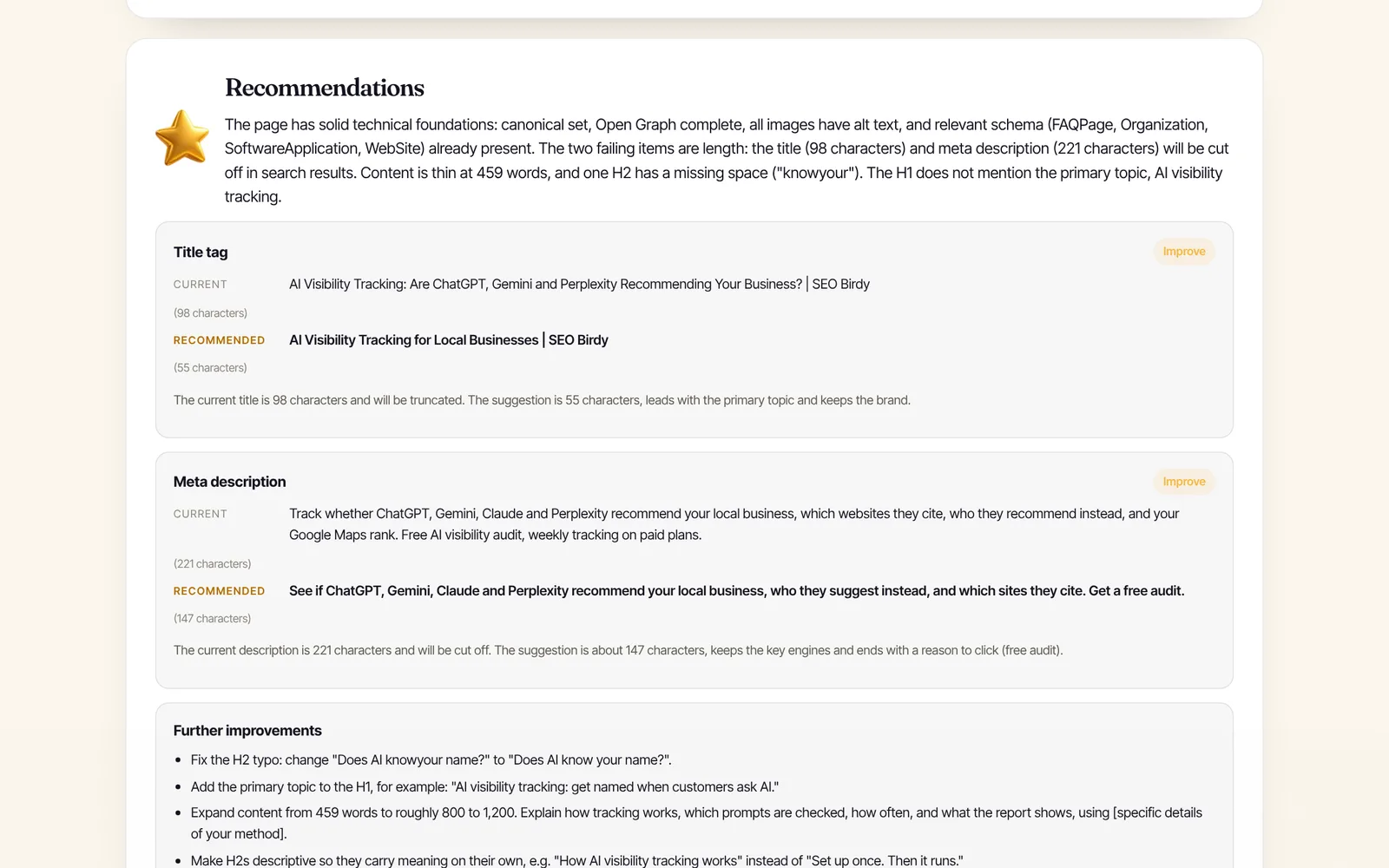
See your meta description the way Google does. Paste any URL into the free Website SEO Audit to check the title and description length, headings, schema and alt text, and get a rewritten description you can paste straight into your CMS.
Audit a page for free →To check every page at once, a full-site audit groups the problem across URLs, so you can see, for example, that one template is missing descriptions on every product. That comes with the paid plans (see pricing).
If you write a lot of pages, it helps to plan the description with the rest of the page, starting from the words people actually search; the free Fan-Out Map shows them for any keyword. Our SEO content brief template includes a title and description field, and the free SEO audit guide shows how to prioritize the fixes an audit finds. Images need the same care as descriptions; see alt text for SEO.
Frequently asked questions
What is a good meta description?
A good meta description is unique to its page, between about 120 and 160 characters, and reads like a short ad: it says what the page offers in the words people search, adds one specific detail that proves it (a price, a guarantee, an area served, a time), and ends with a reason to click. It describes the page honestly, so visitors who click find what they expected.
How many characters should a meta description be?
Aim for 120 to 160 characters. Google has no official limit and truncates snippets to fit the device width, so anything longer may be cut off. Shorter than about 70 characters usually wastes the space and gives Google a reason to write its own snippet. Put the most important words in the first 120 characters, which show on most screens.
Does the meta description affect SEO rankings?
Not directly. Google said in 2009 that it doesn't use the description meta tag in ranking. It affects SEO indirectly: a clear, relevant description can win more clicks from the same position. Bing's guidelines add that missing, duplicate or overly short descriptions may reduce indexing reliability and eligibility for citations in Copilot answers.
Why is Google not showing my meta description?
Google writes its own snippet when it thinks page content describes the result better for that particular search, so the same page can show different snippets for different queries. It's also likely when the description is missing, duplicated across pages, a list of keywords, or doesn't match the page. If you changed it recently, Google may simply not have recrawled the page yet.
Should every page have a unique meta description?
Yes, wherever you can. Google's documentation says identical or similar descriptions on every page aren't helpful and recommends page-level descriptions everywhere except the homepage and aggregation pages. If you can't write them all, prioritize the homepage and your most visited pages, and leave the rest blank rather than copying one description across the site.
Can I use AI to write meta descriptions?
Yes, as a first draft. Google says programmatic generation is appropriate for large sites, as long as the result is human-readable, diverse and specific to each page. Check every AI draft for invented facts such as prices, hours or guarantees you don't offer, trim it to about 155 characters, and make sure it matches what the page actually says.
Is the meta title the same as the title tag?
Yes. Meta title, SEO title, page title and title tag all mean the HTML <title> element in the page head, which Google uses as the main source for the clickable headline in results. It's different from the H1, the visible headline on the page, though the two should describe the same topic.
We build SEO Birdy's audits and autopilots, and we test every recommendation against live search results and AI answers before we publish it. Our guides follow Google Search Central and Bing Webmaster guidelines.