Query fan-out: how AI search splits one question into dozens, and how to answer them all
Query fan-out is how Google AI Mode and AI Overviews split one search into many sub-queries. See how it works, with examples, and how to get your pages cited.


Query fan-out is the technique AI search engines use to split one search into many related sub-queries, run them at the same time, and combine what they find into a single answer. Google says both AI Mode and AI Overviews may use it. For your website, that means a page gets cited by answering the questions behind a keyword, not just by matching the keyword itself.
If you've ever wondered why an AI answer to "how much does a roof replacement cost" also covers insurance, permits and financing, this is why. The engine asked about all of them before it wrote a word.
This guide explains what query fan-out is, how it works step by step, which AI search engines use it, and what it changes for SEO. Then it shows you how to see the fan-out for your own keyword, measure how much of it your page answers, and fill the gaps.
What is query fan-out?
A simple definition: query fan-out is when a search system takes one question and "fans" it out into many smaller, related searches covering every angle a complete answer needs. It runs those searches at once, gathers the results, and writes a single response. Google describes it as issuing multiple related searches across subtopics and data sources.
The phrase "fan out" comes from the shape: one point spreading into many, like the ribs of a paper fan. In computing it has long meant one input feeding many outputs. In AI search it means one question becoming many queries.
Google's documentation for site owners is direct about it. Its page on AI features and your website says both AI Overviews and AI Mode "may use a 'query fan-out' technique," issuing multiple related searches across subtopics and data sources to develop a response. It adds that this lets Google show a wider and more diverse set of links than a classic search.
What does query fan-out mean in plain terms?
It means the AI search engine treats your question as a research brief, not a keyword. Ask "best pediatric dentist in Austin" and it may also look up what age kids should first see a dentist, which insurance plans local practices take, whether sedation is offered, what reviews say, and which offices are open on Saturdays. Then it answers all of that at once.
How does query fan-out work?
Query fan-out works in four steps: the engine reads your question and plans the subtopics, issues a set of related sub-queries at the same time, retrieves the best passages for each from the web and other sources, and combines them into one answer with links. Follow-up questions in the same session start the loop again with more context.
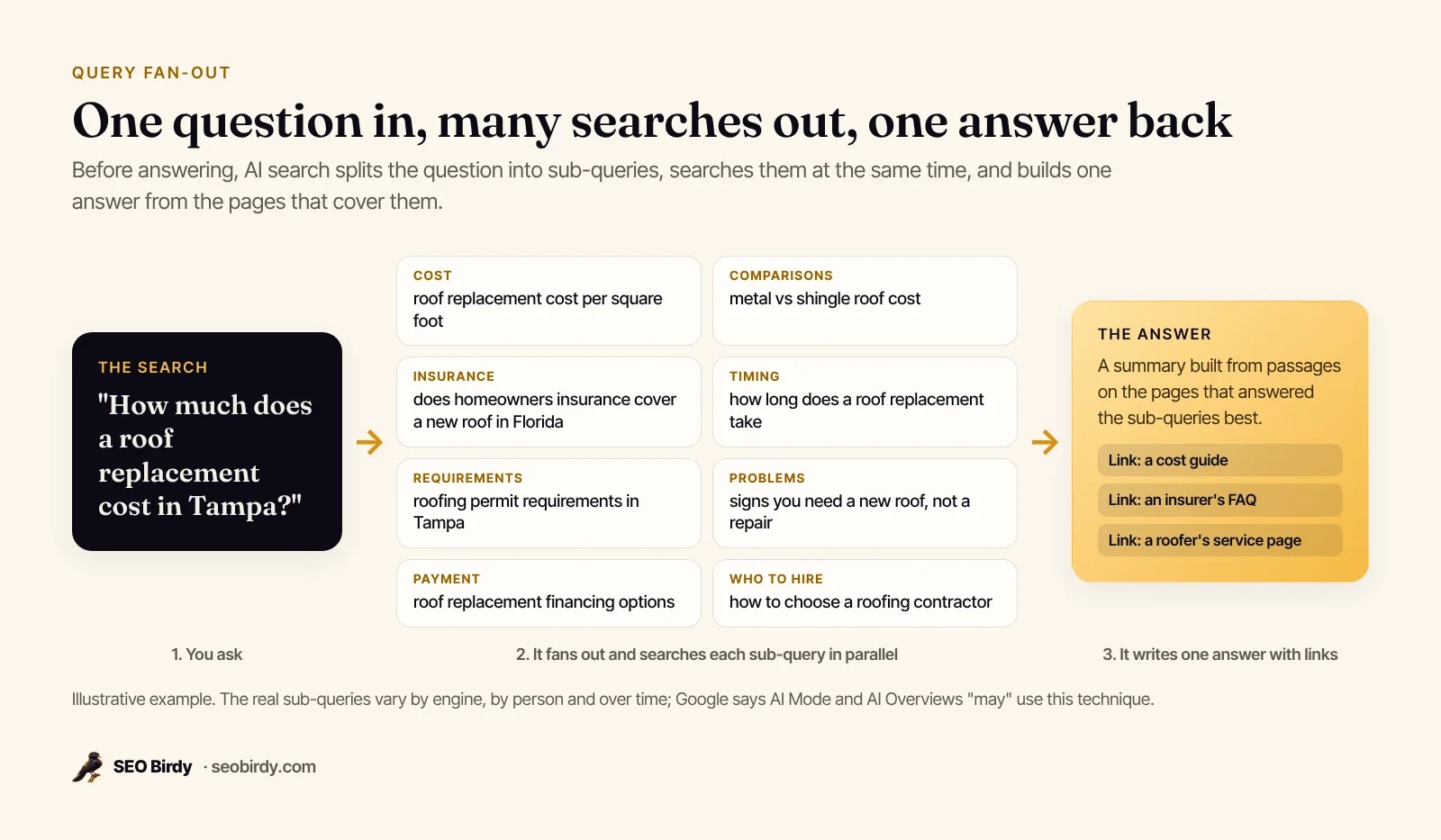
- Plan. The model reads the question and decides what a complete answer needs. When Google launched AI Mode, it described a custom Gemini model that "uses a multistep approach to make a plan, conduct searches to find information and adjust the plan based on what it finds."
- Fan out. It writes many sub-queries, one or more per subtopic, and runs them concurrently. Google's announcement says AI Mode issues "multiple related searches concurrently across subtopics and multiple data sources."
- Retrieve. Each sub-query returns pages, and the system pulls the passages that answer it best. Sources aren't only web pages: Google names the Knowledge Graph, real-time information and shopping data for billions of products.
- Combine. The answers are merged into one response, with links to the pages that supported it.
The whole process runs in seconds, and how far it fans out depends on the question. At Google I/O 2025, Google said AI Mode breaks a question into subtopics and issues "a multitude of queries simultaneously on your behalf," and that Deep Search, a research mode built on the same technique, "can issue hundreds of searches" for one question.
A query fan-out example
Here's a query fan-out example for a local search. A parent in Austin asks AI Mode: "Which pediatric dentist in Austin is best for an anxious 5-year-old?" A plausible fan-out looks like this:
| Aspect | Sub-queries the engine might run |
|---|---|
| Who it's for | pediatric dentist vs family dentist for young kids |
| Problems | how to help an anxious child at the dentist |
| Options | pediatric dentists in Austin that offer nitrous oxide |
| Cost | how much does a child's dental cleaning cost without insurance |
| Requirements | do Austin pediatric dentists accept Medicaid or CHIP |
| Timing | how often should a 5 year old see the dentist |
| Proof | pediatric dentist Austin reviews from parents |
| Places | pediatric dentist near Mueller open Saturday |
This is an illustration, not a capture of Google's internal queries, which aren't published. But the pattern is consistent: who it's for, cost, comparisons, requirements, timing, places and proof. A practice whose site answers four of those rows has far more chances to be cited than one whose site only says "pediatric dentist in Austin" in the title.
Which AI search engines use query fan-out?
Google has publicly named and described the technique: it says AI Mode and AI Overviews may use query fan-out, and AI Mode runs on a custom version of Gemini. Other AI assistants with web search, such as ChatGPT search and Perplexity, also run their own searches before they answer, though they document the mechanics in less detail.
| Engine | What we know |
|---|---|
| Google AI Mode | Uses query fan-out, per Google. Breaks questions into subtopics and runs many searches at once. |
| Google AI Overviews | May use query fan-out, per Google's Search Central documentation. |
| Google Deep Search (in AI Mode) | Same technique "taken to the next level," issuing hundreds of searches for a research report. |
| ChatGPT search, Perplexity, Gemini app | Search the web on your behalf before answering and cite sources. Exact sub-query behavior isn't published in the same detail. |
The idea also has a name in AI engineering: retrieval-augmented generation (RAG), where a model retrieves documents before it writes. Query fan-out is one way to do the retrieval step, by searching many angles instead of one. For how each assistant picks sources, see our guide to LLM SEO.
Why query fan-out matters for SEO
Query fan-out matters for SEO because AI search doesn't rank one page for one keyword. It looks for the best passage for each sub-query, then cites the pages those passages came from. A page that answers many of the sub-questions clearly has many chances to be used. A page that repeats the keyword but answers little has few.
Three things change in practice:
- The unit is the answer, not the page. Each section of your page competes for a specific sub-query. A clear H2 with a direct first sentence is easier to lift than the same fact buried in paragraph six.
- Completeness counts. Google's guidance on helpful content asks whether your content provides "a substantial, complete, or comprehensive description of the topic." Fan-out is that question made concrete: here are the sub-topics, does your page cover them?
- Questions are getting longer. Google's own advice for AI search notes that users are "asking longer and more specific questions", plus follow-up questions to dig deeper Long, specific questions fan out into more specific sub-queries.
In generative engine optimization (GEO) terms, fan-out coverage is how a page earns more citation chances. What doesn't change: Google says there are no additional requirements to appear in AI Overviews or AI Mode. A page must be indexed and eligible to show with a snippet, and "the best practices for SEO remain relevant." If Google can't index the page, no amount of coverage helps. Run a free SEO audit first if you're not sure.
Does query fan-out replace keyword research?
No. Keyword research still tells you which topic deserves a page, based on what customers search. Query fan-out tells you what that page has to cover to be the complete answer. Keep one primary keyword per page and use the fan-out as the page's table of contents. If one aspect of the fan-out is big enough to deserve its own page, give it one and link the two.
How to optimize content for query fan-out
To optimize for query fan-out, map the sub-queries behind your keyword, group them into aspects, give each aspect its own clearly headed section that answers in the first sentence, use the words searchers use, and answer the leftover questions in an FAQ. Then check the page again and close the gaps.
- Map the fan-out. List the sub-queries for your main keyword. Start from real searches (Google autocomplete, People Also Ask, your Search Console queries) and fill the angles they miss.
- Group them into aspects. Ten to sixteen aspects is typical for a commercial topic: cost, timing, comparisons, who it's for, requirements, places, problems, how-to. Each aspect becomes an H2 or H3.
- Lead every section with the answer. Write the first one or two sentences so they'd make sense lifted on their own. Then explain, give the steps, and show proof.
- Use the searchers' words. If people search "how long does a roof replacement take," say "how long" and "takes" in that section. Matching their vocabulary makes it obvious which question each section answers.
- Use tables and lists for comparisons and steps. They're easy to read and easy to extract.
- Put the leftovers in an FAQ. Specific questions that don't deserve a section get a short, self-contained answer. Mark them up with FAQPage schema where it fits.
- Don't pad. Google says it has no preferred word count. Cover the aspects, then stop. A brief written from the fan-out keeps writers on track; our SEO content brief template shows how to build one.
One page or many?
Use one page when the sub-queries share a single intent, like "roof replacement cost" and its details. Split into separate pages when an aspect has its own intent and enough demand, like "roof repair" versus "roof replacement," or when a service differs by city. Link the pages to each other with descriptive anchor text so both people and crawlers can follow the topic.
How to see the query fan-out for your keyword
No tool can show Google's private, internal sub-queries; they aren't published. What a query fan-out tool can do is model the fan-out the same way the engines describe it, ideally grounded in real searches people type, so you can see the full shape of the topic before you write.
Query fan-out generators, simulators and Chrome extensions
Query fan-out tools come in two kinds. Generators and simulators model the fan-out: they ask an AI model to split your keyword into sub-queries, and the good ones ground that in real searches. Browser extensions and extractors read whatever search terms an assistant shows or exposes during one session. That's a real sample, but it's one answer at one moment, for one person, so it's narrower than a full model of the topic. Use extensions to spot-check and a generator to plan the page.
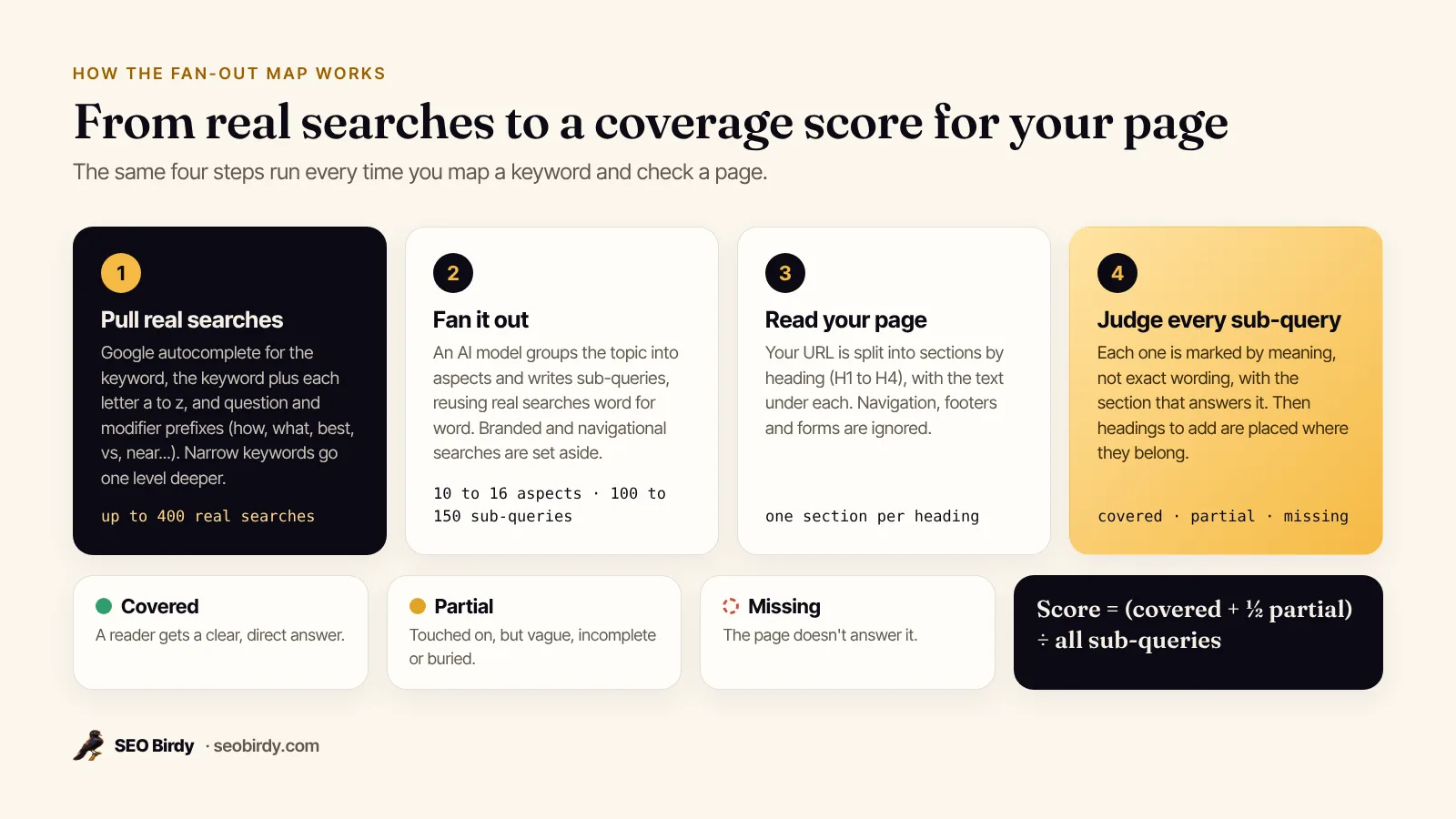
Our free Fan-Out Map is a generator built on real searches. It works in four steps:
- It pulls real searches. For your keyword and market, it collects Google autocomplete suggestions: the keyword alone, the keyword plus each letter of the alphabet, and question and modifier versions ("how," "what," "best," "vs," "near"). Narrow keywords get a second, deeper round.
- It fans the keyword out. An AI model, given those real searches, writes 10 to 16 aspects and 100 to 150 sub-queries, reusing real searches word for word wherever they fit and filling gaps the real list misses. Branded and navigational searches are set aside so they don't skew the map.
- It reads your page. If you add a URL, the page is split into sections by heading, with the text under each. Navigation, footers and forms are ignored.
- It judges coverage. Each sub-query is marked covered, partial or missing by meaning, not exact wording, with the section that answers it.
See every sub-question behind your keyword. The free Fan-Out Map builds the fan-out from real Google searches, groups it by aspect, and checks which sub-queries your page answers. One free map a day with no sign-up.
Make a free Fan-Out Map →How to measure query fan-out coverage on your page
A query fan-out analysis measures coverage by checking each sub-query against your page and marking it covered (a clear, direct answer), partial (touched on but vague or buried) or missing. Your coverage score is the covered sub-queries plus half the partial ones, divided by the total. Then look at which aspects score lowest: that's where to write next.
Here is what that looks like on a real page. We ran the Fan-Out Map on Google's own SEO Starter Guide for the keyword "seo starter guide":
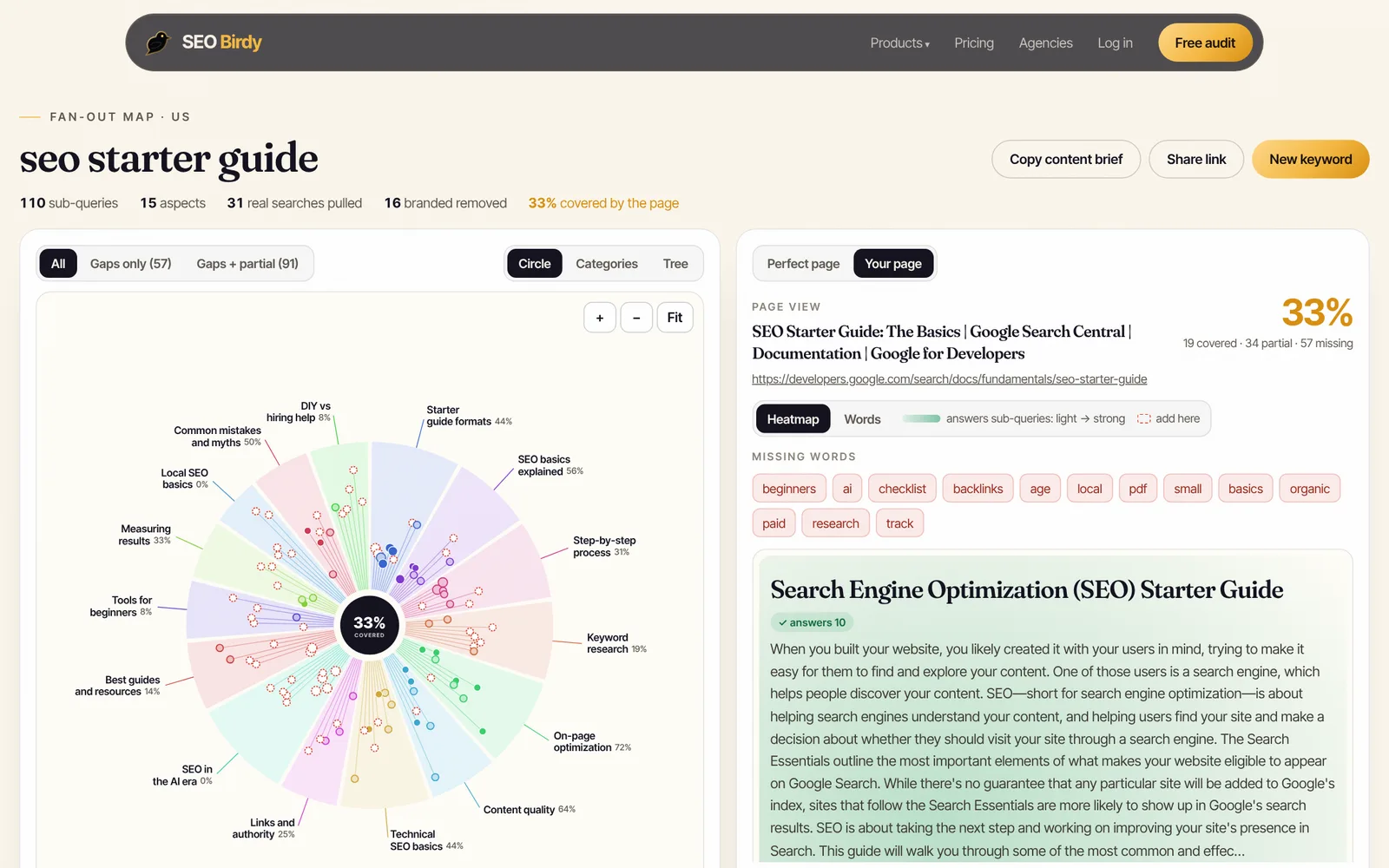
The page scored 33%: 19 sub-queries covered, 34 partial, 57 missing. That isn't a verdict on the page's quality. It's a reference guide that deliberately skips things like "SEO checklist PDF," local SEO and AI search. That's the right way to read any coverage score: a gap is only a problem if your readers need that answer and you want to rank for it.
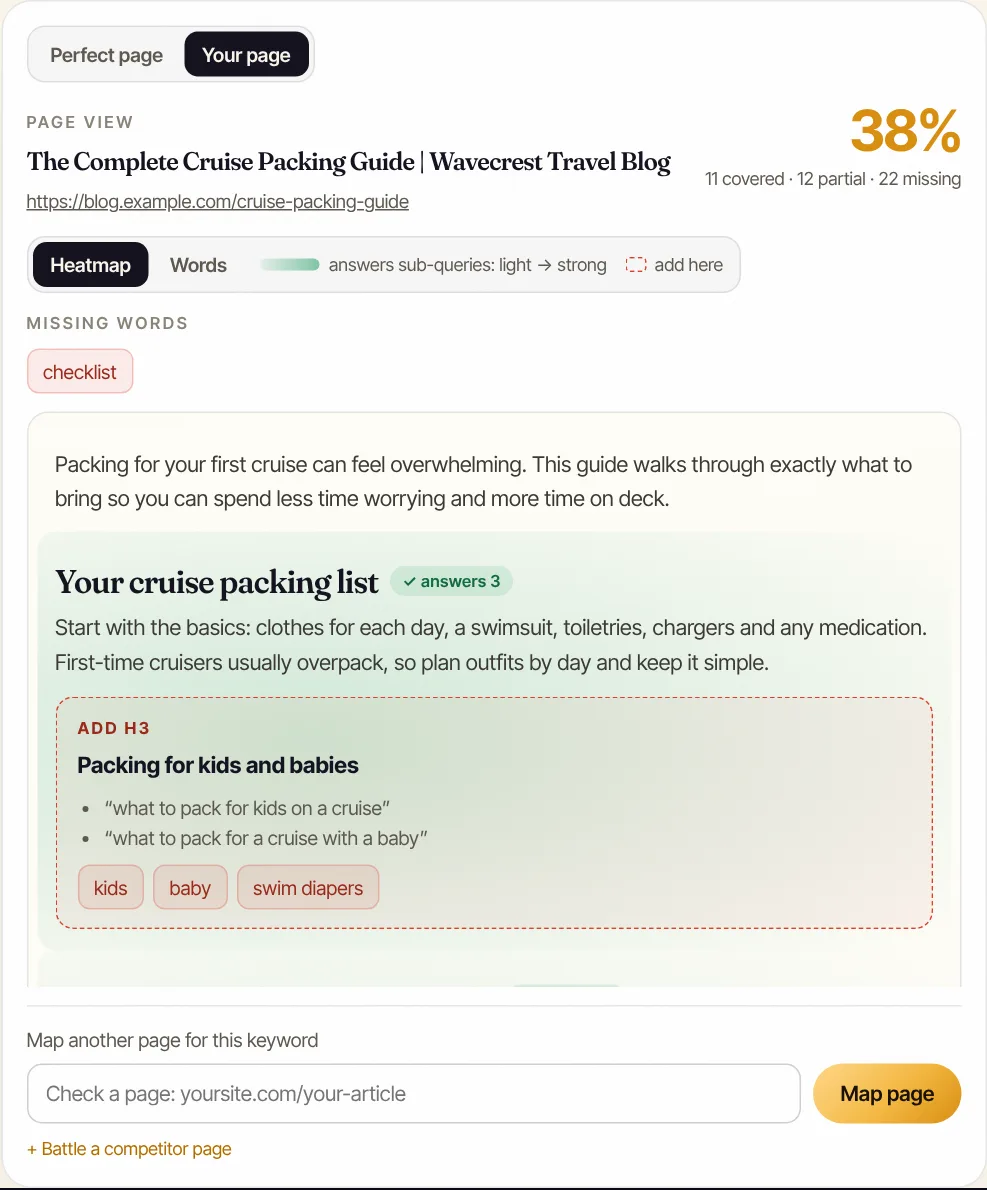
A coverage check is most useful when it tells you exactly what to add. The page panel shows each section of your page, how many sub-queries it answers, and new headings placed where they belong:
Three ways to use the result:
- Filter to gaps. Look at the missing sub-queries by aspect. A whole aspect at 0% usually means a missing H2.
- Check missing words. Words searchers use that your page never does ("checklist," "cost," "near me") point to vocabulary gaps.
- Battle a competitor. Map a competitor's page against the same keyword to see which aspects they answer that you don't.
When the whole page needs restructuring, the "perfect page" outline turns the fan-out into an H1, H2s by aspect and H3s from the closest sub-queries, which you can copy as a content brief.
Query fan-out for local businesses
For local businesses, query fan-out means a single question like "best plumber in Phoenix" is also asking about emergency availability, prices, licensing, reviews, service areas and specific problems. Your service pages should answer those, and your Google Business Profile and reviews should back them up, because AI answers draw on both.
A good local service page covers, at minimum:
- What you do and where, in the first paragraph, with the city and the neighborhoods you serve.
- Cost: typical price ranges or what drives the price, even if you can't quote online.
- Timing: response times, how long the job takes, emergency availability.
- Requirements: licenses, insurance, permits, what the customer needs to prepare.
- Comparisons: repair vs replace, one material vs another.
- Proof: reviews, photos of real jobs, guarantees.
- FAQs: the questions your front desk answers every week.
A plumber in Phoenix whose drain-cleaning page answers "how much," "how fast," "do you come out at night" and "what areas" gives AI Mode four passages to cite instead of one. To see whether the assistants already recommend you, run the free AI Visibility Audit, and read our guide to AI search visibility. Our guides to getting your business on ChatGPT and ranking in AI Overviews go further.
Query fan-out vs keyword research, People Also Ask and topic clusters
Query fan-out overlaps with ideas SEOs already use, but it isn't the same as any of them. Keyword research picks the topic, People Also Ask shows a few related questions, topic clusters organize many pages, and fan-out describes everything one complete answer must cover.
| Concept | What it is | How it relates to fan-out |
|---|---|---|
| Keyword research | Finding which searches have demand | Picks the page's main topic; fan-out fills in its contents |
| Long-tail keywords | Longer, more specific searches | Many fan-out sub-queries are long-tail searches |
| People Also Ask | A handful of related questions Google shows in results | A small, visible sample of the kinds of questions fan-out covers |
| Topic clusters | A hub page linked to related subtopic pages | Big fan-out aspects can become cluster pages |
| Query expansion | Search engines adding synonyms or related terms to one query | Fan-out goes further: many separate searches, not one broader one |
| RAG | Retrieving documents before an AI writes | Fan-out is a way to run the retrieval step across many angles |
If you work on AI search more broadly, our explainer on generative engine optimization covers the rest of the picture: citations, brand mentions and trust signals.
Query fan-out myths and limits
Query fan-out is real and documented, but it's easy to overstate. It doesn't require special markup, it isn't the same for every person or every day, and it doesn't reward long pages for being long. It rewards pages that answer the sub-questions clearly.
- "I need special schema for AI Mode." No. Google says there's no special schema.org structured data you need to add. Regular structured data still helps search engines understand your page.
- "There's one fixed list of sub-queries." No. The fan-out varies by engine, model, wording, follow-ups and context. Cover stable aspects, not one exact list.
- "More words means more citations." No. Google says it has no preferred word count. Padding makes passages harder to extract, not easier.
- "I can optimize for AI Mode separately from SEO." Not really. The page still has to be indexed, eligible for a snippet, fast and trustworthy. Fan-out coverage sits on top of those basics.
- "I can track AI Mode clicks separately." Not in Search Console's Performance report. Google says traffic from AI features is included in the overall search traffic there. Compare clicks and impressions on the pages you improved, before and after. Our Google Search Console for beginners guide shows how.
Content that covered the fan-out a year ago can drift out of date as questions change. If a page that used to earn clicks is slipping, see our guide to content decay.
Frequently asked questions
What does query fan-out mean in the context of AI platforms?
It means the AI doesn't answer your exact words directly. It first breaks your question into many related searches, such as costs, comparisons, requirements and follow-up questions, runs them at the same time, then writes one answer from the best passages it finds. Google says AI Mode and AI Overviews may use this technique. Pages that answer more of those sub-queries have more chances to be used.
Is there a free query fan-out tool?
Yes. SEO Birdy's Fan-Out Map is free: one map a day without an account, or 3 maps and 6 page checks a month with a free account. It pulls real Google autocomplete searches for your keyword, fans them out into sub-queries grouped by aspect, and can check which ones a page answers. No tool can show Google's private internal queries, so treat any fan-out as a model.
Does query fan-out replace keyword research?
No, it widens it. You still pick one main keyword per page, based on what your customers search. Fan-out then tells you what a complete answer to that keyword includes: the sub-questions, comparisons and specifics people and AI search expect. Think of the keyword as the page's topic and the fan-out as its table of contents.
Do I need special schema or markup for AI Mode?
No. Google states there's no special schema.org structured data needed for AI Overviews or AI Mode, and no additional technical requirements beyond being indexed and eligible to show with a snippet. Normal structured data still helps search engines understand your business, so keep LocalBusiness, Service and FAQPage markup where they fit the page.
Is the fan-out the same every time?
No. The exact sub-queries depend on the engine, the model version, the wording of the question, follow-ups and sometimes the person's location. That's why it's more useful to cover the stable aspects of a topic, such as cost, timing, comparisons and requirements, than to chase one list of exact phrases.
Can I see AI Mode clicks in Google Search Console?
Google says traffic from AI features is included in the overall search traffic in Search Console, so it shows up in your Performance report alongside regular results. There's no separate AI Mode filter in that report, so track the queries and pages you improved for fan-out coverage and compare their clicks and impressions before and after.
We build SEO Birdy's audits and autopilots, and we test every recommendation against live search results and AI answers before we publish it. Our guides follow Google Search Central and Bing Webmaster guidelines.