How to get your business on ChatGPT and recommended by it
You can't submit your business to ChatGPT, but you can become the name it recommends. 8 steps for local businesses, from robots.txt to Bing Places and reviews.


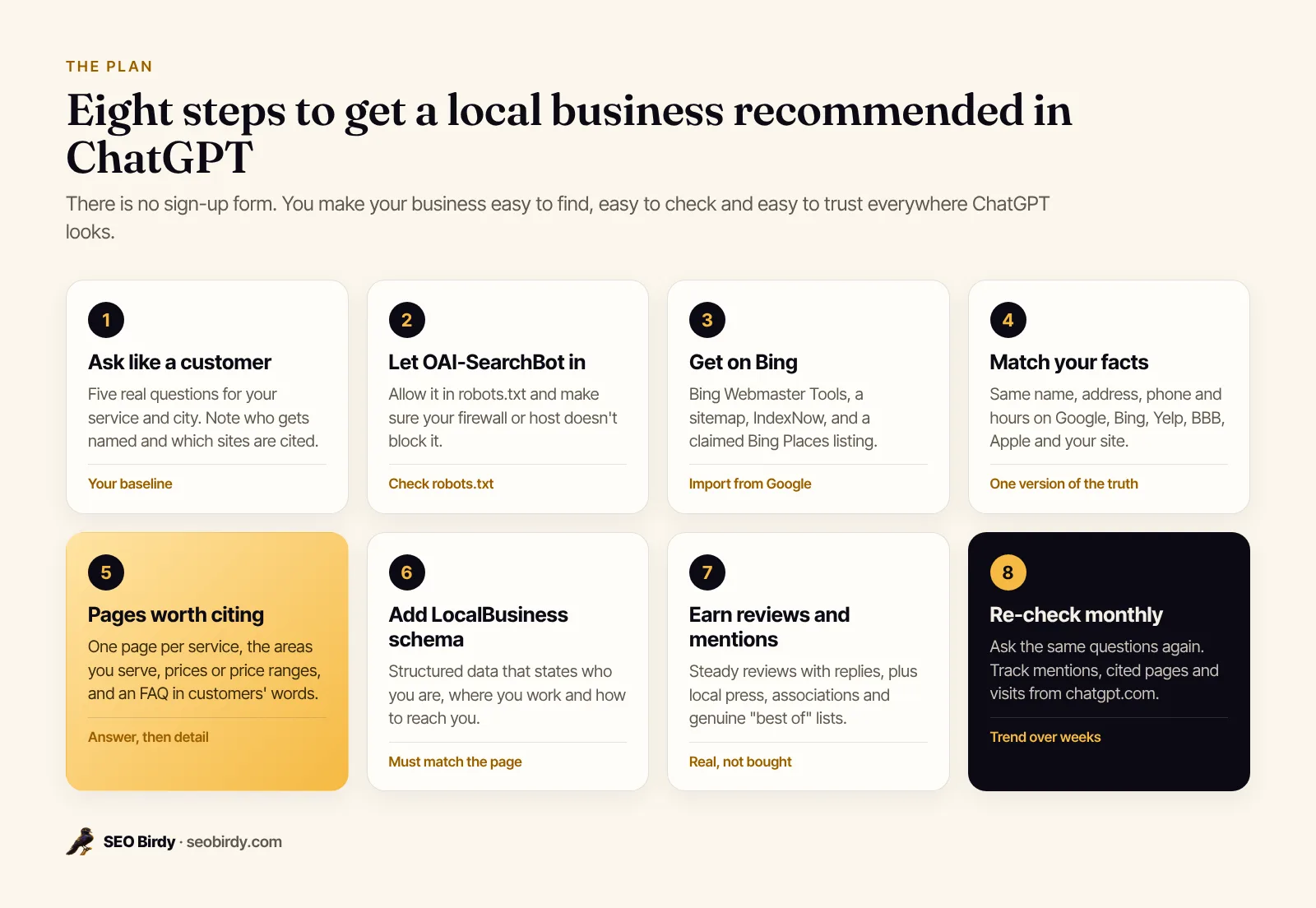
To get your business on ChatGPT, you don't submit anything. You make sure ChatGPT can find, check and trust you when it searches the web: let OpenAI's search crawler read your site, get listed on Bing and the directories it draws on, keep your details identical everywhere, publish pages that answer customers' questions, and earn reviews and local mentions.
That's the short version of how to get your business on ChatGPT, and it works for a plumber, a dental practice or a law firm. This guide walks through the eight steps in order, explains why each one matters, and shows you how to check your work. It's written for local businesses and the agencies that serve them, and it sticks to what OpenAI, Microsoft and Google actually document.
Can you add your business to ChatGPT?
No, you can't add or register your business on ChatGPT the way you claim a Google Business Profile. There's no submission form and no business directory to join. ChatGPT names businesses it finds and can confirm on the open web, so your job is to make those sources exist and agree.
This trips up a lot of owners, because searches like "how to register your business on ChatGPT" suggest a sign-up page somewhere. There isn't one for local businesses. The same goes for paying: OpenAI began testing ads in ChatGPT for US users on the Free and Go plans in February 2026, and it says ads are labeled as sponsored and that "ads do not influence the answers ChatGPT gives you." An ad is not a recommendation.
It's worth the effort because your customers are already asking. Pew Research found that 34% of US adults had used ChatGPT by early 2025, roughly double the share in 2023, and 58% of adults under 30 had. When one of them types "who's the best roofer in Tampa," a short list of names comes back. You want to be on it.
How does ChatGPT decide which businesses to recommend?
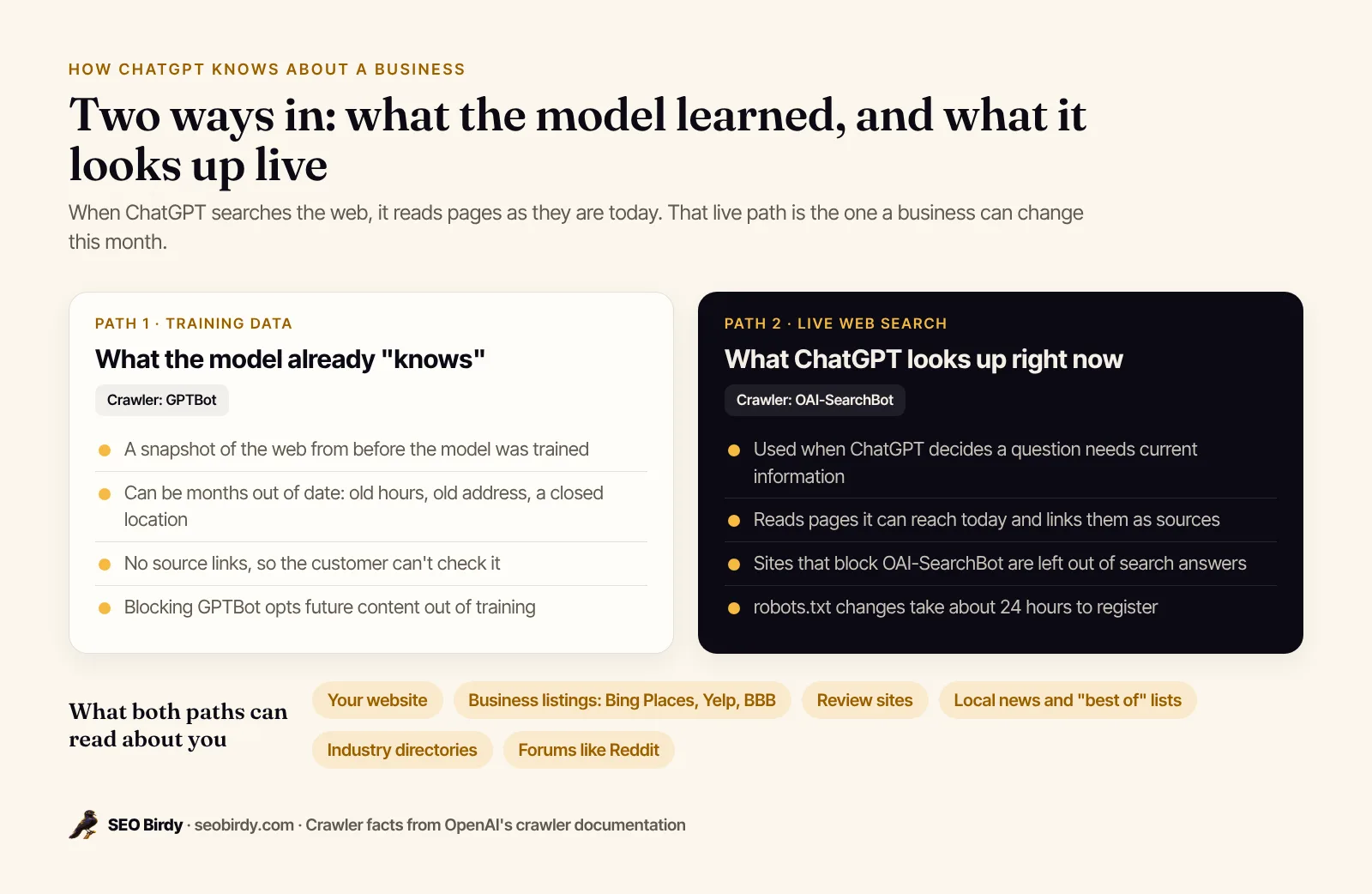
ChatGPT knows about businesses in two ways: from its training data, a snapshot of the web from before the model was built, and from live web search, which reads pages as they are today. For local questions that need current details, the live search is the part you can change, and it relies on pages its crawler can reach.
OpenAI's crawler documentation spells out the split. GPTBot collects content that may be used to train future models. OAI-SearchBot is "used to surface websites in search results in ChatGPT's search features," and sites that block it "will not be shown in ChatGPT search answers." A third agent, ChatGPT-User, visits a page when a person asks ChatGPT to open it.
What OpenAI doesn't publish is a ranking formula. Nobody outside the company knows exactly how ChatGPT weighs one source against another, and anyone who claims to is guessing. What the official guidance from Microsoft and Google does agree on, and what matches the answers our audits record, is a pattern: businesses that get named are easy to find on several independent sites, those sites agree on the basic facts, and there's recent evidence that customers are happy. Treat that as a strong pattern, not a published rule.
There's one more piece worth knowing. Microsoft says its search grounding "powers nearly every major AI assistant in the market," without naming which ones. That's reason enough to treat Bing as a first-class search engine for AI visibility, even if almost none of your customers use it directly. For the wider picture of how assistants build answers, see our guide to generative engine optimization.
Step 1: Check what ChatGPT says about your business today
Start by asking ChatGPT the questions your customers ask, with web search on, and write down what comes back: which businesses it names, in what order, and which websites it cites as sources. That baseline tells you whether you have a visibility problem, a facts problem or a reputation problem.
Use test prompts written the way a real customer would type them, not your business name. A dental practice in Austin might try:
- "Who is the best family dentist in Austin, TX?"
- "Can you recommend a highly rated dentist near Austin for a nervous patient?"
- "I need an emergency dentist in Austin today. Who should I call?"
- "Which Austin dental offices have the best reviews?"
- "Affordable but good dentist in Austin that takes walk-ins?"
Then ask one branded question, "What do you know about [your business name] in [city]?", to see whether the facts it holds about you are right.
Expect the answers to shift. Ask the same thing twice and you may get a different list, because the model writes a new answer each time and the search results it reads can change. That's normal. It's also why one check proves little: you need the same questions, asked the same way, repeated over time.
See who ChatGPT recommends instead of you. The free AI Visibility Audit asks ChatGPT, Gemini, Claude and Perplexity real customer questions for your service and city with live web search, then shows whether you're named, how high, which sites get cited, and who's picked in your place.
Run the free AI Visibility Audit →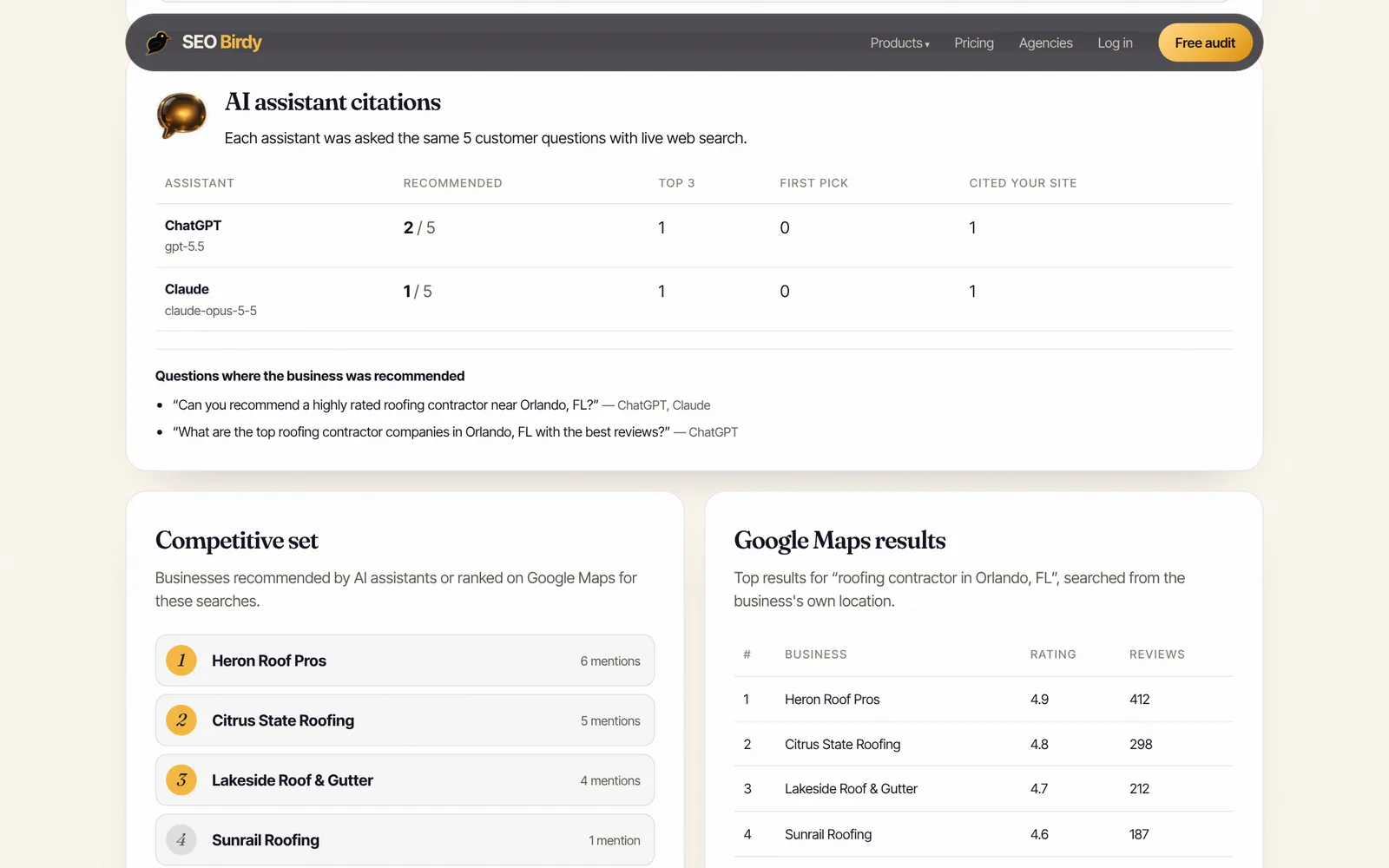
The report also scores your Google Maps position and your website's readiness, so you see all three layers in one place. You can see a full example in the sample report before you run your own.
Step 2: Make sure ChatGPT can read your website
ChatGPT can only cite pages its search crawler is allowed to fetch. Check that your robots.txt doesn't block OAI-SearchBot, that your host or security plugin isn't refusing it, and that your key facts sit in the page's HTML instead of being loaded only by scripts or locked inside images.
Open yourdomain.com/robots.txt in a browser. If you see User-agent: OAI-SearchBot followed by Disallow: /, or a blanket Disallow: / for every bot, you're invisible to ChatGPT search. A minimal setup that keeps you in search answers looks like this:
User-agent: OAI-SearchBot
Allow: /

User-agent: GPTBot
Disallow: /
That example blocks training while allowing search, which OpenAI explicitly supports: the two settings are independent. Whether to block GPTBot is a business choice. Blocking it doesn't remove you from ChatGPT search, but it does keep your future content out of training data, so the model's built-in knowledge of you may stay thinner. Most local businesses are better off allowing both.
A few other things quietly block AI crawlers:
- Firewall and bot-protection rules at your host or CDN that challenge unknown bots. OpenAI publishes the IP addresses OAI-SearchBot uses, so your host can allow them.
- Pages that need JavaScript to show their text. If your services and prices only appear after scripts run, a crawler may see an empty page.
- Facts trapped in images. Your phone number and hours in a banner graphic aren't readable text.
OpenAI says robots.txt changes take about 24 hours to register. For a deeper look at the different AI crawlers and what each one does, read our LLM SEO guide. Our free Website SEO Audit checks indexability, robots.txt and the on-page basics in under a minute.
Step 3: Get your business on Bing
Getting your business on Bing means two free setups: Bing Webmaster Tools for your website, and Bing Places for Business for your listing. Microsoft points local businesses to both in its AI guidance, and since its search grounding sits behind many AI assistants, a weak Bing presence can hold you back well beyond Bing itself.
When Microsoft launched AI citation reporting in Bing Webmaster Tools, it told local businesses to register with Bing Places so their address, hours and contact details stay current in AI responses, and recommended IndexNow to keep information fresh "across search and AI experiences" (Bing Webmaster Blog, February 2026).
How to list and verify your business on Bing
- Go to Bing Places for Business, which Microsoft describes as free, and sign in.
- Search for your business first. If a listing already exists, claim it instead of creating a new one, or you'll end up with duplicates.
- If you have a Google Business Profile, use the import option. Microsoft's October 2025 update to Bing Places says the import keeps details like your name, hours and contact information.
- Go through every field after the import, especially categories and service areas, and fix anything that didn't carry over.
- Complete verification, then search Bing Maps for your business name a week or two later to confirm the listing is live.
To update your business on Bing later, change it in the same place you manage it. If your listing syncs from Google, update Google first so the two don't drift apart.
How to submit your website to Bing
Add your site in Bing Webmaster Tools. If you already use Google Search Console, you can import your verified sites instead of verifying again. Submit your XML sitemap, then turn on IndexNow if your CMS or host supports it. IndexNow is "a simple ping so that search engines know that a URL and its content has been added, updated, or deleted," so a new service page or updated hours don't wait for the next crawl.
Step 4: Make your business facts match everywhere
Every listing that describes your business should give the same name, address, phone number, hours, website and service area. When ChatGPT finds three versions of your phone number, it has less reason to trust any of them, and it may simply recommend a competitor whose details agree.
Start with the profiles that feed the most other sites and assistants:
| Listing | Why it matters for AI answers |
|---|---|
| Google Business Profile | Gemini uses Google Maps place data for addresses, hours and ratings, and Google's own AI features draw on it |
| Bing Places | Microsoft recommends it for keeping AI responses current |
| Apple Business | Lets you claim your location on Apple Maps |
| Yelp | One of the most-read review sites for local services |
| BBB | A trust signal for contractors, movers and home services |
| Your industry's directories | Avvo for lawyers, Healthgrades for doctors, Houzz for remodelers, and so on |
OpenAI doesn't say ChatGPT reads Google Business Profile directly, but your Google profile is still the master copy. Its details get scraped and copied across the web, and Google's local ranking guidance says complete, accurate information helps you match the right searches. Our Google Business Profile optimization guide covers every field.
Step 5: Build pages ChatGPT can cite
ChatGPT cites pages that answer the question in front of it. Give it one clear page per service, a page or section for each area you serve, prices or price ranges where you can, and an FAQ written the way customers ask. Generic "we do it all" homepages rarely get cited.
Think about what a recommendation needs to be confident. If someone asks for "an emergency plumber in Tampa who does weekend calls," a page titled "Emergency plumbing in Tampa" that says "We answer calls 24/7, including weekends, across Tampa, Brandon and Riverview" is easy to match and easy to quote. A homepage that says "Quality service since 1998" is not.
Pages worth building or fixing:
- One page per service. Water heater repair, drain cleaning and repiping each get their own page, with what's included, typical timing and who it's for.
- Service area pages. Real content about the neighborhoods you serve, not the same text with the city name swapped.
- Pricing. Even a range ("most drain cleanings cost $150 to $300") gives an assistant something specific to cite when someone asks about cost.
- FAQ. Real questions from calls and emails, answered in two or three sentences each.
- About page. Who owns the business, licenses, insurance, years operating and awards.
Lead each section with the direct answer, then the detail. That's good writing for people and makes your page easy for any assistant to lift a passage from. To see which questions your customers ask around a topic, run it through the free Fan-Out Map, which shows the sub-questions AI search breaks a search into.
Step 6: Add LocalBusiness schema to your website
LocalBusiness schema is structured data that states, in a format machines read reliably, your business name, type, address, phone, hours, area served and links to your official profiles. It doesn't guarantee a recommendation, but it removes guesswork about who you are and where you work.
Use the most specific type that fits from schema.org's LocalBusiness list, such as Plumber, Dentist or RoofingContractor, and follow Google's local business structured data guidelines. Add a sameAs property that lists your Google, Bing, Yelp and social profile URLs, so every listing is tied back to one entity.
Two rules keep it useful. The markup must match what's visible on the page, and it must match your listings. Schema that says you open at 7 a.m. while your profile says 8 a.m. creates exactly the conflict you're trying to remove. Our step-by-step LocalBusiness schema guide has copy-ready examples.
Step 7: Earn reviews and real mentions on other sites
Reviews and independent mentions are how ChatGPT tells a recognized, trusted business from one that merely has a listing. Ask every happy customer for a review, reply to the ones you get, and earn mentions on local news sites, community lists, trade associations and the "best of" roundups that show up as sources in AI answers.
Google says plainly that "more reviews and positive ratings can help your business's local ranking," and that helpful replies help you stand out. The same evidence reads well to an assistant summarizing who to hire. Our guide on how to respond to Google reviews has reply templates for good and bad ones.
For mentions, look at the sources ChatGPT cited in Step 1. Those are the sites it already trusts for your category and city. Common ones for local services:
- Local news features and "best of" reader polls
- Chamber of commerce and trade association member directories
- Sponsorships of local teams, events or charities that link to you
- Community forums and Reddit threads where customers ask for recommendations
- Industry review sites and licensing boards
Earn these honestly. Fake or bought reviews break Google's review policies and can get removed, and Google's own guide to optimizing for generative AI search warns that "seeking inauthentic 'mentions' across the web isn't as helpful as it might seem." Genuine coverage lasts.
Step 8: Track your results and fix what's wrong
Re-ask the same customer questions every month, keep a record of who's named and which pages are cited, and watch your analytics for visits from chatgpt.com. Progress shows up as a trend: you appear in more answers, higher in the list, and your own site starts getting cited.
Keep a simple log with the date, the question, whether you were named, your position, and the cited sources. Over two or three months you'll see whether your work is moving anything. In Google Analytics, look at referral traffic from chatgpt.com to see whether those recommendations bring visitors, and track calls and form fills from them where you can.
How long does it take to get recommended by ChatGPT?
Technical fixes are quick: robots.txt changes register in about a day, and IndexNow gets new pages found within days. Recommendations take longer, typically a few months, because they depend on reviews, listings and mentions accumulating. A new business with few reviews should expect the slow end.
What to do when ChatGPT has wrong information about your business
If ChatGPT says you're closed, lists an old address or quotes the wrong hours, the fix is at the source. Find where the wrong fact lives (an old directory listing, a stale Bing record, a forgotten page on your own site), correct or remove it, and then re-check a few weeks later. You can also use the thumbs-down button in ChatGPT to report a bad answer, but correcting the source is what lasts.
If it keeps recommending a competitor, open the sources it cites for that competitor. Usually you'll find something concrete you lack: more recent reviews, a page for that exact service, or a mention on a local list.
Does this work for Gemini, Perplexity and AI Overviews too?
Almost everything in this plan helps on every assistant, because they all read the same open web. The main differences are which crawler and which map data each one uses: Gemini leans on Google Maps, Microsoft Copilot on Bing, and Perplexity on its own crawler, PerplexityBot.
If you've followed the steps above, you've covered the shared ground. For Google specifically, our guide on how to rank in AI Overviews covers the eligibility rules and Search Console's reporting. And if you want one report that checks all four assistants and your Maps ranking together, the AI Visibility Audit is free for one business, with five customer questions and a re-check every two weeks. Paid plans add weekly tracking and your own questions; see pricing for details.
Frequently asked questions
Can I pay ChatGPT to recommend my business?
No. You can't buy a place in ChatGPT's answers. OpenAI started testing ads in ChatGPT in the US in February 2026, but it says ads are labeled as sponsored, shown separately, and don't influence the answers ChatGPT gives. The recommendation itself has to be earned with a crawlable website, accurate listings, reviews and mentions on sites ChatGPT reads.
Is there a way to register or list my business on ChatGPT?
There is no ChatGPT business directory or submission form for local businesses. ChatGPT learns about businesses from the open web: your website, map and directory listings, review sites and local coverage. Getting listed means making sure those sources exist, agree with each other, and can be read by OpenAI's OAI-SearchBot crawler.
Does ChatGPT use Google Business Profile?
OpenAI doesn't say ChatGPT reads Google Business Profile directly, so don't count on it. Your profile still matters: Gemini uses Google Maps place data, Google's AI features use it, and the details on your profile get copied across the web. Keep it complete and identical to your Bing Places listing and website.
How do I get my website indexed by ChatGPT?
Allow OAI-SearchBot in your robots.txt, make sure your host or firewall doesn't block it, and keep your important text in the HTML rather than loaded only by scripts. Then get the site into Bing Webmaster Tools with a sitemap and turn on IndexNow, so new and updated pages are found quickly.
Why does ChatGPT recommend my competitor instead of me?
Usually because the competitor is easier to confirm. They tend to have more recent reviews, consistent listings, a clear page for the exact service and city, and mentions on local lists or news sites that ChatGPT cites. Run the same question yourself, open the sources it cites, and work out which of those you're missing.
Does ChatGPT recommend new businesses?
It can, but a new business starts with few sources to point to. Claim Google and Bing listings on day one, publish clear service and area pages, ask early customers for reviews, and join your chamber of commerce or trade association so independent sites mention you. Expect it to take a few months of steady signals.
How do I get my business to the top of ChatGPT's list?
Being named first usually comes down to being the easiest choice to justify for that exact question. Have a page for the precise service and city being asked about, more recent reviews than the businesses above you, and mentions on the local sources ChatGPT cites. Promoting your business on ChatGPT with ads won't move you up the answer itself.
How long does it take to show up in ChatGPT?
Technical fixes register fast: OpenAI says robots.txt changes take about 24 hours. Recommendations take longer because they depend on reviews, listings and mentions building up. Most local businesses should plan on re-checking monthly and judging progress over two to three months, since answers vary from one ask to the next.
We build SEO Birdy's audits and autopilots, and we test every recommendation against live search results and AI answers before we publish it. Our guides follow Google Search Central and Bing Webmaster guidelines.