How to respond to Google reviews: steps, examples and 40 reply templates
How to respond to Google reviews as a business owner: the steps, Google's own tips, examples for 5-star, negative and fake reviews, and 40 free templates.


To respond to Google reviews, open your verified Business Profile, select Read reviews, click Reply next to the review, and write a short, specific, polite response. Thank the reviewer by name, mention something they said, and for complaints, apologize and give a direct way to reach you. Google checks the reply and then shows it publicly under the review.
That's the mechanics. The harder part is what to say, especially to a one-star review that feels unfair. This guide covers how to respond to Google reviews of every kind: the exact steps, what Google itself recommends, examples for positive, mixed, negative and fake reviews, industry versions for healthcare, restaurants and contractors, and a free printable pack of 40 reply templates.
Get the 40 reply templates as a printable PDF. Fill-in-the-blank replies for 5-star, 4-star, star-only, mixed, negative and fake reviews, industry versions, a phrases-to-avoid table and a reply tracker.
Download “Google Review Reply Templates” (PDF)Why is responding to Google reviews important?
You should respond to Google reviews because it's one of the few things Google itself asks owners to do. Google recommends replying in its own tips to get more reviews, saying it shows "customers that their feedback matters," and in its local ranking tips. Replies also speak to every future customer who reads your reviews before deciding whether to call.
Think of each reply as written for two readers. The reviewer wants to feel heard. The next customer wants to know what happens when something goes wrong. A calm, specific reply to a bad review often does more for the second reader than a dozen five-star ratings.
Does responding to Google reviews help SEO?
Indirectly. Google says "more reviews and positive ratings can help your business's local ranking," and that "positive reviews and helpful replies can help your business stand out." It does not say replies themselves are a ranking factor. In practice, businesses that reply tend to keep earning reviews, because customers can see someone is listening, and reviews do feed rankings. Our guide on how to rank in Google Maps explains where reviews fit among Google's three local ranking factors.
Replies matter beyond Google, too. AI assistants that recommend local businesses lean on reviews and reputation, which we cover in how to get your business on ChatGPT.
How to respond to Google reviews as a business owner
You reply from your Business Profile while signed in to a Google account that has owner or manager access. The business must be verified first. Here are the steps from Google's Manage customer reviews help page:
- Go to your Business Profile. The quickest way is to search your business name on Google while signed in.
- Select Read reviews.
- Next to the review, select Reply.
- Write your reply in the box.
- Select Reply to submit it.
How to respond to Google reviews on your phone (iPhone or Android)
The same profile controls appear on a phone. Log in to the Google app or Google Maps with the account that manages the profile, search your business name, open your reviews and tap Reply. If you don't see the option, you're signed in to the wrong account or the profile isn't verified yet.
Who can respond to Google reviews?
Owners and managers of the profile can reply. Google's owners and managers help page shows both roles can respond to reviews; managers just can't add or remove users. If an employee or agency replies for you, give them manager access instead of sharing your password.
What happens after you reply?
Google checks each reply against its content policies, which usually takes up to 10 minutes and can take up to 30 days. The reviewer is notified, and your reply appears publicly under the review as a response from the owner. You can edit or delete your reply anytime from the same Read reviews screen. The reviewer can also edit their review afterward.
Replies are text only, so you can't respond to Google reviews with photos. If a reviewer complains about something you've since fixed, describe the fix in words and add the new photos to your profile.
How to professionally respond to Google reviews
A good, professional reply is short, personal and specific: it uses the reviewer's name, mentions a detail from their review, and, if something went wrong, says what you'll do about it and how to reach you. Google's tips boil it down to being professional and polite, keeping it brief, varying your replies, and being conversational rather than promotional.
The best practices for responding to Google reviews:
- Reply quickly. Google says prompt replies show you value feedback. Aim for two business days, and the same day for complaints.
- Personalize. Use their first name and sign with yours. Google suggests signing with your name or initials.
- Be specific. "Glad the crew left your yard spotless" beats "Thanks for your business."
- Don't sell. Google advises against using replies to offer deals. Skip the coupon codes and keyword-stuffed city names.
- Protect privacy. Never share a reviewer's private details, even if they shared them first.
- Apologize when it's earned, and don't take responsibility for things outside your control.
How to respond to positive Google reviews
Respond to a positive or nice Google review by thanking the person by name, repeating one specific thing they praised, and closing warmly. Two to four sentences is plenty. Mention the staff member they named, because that person will read it too, and add a useful tip or a reason to come back if it fits naturally.
Here are positive Google review response examples and sample reply messages you can adapt.
5-star review: "They replaced our whole roof in two days and left the yard cleaner than they found it."
Thank you, Maria. Two days with a full crew is exactly how we like to work, and we're glad the cleanup stood out. Enjoy the new roof, and call us anytime you need a check-up before storm season.
5-star review naming a staff member: "Dr. Patel's hygienist Jess was so gentle."
Thank you for the kind words about Jess. She'll be thrilled to hear it. Our whole team works hard to make every visit comfortable.
(Note what that healthcare reply doesn't do: it doesn't confirm a visit or mention any treatment.)
4-star review: "Great food, but we waited 20 minutes for a table even with a reservation."
Thanks, Andre. You're right about the wait, and we've added a host on Friday nights so reservations are seated on time. Glad the food made up for it. We'd love to earn that fifth star next visit.
How to respond to a Google review without comments
For a star-only rating, a one-line thank-you is fine: "Thank you for the five-star rating, Priya. We appreciate you choosing us." For a low star-only rating, invite them to share more: "Thanks for rating us. If there's something we could have done better, I'd like to hear it at [email]."
How to respond to negative Google reviews
Respond to a negative, nasty or poor Google review within a day, in four moves: thank them and apologize, name the specific problem so they know you read it, say what you're doing about it, and give a real name and direct contact to continue offline. Keep it under about 90 words, and don't argue the facts in public.
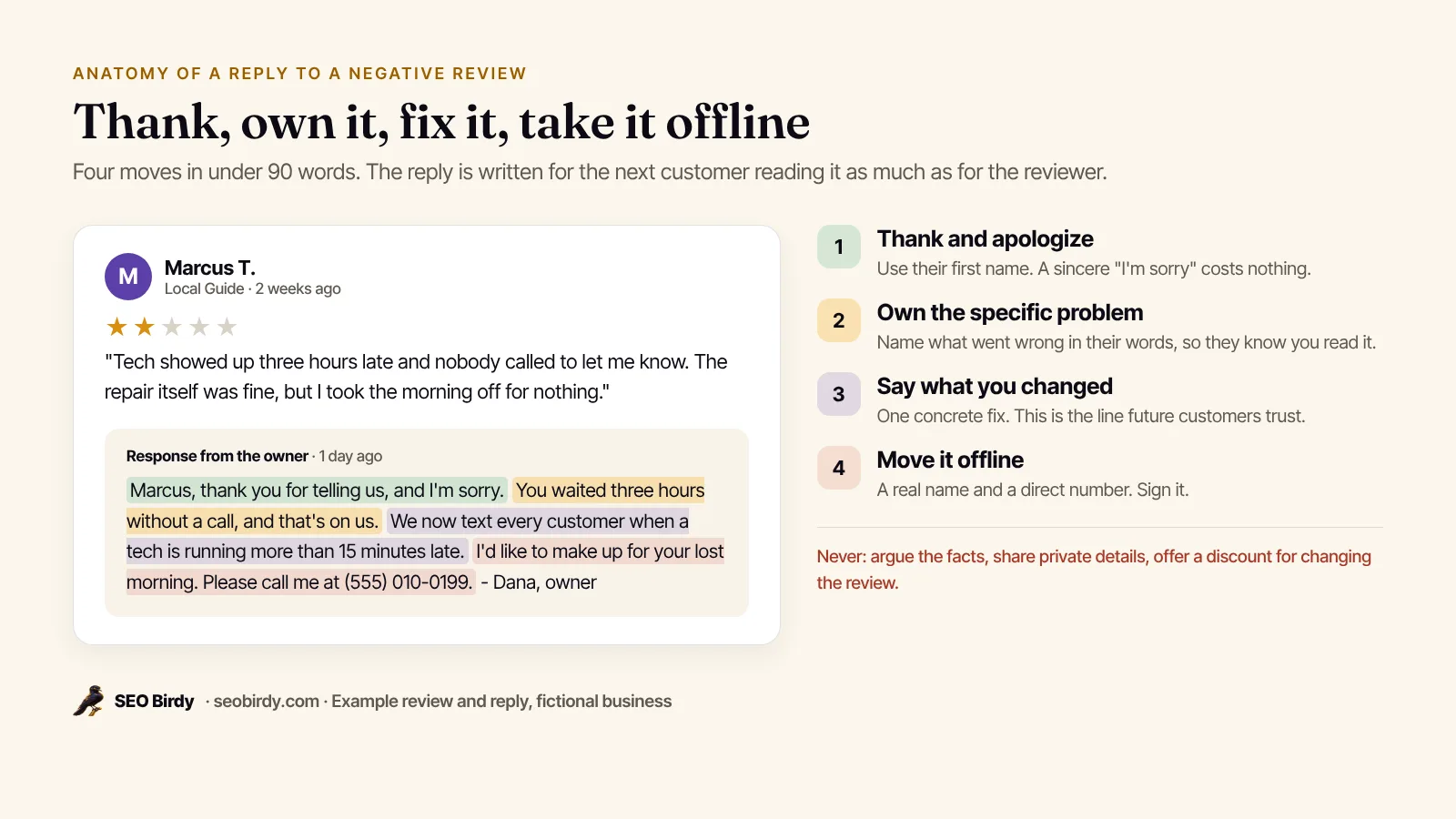
Google's guidance on negative reviews matches this shape. Its tips say to acknowledge real mistakes, apologize when appropriate, never share a reviewer's private information or make personal attacks, and ask the reviewer to contact you by phone or email for complex issues.
Negative Google review response examples:
1-star review, service problem: "Nobody showed up for my 8 a.m. appointment and nobody called."
James, I'm sorry. Missing your window without a call isn't acceptable, and I'm looking into what happened with our dispatch that morning. I'd like to make this right. Please call me directly at (555) 010-0142. - Dana, owner
2-star review, price complaint: "Way more expensive than the estimate."
Thanks for your feedback, Lena. I'm sorry the final bill was a surprise. Our estimates should explain exactly what can change the price, and I'd be glad to walk through your invoice with you. Please call me at (555) 010-0142. - Dana
How to respond to a Google review that is not true
When the customer is wrong or the review isn't true, stay factual, brief and kind, and correct only what a future customer needs to know. "We don't offer weekend service, so I'd like to understand what happened. Please call me." Don't call the reviewer a liar, don't post their job details to prove your point, and never threaten legal action in a reply. Readers side with the calm party.
What not to say in a reply to a negative review
- "We're sorry you feel that way." It reads as blame.
- "As per our policy..." It sounds cold.
- Any detail that identifies the customer: dates, addresses, invoices, diagnoses.
- An offer of a refund or discount in exchange for changing or removing the review. Google's tips say offering anything for posting, changing or removing a review is "strictly prohibited."
You can absolutely make things right with a refund. Just don't make it conditional on the review.
How to respond to mixed and 3-star reviews
A 3-star review usually means "good, but." Credit the part that went well, own the part that didn't, and say what you've changed. These reviewers are often the easiest to win back, because they've told you exactly what to fix.
Thank you for the honest review, Sam. We're glad the haircut was what you wanted, and sorry the wait ran past your appointment time. We've started spacing bookings 10 minutes further apart on Saturdays. Hope to see you again.
How to handle fake, unfair or untrue Google reviews
If a review breaks Google's policies, report it; if it's simply unfair, reply calmly. Google removes reviews that violate its Maps content policy, such as fake engagement, off-topic rants, conflicts of interest from competitors or former employees, and personal information. It won't remove a review "just because you disagree with it."
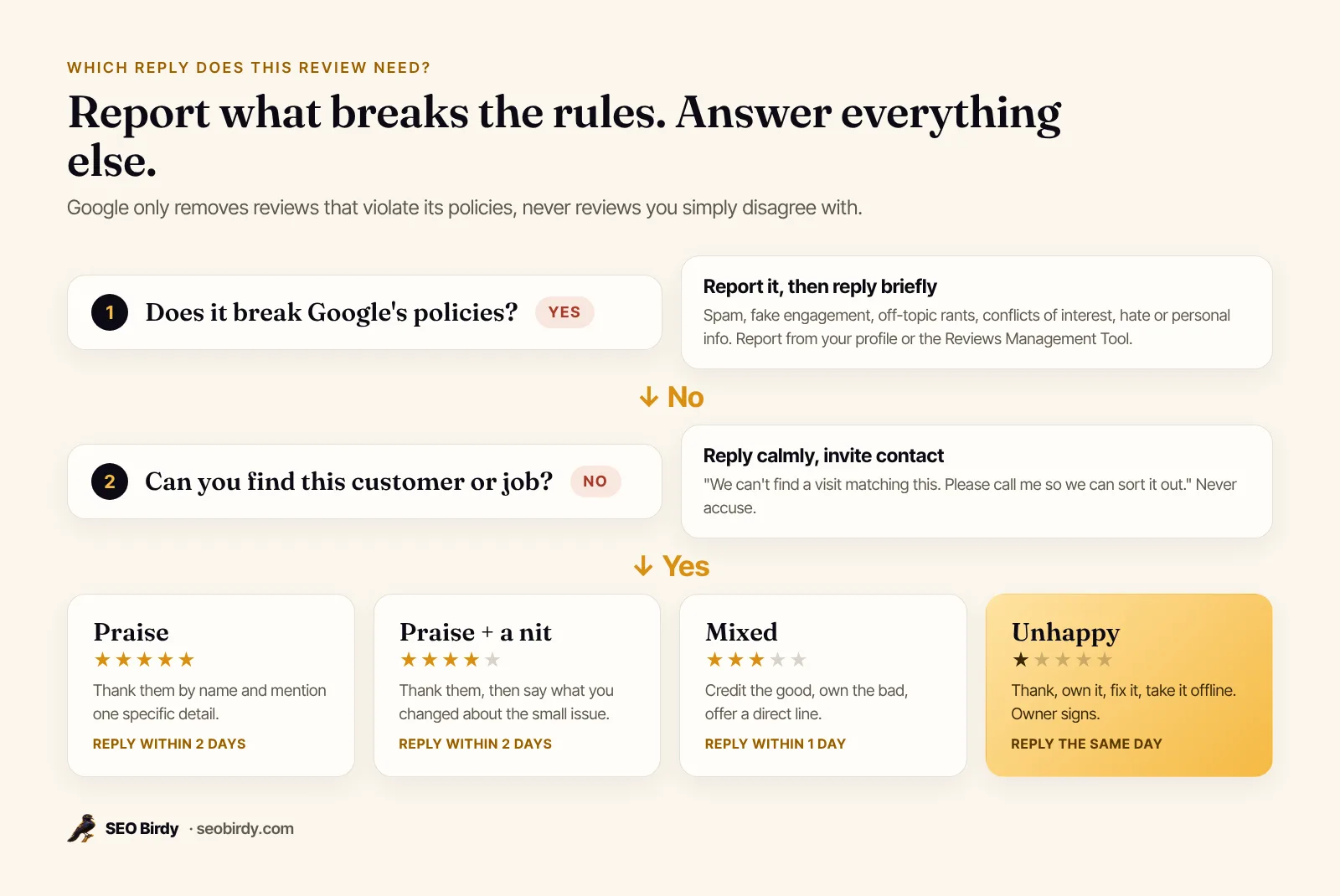
How to report a fake Google review
From Google's report inappropriate reviews help page:
- Go to your Business Profile and select Read reviews.
- Next to the review, select the Report icon.
- Choose a reason, such as spam or conflict of interest, and send the report.
- Track it in the Reviews Management Tool, where the status shows as decision pending, no policy violation, or escalated.
- If Google finds no violation, you can submit a one-time appeal from the same tool.
Google says evaluation "typically takes several days." While you wait, post a short reply so readers see your side:
We can't find any visit matching this description in our records. If you've worked with us, please call me at (555) 010-0142 so we can sort it out.
What if someone demands money to remove fake reviews?
Don't pay. Google says it has upgraded its systems to catch scams that "demand payment in exchange for removing fake one-star reviews," and that when it sees a sudden spike in spam reviews it removes them, pauses new reviews on the profile and alerts the owner, per its April 2026 announcement. Report each review and keep records of the demand.
The rules work both ways
The same policies that protect you limit what you can do. Google's content policy bans businesses from offering incentives for reviews, discouraging negative reviews, and selectively soliciting positive ones (review gating). The FTC's guide on soliciting and paying for online reviews says the same: "Don't ask for reviews only from customers you think will leave positive ones." And the FTC's final rule on fake reviews bans fake and AI-generated reviews, buying reviews, and suppressing negative ones with groundless legal threats or intimidation.
If Google finds a business owner faked engagement, it may restrict the profile: blocking new reviews, unpublishing existing ones, or showing a warning that fake reviews were removed. The honest way to grow your rating is to ask every customer, using the review link or QR code Google gives you.
Google review response examples by industry
Every industry has its own sensitive spots. Here's how to adjust.
Dentists, doctors and other healthcare providers
Never confirm the reviewer is a patient, and never mention a visit, treatment or condition, even if the patient described it in the review. Health privacy rules apply to your reply. Respond generally and move it offline:
Thank you for your feedback. We take every concern seriously, but privacy rules prevent us from discussing details here. Please call our office manager, Tara, at (555) 010-0175 so we can talk privately.
Restaurants and hotels
Name the dish or the room detail in positive replies, because it reads as genuine and tells other diners what to order. For complaints about cleanliness or food safety, say exactly what you've done: "We've retrained the closing team and added a mid-shift check." Specific fixes reassure readers more than apologies alone.
Home services: plumbers, roofers, HVAC, cleaners
Most complaints are about timing and communication, not workmanship. Own the scheduling problem, name the fix (text alerts, arrival windows), and offer a callback. For workmanship complaints, offer an inspection rather than debating it in public.
Lawyers, accountants and financial advisers
Like healthcare, don't confirm the reviewer is a client or discuss any matter, and check your professional conduct rules before replying. Thank them, keep it general, and give the office number.
The PDF pack above includes ready-made versions of all of these, plus salons, auto repair and retail.
Can you use AI to respond to Google reviews?
Yes, as long as a person checks every reply before it goes out. AI is good at the blank-page problem: it can draft a warm, specific reply in seconds. It's bad at knowing what actually happened, so an unchecked AI reply can promise a refund you don't offer or confirm details you shouldn't. Draft with AI, edit as the owner, then post.
This is how Maps Autopilot works. When a new review arrives, it drafts a reply in your voice that thanks the reviewer by first name and references what they said. For one to three stars, it apologizes sincerely, invites them to contact you directly, and never invents discounts or promises. Every draft waits for your approval unless you switch on auto-posting for 4 and 5-star replies.
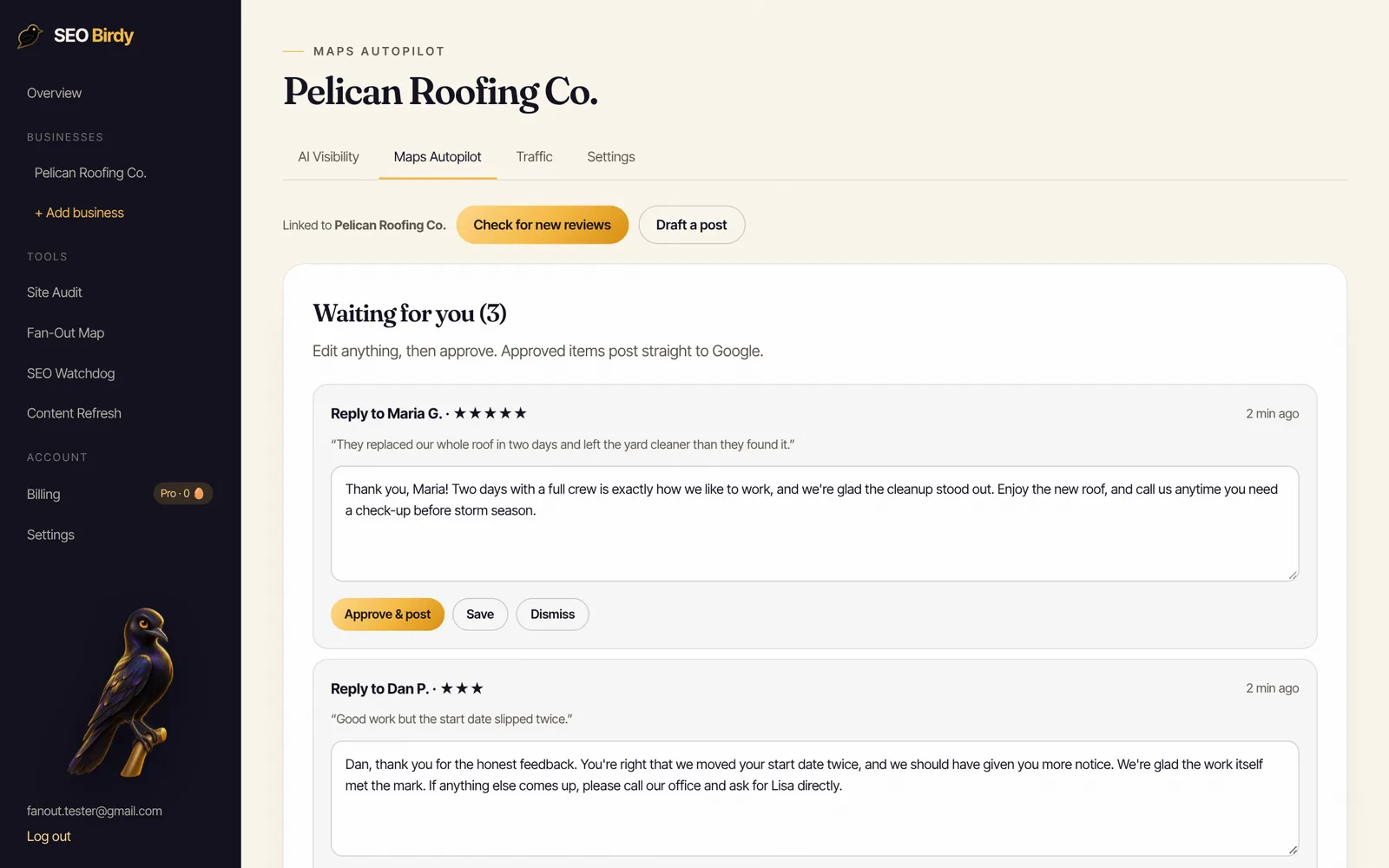
Never leave a review unanswered again. Maps Autopilot drafts a personal reply to every new Google review, in your voice, and waits for your one-click approval. It also writes a weekly Business Profile post and tracks your Google Maps rank across your area.
See Maps Autopilot →What if the reviewer replies back?
Customers can't reply under your response, but they can edit their review, and Google notifies them when you respond. If they update it after you've fixed the problem, thank them for the update in an edited reply. If they're still unhappy, repeat your offer once, briefly, and leave it there. A long public back-and-forth helps no one.
If you're the customer and want to answer an owner's reply, edit your own review to add the update. That's the only way to respond on Google.
How to get more Google reviews without breaking the rules
Ask every customer, at the moment they're happiest: when the job's done, at checkout, in the thank-you email. Google lets you create a review link or QR code from your profile on a computer. Put it on receipts, invoices and follow-up texts. Then keep replying, because a profile with answered reviews is one people are more willing to review.
Reviews are one part of a strong profile. Our Google Business Profile optimization guide covers the rest, and our local SEO checklist covers everything beyond Google. Agencies managing reviews for many clients can offer this under their own brand through our white-label program. To see how your rating and review count compare with nearby competitors, run the free AI Visibility Audit.
See your review gap against the competition. The free AI Visibility Audit compares your Google Maps position, rating and review count with the top local competitors, and shows whether AI assistants recommend you.
Run the free AI Visibility Audit →Frequently asked questions
Does responding to Google reviews help SEO?
Google lists replying to reviews in its tips to improve local ranking, saying replies show you value feedback and help your business stand out. It hasn't said replies are a ranking factor on their own. What Google does confirm is that more reviews and positive ratings can help ranking, and replies make customers more willing to leave them, so the effect is real even if it's indirect.
Should you respond to all Google reviews?
Yes, if you can keep up. Google's tips say to reply to all reviews and to vary your replies rather than posting the same generic thank-you. If time is short, answer every negative and mixed review first, then positive reviews with written comments, then star-only ratings. A short, specific reply beats a long copied one every time.
Can you reply to Google reviews privately?
No. Replies to Google reviews are public and appear under the review labeled as a response from the owner. To talk privately, reply publicly with a short apology and a direct phone number or email, then continue the conversation there. Google's tips recommend exactly that for complex issues, and it keeps private details out of public view.
How long does it take for a Google review reply to show up?
Google checks every reply against its content policies before it goes live. Google says this usually takes up to 10 minutes but can take up to 30 days. If a reply isn't approved, you're asked to edit it. Once it's live, the reviewer is notified, and the reply shows publicly under their review.
Can you respond to Google reviews as a customer?
A customer can't post a reply under someone else's review, but you can edit your own review at any time, including after the owner responds. Edit it to add an update, such as the business fixing the problem. You can also mark other reviews as helpful. Only the verified owners and managers of a Business Profile can post the owner response.
Should you respond to old Google reviews?
Yes, especially unanswered negative ones that still show near the top. A short reply to an old complaint, explaining what you've changed since, shows future customers you take feedback seriously. Don't flood dozens of years-old five-star reviews in one afternoon with copied thank-yous. Work through them gradually and keep each reply specific.
Can doctors and dentists respond to Google reviews?
Yes, but carefully. Healthcare providers shouldn't confirm that the reviewer is a patient or mention any visit, treatment or condition, because health privacy rules apply even when the patient shared the details first. Reply generally, thank them, and invite them to call the office manager. Have your compliance officer approve your reply templates.
We build SEO Birdy's audits and autopilots, and we test every recommendation against live search results and AI answers before we publish it. Our guides follow Google Search Central and Bing Webmaster guidelines.