How to rank in Google Maps: a 12-step plan for local businesses
How to rank in Google Maps and the map pack: what Google confirms about relevance, distance and prominence, 12 steps to climb, and how to track progress.


To rank in Google Maps, you need a verified Business Profile that matches the search (relevance), a real location near the searcher (distance), and more reviews, ratings and links than nearby competitors (prominence). Google names those three factors itself, and everything that works in local SEO feeds one of them.
This guide shows you how to rank in Google Maps step by step: what Google actually confirms, the 12 actions that move a profile into the map pack, how to rank outside your city, why rankings drop, and how to check where you really stand across your service area. Every Google-specific claim links to Google's own documentation.
What is the Google map pack?
The Google map pack (also called the local pack or 3-pack) is the box of three business listings with a map that Google shows for searches with local intent, like "roofer near me" or "dentist in Austin." Clicking "More places" opens the full list in Google Maps, where the same ranking system orders dozens of businesses.
The map pack and Google Maps draw on the same Business Profiles, so when people ask how to rank in Google Maps, they usually mean both: the top three on the results page and the top of the list inside the Maps app. Your position in each depends on where the searcher is standing, which is why two people in the same city can see different results.
Is the map pack the same as ads?
No. Ads can appear above or inside local results and in Maps, marked "Sponsored." In some service categories, Local Services Ads appear too. Those are paid placements with their own auctions. The organic map pack below them is earned, and Google states plainly that "there's no way to request or pay for a better local ranking on Google" in its local ranking help article.
How does Google rank businesses on Google Maps?
Google ranks local results mainly on three factors: relevance (how well your profile matches the search), distance (how far you are from the searcher) and prominence (how well known your business is, based partly on links to your site and your reviews). Google combines them, so a closer business can lose to a better-known one.
Here is exactly what Google's Tips to improve your local ranking page says, and what each factor means in practice.
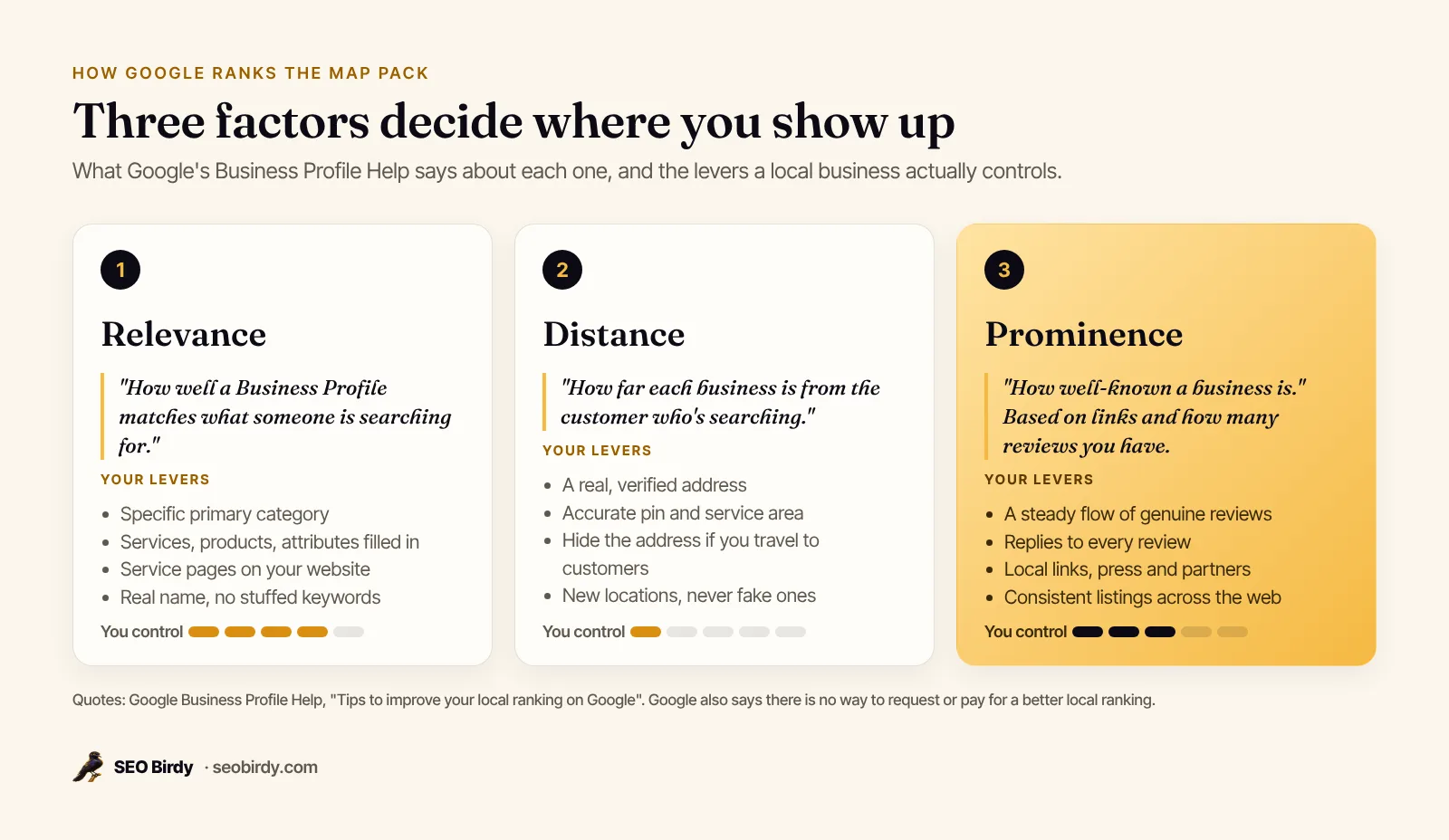
| Factor | Google's definition | What it rewards | How much you control it |
|---|---|---|---|
| Relevance | "How well a Business Profile matches what someone is searching for" | The right categories, complete services, a website that explains each service | A lot |
| Distance | "How far each business is from the customer who's searching" | Being close to the searcher; Google estimates location if the searcher doesn't share it | Very little |
| Prominence | "How well-known a business is," based on links and reviews | Review count, positive ratings, links and mentions across the web | A lot, over time |
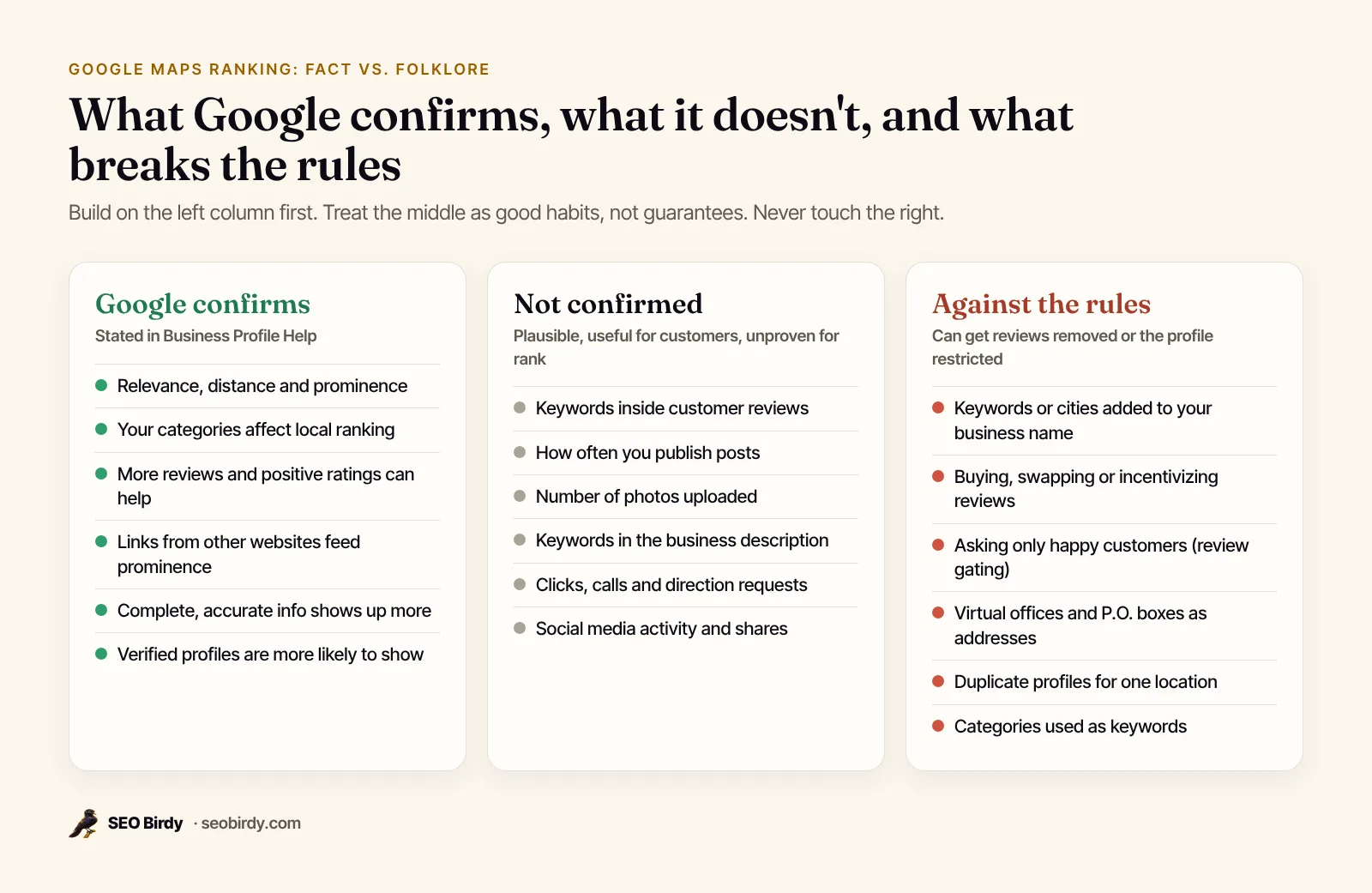
Google also says "the categories you select affect your local ranking" in its category help page, and that "businesses with complete and accurate info are more likely to show up." Beyond that, Google keeps the details confidential. Plenty of popular advice, like posting every day or stuffing keywords into your description, is not something Google has confirmed.
How to rank higher in Google Maps: 12 steps
The fastest way to rank higher and increase your ranking on Google Maps is to fix relevance first (category, services, website), then make sure Google trusts your location (verification, address, service area), then build prominence every month (reviews, replies, links). Work through the steps in order. The early ones take an afternoon and the later ones never really stop.
1. Claim and verify your Business Profile
Verification tells Google you're authorized to manage the business, and Google says a verified business is "more likely to show up in search results." Google offers phone, text, email, video and postcard verification depending on your business, and reviews usually take up to five business days, per its verification help page. Nothing else on this list matters much until this is done.
If you're not on Google yet, putting your business on Google Maps works the same for a restaurant, a shop or a plumber: sign in to Business Profile with a Google account, add your business name, category and address (or service area), then verify. It's free.
2. Pick the most specific primary category
Choose the category that completes the sentence "This business IS a..." and pick the specific option over the general one: "Nail salon" rather than "Salon," which is Google's own example. Add a few secondary categories only for real departments or services. Google's guidelines for representing your business say to use as few categories as possible and never use them as keywords.
To choose, search your main service and look at the primary category of the businesses already in the top three. If they all use one you don't, that's your first test.
3. Use your real business name
Your name on Google should match your storefront, website and stationery. Google's guidelines forbid adding marketing taglines, service descriptions or locations like "near downtown." A plumber called "Brightline Plumbing" should not be "Brightline Plumbing Emergency Plumber Tampa." Stuffed names do sometimes rank for a while, which is why people try it, but they invite user edits and suspensions. Report competitors who do it with "Suggest an edit" and build on clean ground yourself.
4. Get your address, pin and service area right
Use your real street address and check that the map pin sits on your building. If you travel to customers and don't serve them at your address, remove the address from public view and add up to 20 service areas within about two hours' drive. Virtual offices and P.O. boxes aren't eligible, and a profile built on one is at risk of suspension.
5. Complete every field that applies
Fill in hours (including holiday hours), phone, website, services, products, attributes, opening date and a 750-character description. Complete, accurate info is one of the few things Google explicitly ties to showing up more. Our Google Business Profile optimization guide walks through every field, with the rule for each.
6. Build a service page for each main service
Relevance doesn't stop at your profile. Link your profile to a page that clearly explains the service people search for, with your city, service area, prices or price ranges if you publish them, and FAQs. If you offer drain cleaning, water heater repair and repiping, give each its own page. Add local business schema so search engines read your name, address and hours consistently, and run the page through our free Website SEO Audit to catch missing titles, headings and schema.
7. Ask every customer for a review
Google says "more reviews and positive ratings can help your business's local ranking." The way to get more is boring and reliable: ask every customer, every time, with your review link or QR code. Never offer discounts or gifts for reviews, and never ask only the happy ones. Google's Maps content policy bans both.
8. Reply to every review
Google lists replying to reviews in its local ranking tips because it "shows that you value their feedback." Replies also help the person deciding between you and the business above you. Thank people specifically, and answer complaints calmly with a way to make it right. Our guide on how to respond to Google reviews has templates for every star rating.
9. Add real photos and videos
Upload photos of your storefront, team, vehicles and finished work, plus short videos. Google recommends JPG or PNG files at 720 by 720 pixels and says photos "should represent reality" in its photo help page. Photos aren't a confirmed ranking factor, but they are often the first thing people look at before calling.
10. Earn local links and mentions
Prominence is partly based on "how many websites link to your business." Sponsor a youth team, join your chamber of commerce, get listed by suppliers and manufacturers you're certified with, and offer quotes to local news when your trade is in the headlines. Keep your name, address and phone (your NAP) consistent everywhere you're listed, so Google can match every mention to the same business.
11. Keep the profile active
Post updates, add new photos, update holiday hours and answer messages. Google hasn't said activity is a ranking factor, but current information is part of "complete and accurate," and posts give searchers a reason to choose you. See our guide to Google Business Profile posts for ideas that don't feel like filler.
12. Track rank across your whole area
Search "plumber" from your office and you'll probably see yourself near the top. Search from five miles away and you may not appear at all. Measure with a geo-grid that checks rank from many points across your service area, and re-check after each change so you know what worked. We explain how in our guide to local rank tracking.
Do steps 7, 8, 11 and 12 on autopilot. Maps Autopilot drafts a reply to every new review, writes a weekly post for your service and city, and scans a geo-grid of your Google Maps rank every week, so you can see which blocks you win and which you don't. Nothing publishes without your approval unless you switch that on.
See Maps Autopilot →How do you rank in the top 3 on Google Maps?
To reach the top three, compare your profile with the three businesses that hold those spots for your main search, from the area you want to win, and close every gap you can: their primary category, review count and recency, rating, photos, website pages and links. The top three is a relative contest. You only need to beat who's there.
Run that comparison for a real search, like "roofing contractor in Orlando, FL." Note each competitor's category, rating and review count, and how recently customers reviewed them. Our free AI Visibility Audit does this cross-check for you: it shows the businesses ranked on Google Maps for your service and city, with their ratings and review counts, next to who AI assistants recommend.
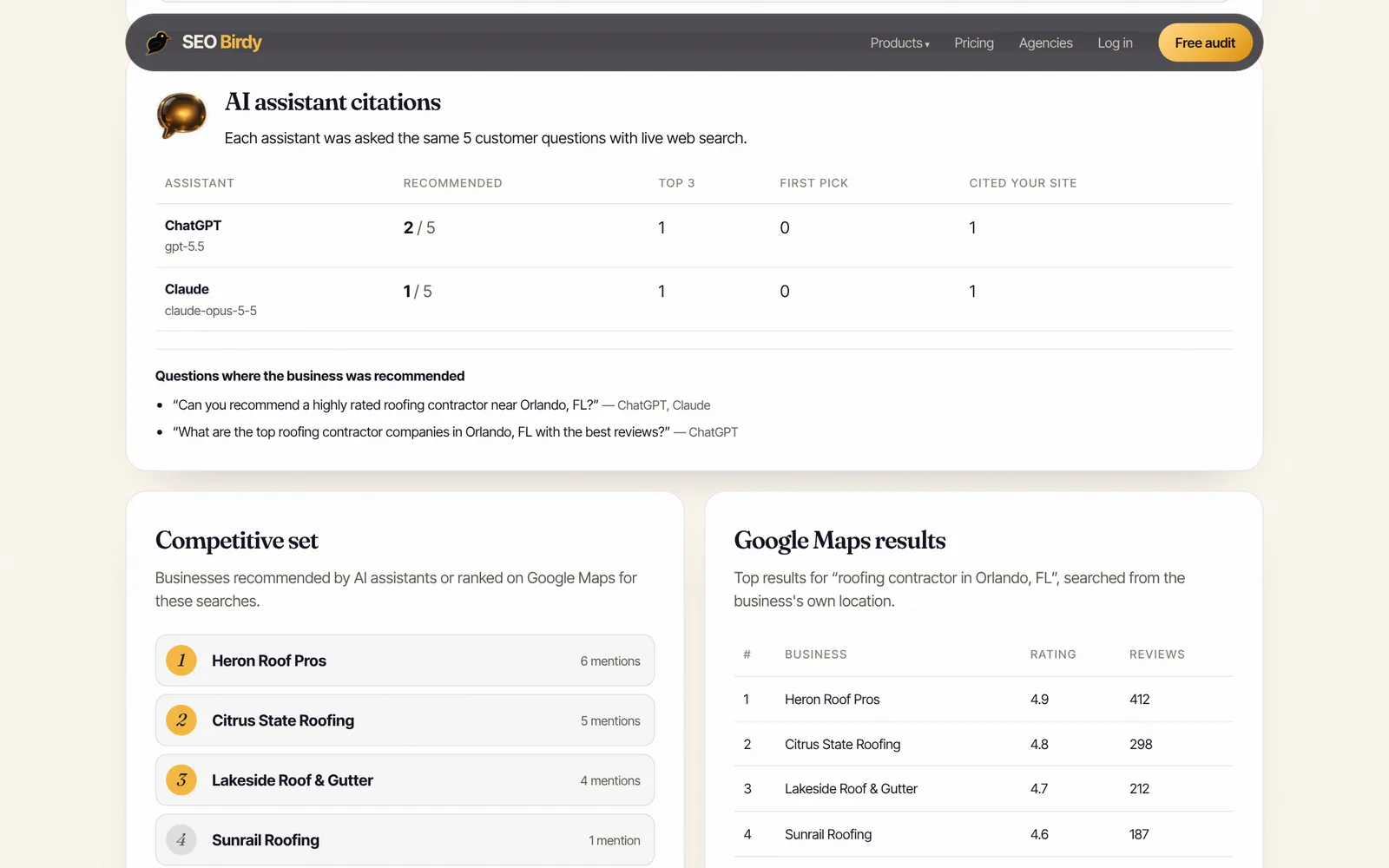
In that sample, the leader has 412 reviews and a 4.9 rating. A business with 60 reviews won't overtake it this month, but it can win the blocks closest to its address now and widen that area as reviews build. Read results that way, as territory you hold, rather than one number.
How to rank in Google Maps outside your city or without an address
You rank strongest near the address Google has for your business, and you can't move that with settings. To rank in more of your area, build prominence (more reviews and links make Google willing to show you farther away), publish a genuine page for each city you serve, and open real, staffed locations where demand justifies it.
What you can't do is create profiles at addresses where you don't operate. Google's guidelines say a rented mailing address where you don't work is not eligible, and service-area businesses can't list a virtual office unless it's staffed during business hours. Setting a large service area doesn't make you rank across it either: Google says service areas help people find you, not that they extend your ranking radius.
If you're a service-area business without a storefront, you can still rank. Verify at your real base, hide the address, set your service areas, and expect your strongest results nearest your base.
Can you pay Google to rank higher on Google Maps?
You can't pay for a higher organic ranking on Google Maps. Google says so directly. You can advertise on Google Maps, though. Google Ads place you above or alongside the organic results with a Sponsored label, and Local Services Ads do the same in eligible service categories like plumbing and HVAC. Neither changes your unpaid map pack position.
Local Services Ads have their own ranking. Google's ad rankings help page says they're ordered by your bid and profile quality, including "your rating, number of reviews, average response time," and that missed calls can hurt your responsiveness. Reviews help on both sides, which is one more reason to earn them steadily.
Putting your business on Google Maps is free. Creating and verifying a Business Profile costs nothing, and Google doesn't charge to be listed.
How long does it take to rank in Google Maps?
Profile fixes like a better category or corrected hours can show up within days, once Google reviews and accepts the edit. Prominence takes months, because reviews and links accumulate slowly and so do your competitors'. For a new business in a competitive category, plan on three to six months of steady work before you judge the results.
Expect movement in this order: first you climb near your address, then the circle where you rank in the top three slowly widens. That's why a single rank number misleads you, and why weekly grid scans are more useful than daily checks of one search.
Why is my business not showing up on Google Maps?
Most "missing" businesses fall into one of five cases. Check them in this order:
- Not verified or still pending. Unverified profiles rarely show. Check the status in Business Profile.
- Suspended or restricted. Google notifies owners by email before it restricts a profile. Fix the cause and appeal.
- An edit is under review. Google reviews changes before they go live, and a pending name or category change can affect visibility for a while.
- The category doesn't match the search. A "Contractor" won't show for "roofer" as reliably as a "Roofing contractor."
- Distance. You rank near your address and not across town. This is normal, and it's the most common reason owners think they've vanished.
Why did my Google Maps ranking drop?
Rankings drop when a competitor improves, when Google updates how it ranks local results, when your profile changes (a new category, address or name), or when reviews are removed. Google now pauses new reviews on a profile when it sees a sudden spike of spam reviews, according to its April 2026 post on protecting businesses on Maps. Compare your grid from before and after the drop to see whether you lost everywhere or only at the edges.
How do I check my Google Maps ranking?
Check your Google Maps ranking with a geo-grid: a scan that searches your keyword from a grid of points across your service area and records your position at each one. One search from your phone only shows the ranking at your exact location, which is usually your best spot. A grid shows the whole picture: where you're in the top three, where you're on the second page and where you don't appear.
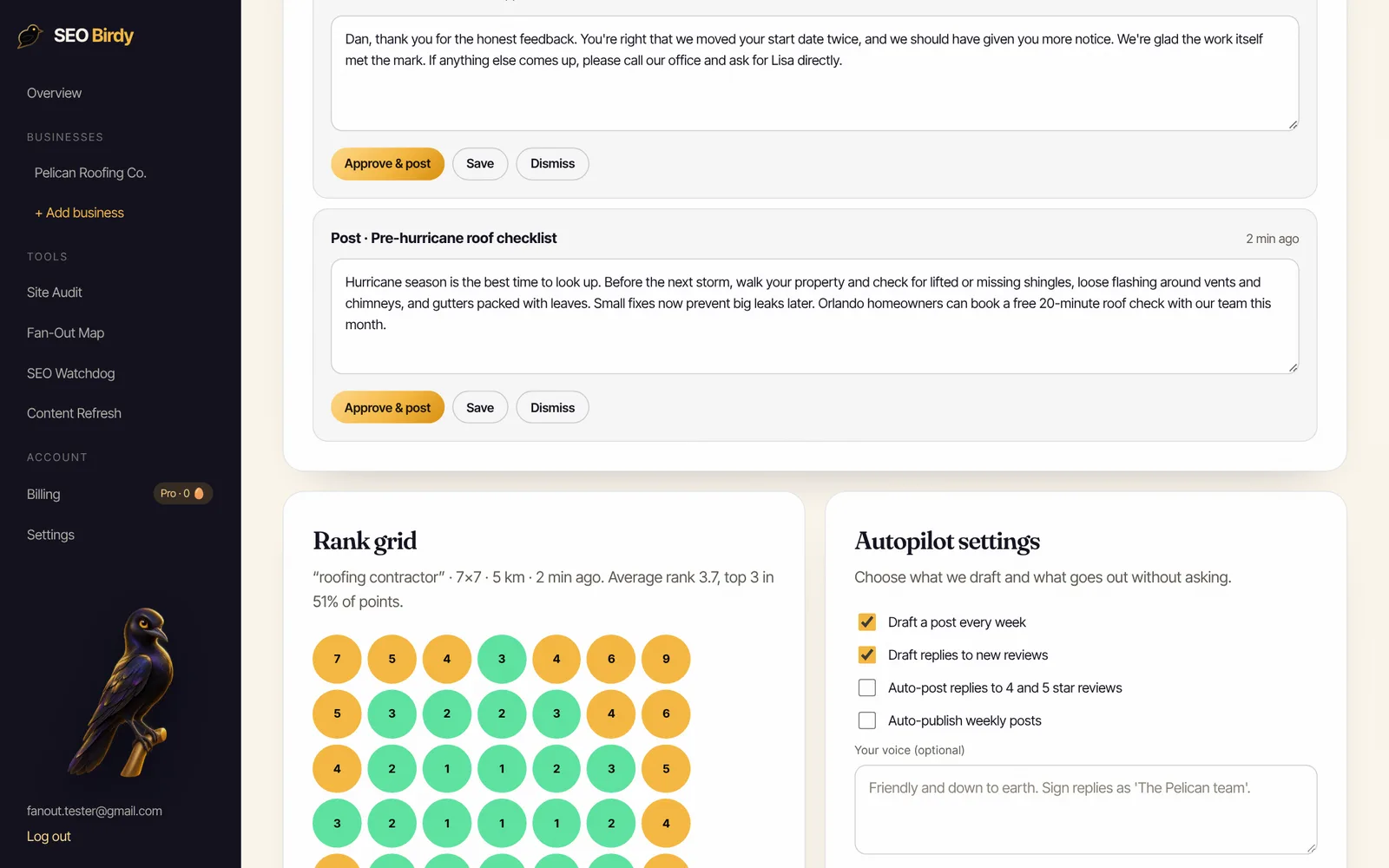
In the example above, the roofer ranks first or second in the middle of its area and drops to sixth through ninth at the edges. That tells you where to focus: reviews from customers in those outer neighborhoods, city pages for those suburbs, and links from local organizations there.
Our free plan includes one map rank check a month for your main keyword. Growth scans a 5×5 grid every week and Pro scans a 7×7 grid, as shown on our pricing page.
What mistakes can get your Google Business Profile suspended?
Profiles get suspended or restricted for misrepresenting the business: keyword-stuffed names, fake or virtual addresses, duplicate profiles for one location, and fake engagement like bought or incentivized reviews. Google says it may stop a profile from receiving new reviews, unpublish existing ones, or show a warning that fake reviews were removed.
The scale is real. Google reports it blocked or removed more than 292 million policy-violating reviews and over 13 million fake Business Profiles in 2025.
Shortcuts carry a second risk: a competitor who reports you. Build only on things you'd be comfortable explaining to a Google reviewer, and use our local SEO checklist to cover the rest of your local presence.
Should I do Google Maps SEO myself or hire help?
Most owners can do steps 1 to 6 in a weekend, for free. The hard part is steps 7 to 12, because they never end. If you'd rather not write posts and replies every week, software like Maps Autopilot drafts them for your approval and tracks the grid, for $299 a month on the Growth plan. Agency retainers for the same work vary widely, so compare what's included, not just the price. Agencies serving many local clients can resell the same work under their own brand through our white-label program, covered in our guide to white-label local SEO.
See where you rank before you change anything. The free AI Visibility Audit checks your Google Maps position, rating and review gap against the top local competitors, and shows whether ChatGPT, Gemini, Claude and Perplexity recommend you.
Run the free AI Visibility Audit →Frequently asked questions
How long does it take to rank on Google Maps?
Fixes to your Business Profile, like a better primary category or corrected hours, can show up within days once Google accepts the edit. Gains from reviews, links and website pages build over months. A new business in a competitive category should plan on three to six months of steady work before judging results, and track rank across the whole service area rather than from one spot.
Can you pay Google to rank higher on Google Maps?
No. Google states there is no way to request or pay for a better local ranking. You can pay for ads, which appear in Maps and the local results with a Sponsored label, and for Local Services Ads in eligible categories. Those are separate auctions. They do not change where your Business Profile ranks in the unpaid map pack.
How many reviews do I need to rank on Google Maps?
There is no fixed number. Google says more reviews and positive ratings can help local ranking, so what matters is how you compare with the businesses already in the top three for your search and area. Look at their review counts and how recent their reviews are, then aim to earn genuine reviews steadily every month rather than in a single burst.
Why is my business not showing on Google Maps?
The most common causes are an unverified or suspended profile, a pending edit, a category that doesn't match the search, or simply distance: you may rank well near your address and not at all across town. Check your profile status in Business Profile, search from several locations, and confirm the profile follows Google's guidelines for names and addresses.
Does adding keywords to my business name help on Google Maps?
It breaks Google's guidelines, which say your name should match your real-world name on your storefront, website and stationery. Adding services or cities to the name can lead to edits by other users, lost rankings or a suspended profile. If you want a keyword in your name, the only safe route is to legally rebrand and change your signage first.
Can I rank on Google Maps without a physical address?
Yes, if you serve customers at their location. Service-area businesses like plumbers and cleaners verify with a real address, remove it from public view, and set up to 20 service areas. You can't use a virtual office or P.O. box. Ranking is still strongest near where Google knows your business is based, so expect weaker results far from your base.
Do Google Business Profile posts help you rank in Google Maps?
Google hasn't said posts are a ranking factor. Its local ranking help article lists verification, complete info, reviews, replies and photos, not posts. Posts still help people who find your profile decide to call, and they keep your offers and news current. Treat them as a conversion tool that supports ranking work, not as a ranking lever on their own.
We build SEO Birdy's audits and autopilots, and we test every recommendation against live search results and AI answers before we publish it. Our guides follow Google Search Central and Bing Webmaster guidelines.